X Launches Standalone Chat App for Accessing Direct Messages
X has split its direct messaging feature into a standalone chat site that works independently from the main social media feed. The new app focuses solely on private messages and removes timelines, posts, and other platform features from view. It is designed for users who rely on X primarily for messaging rather than public posting.
The standalone chat site exposes the same direct messages already available on X, but in an isolated interface. Conversations, message history, and existing contacts carry over automatically once the user signs in. No migration or separate account is required.
The change shifts X closer to competing directly with dedicated messaging services, at least on the web. Instead of treating messaging as a secondary feature attached to social content, X is now offering it as a primary use case.
Who the new chat site is for
The standalone chat experience is most relevant for users who use X as a messaging platform rather than a social network. This includes users who rely on direct messages for coordination, private conversations, or subscriber communication and want to avoid exposure to the main feed.
The site is currently designed for desktop browsers. The interface scales well on larger screens and resembles a stripped-down messaging client rather than a social website. X has not confirmed release details for a mobile version, but the current offering clearly targets desktop users.
Users who primarily access X through mobile apps will see little immediate benefit, as the chat site does not replace the existing in-app messaging experience.
What the standalone chat includes
Functionally, X Chat is the direct messaging component of X presented on its own domain. The interface focuses on conversation lists, individual message threads, and message composition.
Feature scope is limited. There are no additional tools beyond what already exists in X's messaging system. There is no separate contacts system, advanced chat organization, or automation support. The goal appears to be separation, not expansion.
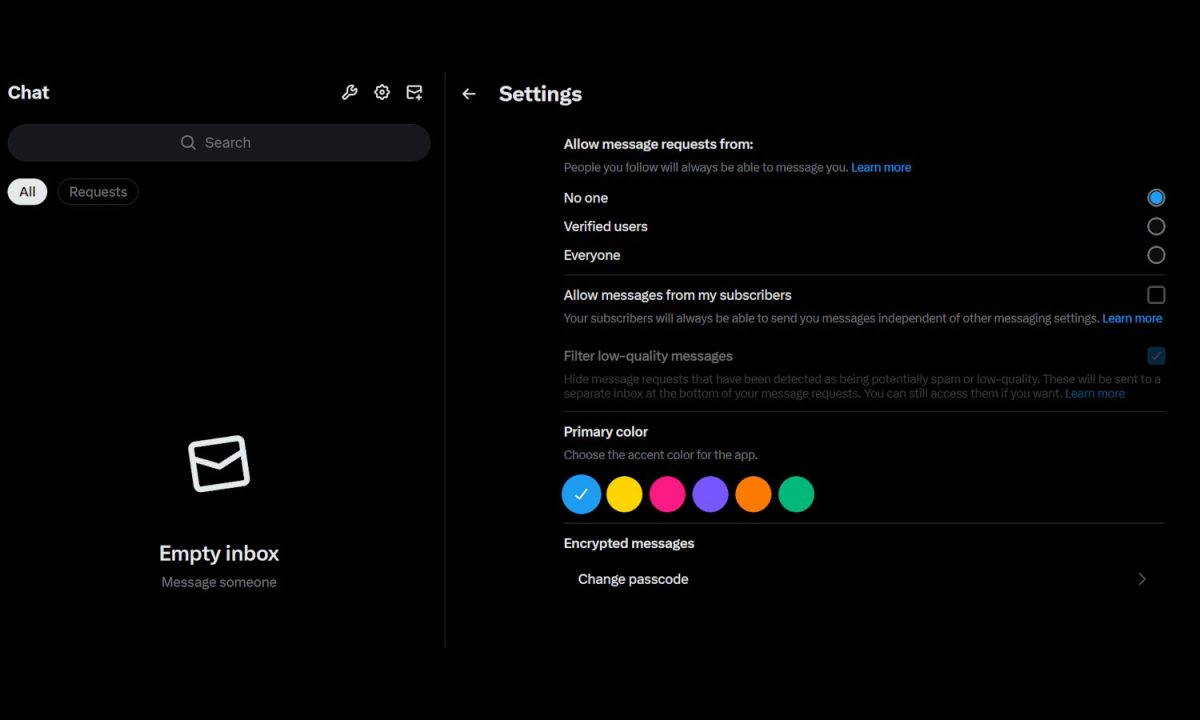
The most notable controls are privacy and filtering options that determine who can send messages.
Users can configure message permissions to allow messages from:
-
No one
-
Verified users only
-
Everyone
There is also a separate option that allows subscribers to send messages. This subscriber setting can override the general message request rules, giving creators more granular control over paid interactions.
Spam and low-quality messages remain a concern on X, and the standalone chat includes a "Filter low-quality messages" toggle. When enabled, messages identified as low quality are filtered before reaching the main inbox. The filtering logic is the same as on the main platform.
Beyond messaging and privacy controls, customization options are minimal. Users can choose an accent color that affects interface elements such as highlights, selections, and URL emphasis. No layout or behavior customization is available.
How to access X Chat
The standalone chat site is accessible through the web and does not require a separate installation.
When visiting the site for the first time, users are prompted to set a passcode. X states that this passcode is used for encryption purposes and is required before accessing messages. Once the passcode is set, existing conversations become available immediately.
There is no indication that the chat site supports multiple profiles or sessions in parallel. Users who manage more than one X account will need to sign out and back in when switching.
What users can do now
Users who want to separate messaging from the main X experience can start using the chat site immediately.
To use the standalone chat site:
-
Visit the X Chat website while signed into your X account.
-
Set a passcode when prompted to enable encrypted access.
-
Review message permissions and filtering settings.
-
Start or continue conversations without accessing the main X feed.
Users who rely on strict message controls should review their settings carefully, especially the interaction between general message permissions and subscriber overrides.
The standalone chat does not disable or replace direct messages on the main X site. Both interfaces remain active and synchronized.
Limitations and open questions
The standalone chat site does not introduce new messaging features or improvements over the existing system. It also does not address long-standing concerns around spam beyond the existing filter toggle.
There is no confirmation on whether end-to-end encryption applies uniformly across all message types or whether the passcode setup changes how messages are stored or synced across devices. X has not published detailed technical documentation on this point.
Mobile support has not been formally announced. Until a mobile version exists, users who prefer messaging on phones will still need to rely on the main X apps.
The standalone chat currently serves as an interface change rather than a functional expansion, and its usefulness depends entirely on how much value users place on separating messaging from the rest of the platform.

Loved this! Simonetta Lein is setting the bar in digital-media
evolution. Thanks for sharing!
Wait till you have to pay for it… ensh*ttification ensues.