Firefox 145 ships with a handy tab group improvement, MKV support and better fingerprinting protection
Mozilla has released a new stable version of its open source Firefox web browser a moment ago.Firefox 145 is the latest version of the browser and it comes with several new features, improvements and changes.
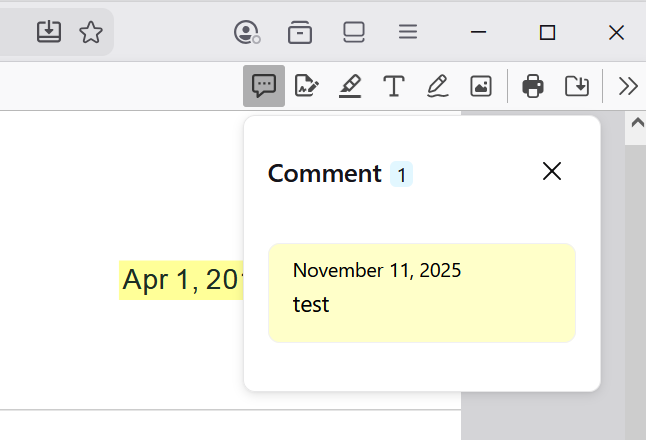
On the feature side, Mozilla is adding support for PDF comments, which lets you add, edit or delete comments. There is also a handy option to reveal all tabs of a tab group and a new option to create links to specific parts of webpages. On the downside, support for 32-bit versions of Linux is ending with this release.
The Firefox Extended Support Releases (ESR) 140.5 and 115.30.0 are also released today. As usually, they focus on security fixes and bug fixes, but do not contain new features.
Firefox 145: the major changes and new features
Comments in PDF documents
If you use Firefox to view PDF documents, you may know use new editing tools. Mozilla added support for adding, editing, and removing comments from PDF documents. This is a built-in feature that does not require any plugins or third-party applications.
To add a comment, simply highlight content, right-click on the selection and
The PDF viewer supports a range of editing options already. You can add text or highlight sections, add a signature, draw on the PDF or add images to it. The new commenting option complements these features and may improve the appeal in business scenarios.
Reveal tabs in tab groups
Tab groups is a relatively new feature, at least in the current form, in Firefox. The feature enables you to add multiple tabs to a group, which you can then collapse or reveal. It improves manageability, especially if you happen to have lots of tabs open.
You could create tabs for various activities, such as shopping, gaming, or research, keep them collapsed most of the time to only expand them when needed.
Firefox 145 introduces sort of a preview feature for tab groups. If you want to know which tabs are in a group, you can now hover over the tab group to reveal all its tabs. Previously, you had to click to expand it, and then click again to collapse it.
It is a handy little feature that improves the handling of tab groups in the browser.
Improved fingerprinting
Ashwin reviewed the new privacy feature in a detailed article already and I suggest you check out the article for a deeper dive into what is changing. Put simply, Mozilla is implementing changes that make less users appear unique to fingerprinting scripts that are used on the Internet.
According to Mozilla, the figure drops from over 60 percent when no protections are used to about 20 percent under the new anti-fingerprinting system. That is a big improvement over the previous version, which dropped the figure to about 35 percent.
Other new features in the release
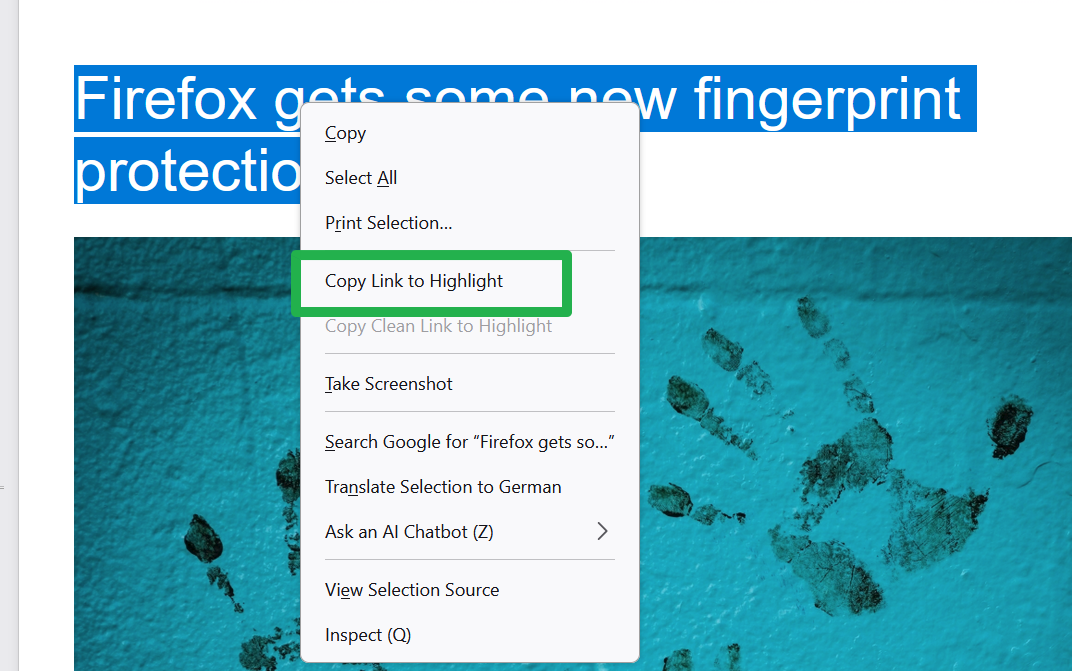
- Firefox supports linking to specific sections of a page now. Highlight content on any webpage, right-click on the selection and then select the new "Copy Link to Highlight" feature of the browser. This creates a link that points directly to the highlighted c content.
- Firefox 145 does not support 32-bit Linux distributions anymore. Mozilla recommends installing the 64-bit version. Another option for the time being is to switch to Firefox 140.5 ESR, which should continue to support 32-bit Linux for the time being.
- Horizontal tabs are slightly more rounded to match the look and feel of vertical tabs.
- Clicking on the Extensions button with no extensions installed displays a text now about the benefits of using extensions. It also includes a link to the add-ons store.
- Passwords can now be accessed and managed directly from the sidebar.
- The translations feature has been improved. It works better now when translating between languages that use different script directions.
- The new tab-page features new wallpapers. Mozilla says these are brand-inspired. Does that mean that they are ads? I could not check, as I do not see them there in Firefox 145.
- New "open links from apps next to your active tab" feature. This opens them next to the active tab instead of at the end of the tab strip as before.
- Enhanced Bounce Tarcking Protection's stateless mode is now enabled in strict mode of the Enhanced Tracking Protection feature. This blocks "more advanced tracking techniques based on redirection".
- Mozilla has changed the shortcut of Firefox for most Windows users. It points to "a small program that will launch Firefox" now, if the browser is still installed. If not, it will prompt to install Firefox.
Developer changes
- The text-autospace property is now supported.
- The math generic font family is now supported as a value of the font-family property.
- Firefox for Android supports separators in <select> menus now.
- Firefox now supports the Atomics.waitAsync() static method.
- The Integrity-Policy and Integrity-Policy-Report-Only HTTP headers are now supported for script resources.
- The source property of the ToggleEvent interface is now supported.
- A CSSStyleProperties instance is now returned for the style property on HTMLElement, MathMLElement, SVGElement, and CSSStyleRule, and the Window.getComputedStyle() method.
- RTCEncodedVideoFrame and RTCEncodedAudioFrame are now serializable objects, and RTCEncodedAudioFrame() and RTCEncodedVideoFrame() copy constructors are supported.
- The Matroska container (.mkv) is now supported for the most commonly-used codecs: AVC, HEVC, VP8, VP9, AV1, AAC, Opus, and Vorbis.
- Cookies created with cookies.set() are now validated, and invalid cookies are rejected.
Enterprise changes
- Fixed the Chatbot option of the GenerativeAI policy, as it did not turn off the Generative AI of the right-click context menu.
- GenerativeAI policy has a new option to turn of all GenerativeAI features
- The EnableTrackingProtection policy has been updated so that BaselineExceptions and ConvenienceExceptions can be set when in strict mode (not in ESR).
Firefox 145.0 download and update
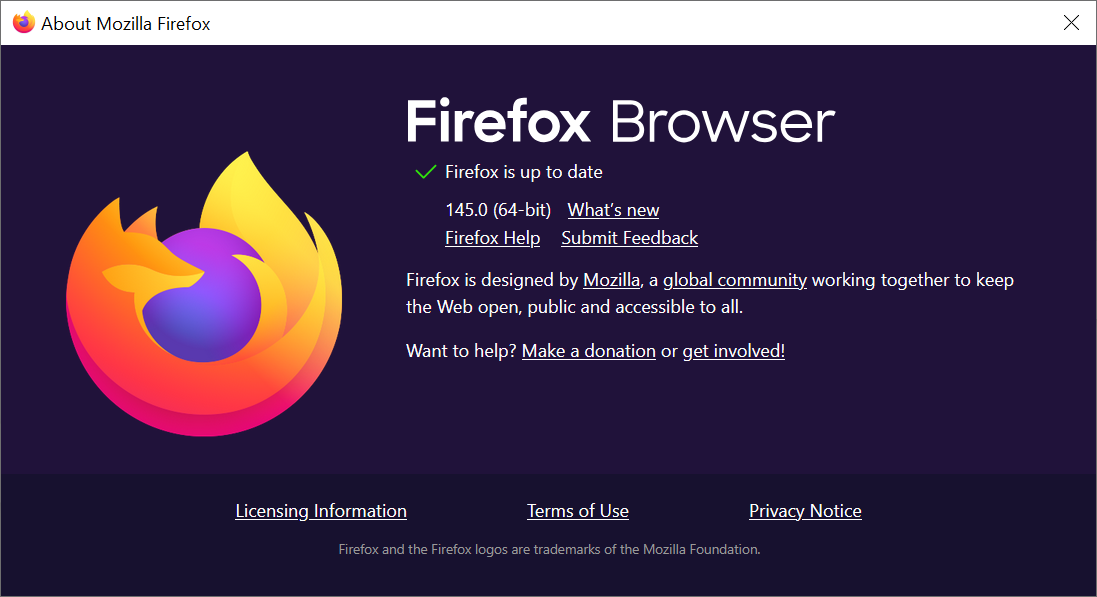
Firefox installations should pick up the Firefox 145.0 update automatically. Desktop users may speed up the installation by selecting Menu > Help > About Firefox.
This should run a check for updates and will download any update that is found automatically.
Manual downloads are also provided on Mozilla's official website for desktop operating systems.
Outlook
Firefox 146.0 will be the least main release of the Firefox web browser in 2025. This happens on December 9, 2025. The first release of the new year is Firefox 147, which Mozilla plans to release on January 13, 2026.
Firefox 115.x ESR continues to be supported until at least March 2026 for older versions of Windows and Mac OS. Firefox 140.x is the current main ESR base, and it will be replaced in mid-2026 by Firefox 153.x ESR.
Additional information / resources

Still can’t play directly H265 videos because the audio codec is not supported. I know firefox will pat theirselves on the back and move on.
This: “Firefox will not use locally installed fonts to render text on a web page, especially fonts that are not bundled in operating systems. This will ensure that a user-installed font is not detected by the website, to identify them.”
So websites that have a fotnt stack like ‘Segoe UI’, Helvetica, Inter” will only use Inter in FF? Prefering local OS fonts makes for faster page load and knowing “Oooh somene is using Helvetica” is nonsense protection – basically all Mac users so what’s the point?
@getalife
> it sounds like some changes duplicate what some extensions like CanvasBlocker are already doing.
a) extensions are redundant if you have built-in fingerprinting mitigations within the browser, this is good especially when you consider extensions like these are detectable and do not work when it touches the dom.
b) more extensions = weaker site isolation. That would be about as moot as bothering to change an ip without disabling webrtc or blocking unproxied udp.
You only need one extension: ublock origin in advanced mode. Get it togetha.
https://github.com/arkenfox/user.js/wiki/4.1-Extensions
Im unclear on the new mini-program instead of a shortcut.
*Mozilla has changed the shortcut of Firefox for most Windows users. It points to “a small program that will launch Firefox” now, if the browser is still installed. If not, it will prompt to install Firefox.*
It’s confusing because based on their documentation this seems to only apply if you try and sync settings from one device to another with OneDrive.
The change note however reads like everyone’s shortcuts in Windows will be changed without their consent which is not very user or privacy friendly.
So which is it?
More here: https://support.mozilla.org/en-US/kb/firefox-desktop-launcher
Updated to Firefox 115.30.0, no fuss no bloat
When I click on a link to a .pdf file, I have FF configured to “Always ask” (ask what I want to do). FF is *NOT* a pdf reader program. I wish the developers would stop trying to compete with dedicated freeware .pdf readers out there like PDFX-change Reader and Foxit that have more features than Firefox’s efforts. Addtionally, there are freeware programs like PDF Shaper Free that let you do all kinds of things to .pdf files. Firefox will never, ever be the default .pdf reader on anything that I own.
Most people open PDF files with Microsoft Edge. Mozilla attempts to compete with that.
Say WHAT??? Works great for me. In fact it’s the only PDF app I use now, and the Firefox 145 implementation is even better.
I don’t understand why you are specifically complaining Firefox can read .pdf files.
For most of us home users we don’t need a dedicated PDF program… I used to have SumatraPDF and PDFGear but realized I only view .pdf files a few times a year – car brochures mainly.
Glad to hear about the new features. I find FF pdf viewer very useful. It has nice functions and the best text rendering in the linux world and probably beyond in FOSS. Now I’m waiting for Mozilla to offer as an option custom paper and font colour of pdf files.
I’m not a fan of “new features every month” but there are a couple this time that will be useful for me.
And improvements in anti-fingerprinting are always welcome, although a) they’re moot if you’re not using a decent VPN, as your IP is your most obvious fingerprint, and b) it sounds like some changes duplicate what extensions like CanvasBlocker are already doing.
I lose the top title bar with the buttons “Minimize-Maximize-Close” with this version.
I’ve tested all the themes, in vain.
Others in the case?
I had the same problem. I managed to fix it by right clicking on the bar, choose customise toolbar.
At the bottom Title Bar is checked. Uncheck it and that restores the close minimize and maximise.
It is a work around because now I don’t get the name of the website on the top.
I have no such problem on Linux Mint
The problem is not with the installer, but only with the update!
More tools… Customize toolbar…Tick “Title Bar” ?
Thank you, but the option was checked.
I gave up sometime ago… No clue, sincerely.
Ha Ha Ha ! yet another long round of hi-tech fashion statements from the land of couldah shouldah in the region of “lets do it because we can, not because it necessarily creates a better browser”.
Many of the employees from this off-world continent, originally based on the home world of Xenophobia, are bargain basement developers and programmers, whom are desperate to prove their capabilities, and their worthiness of employment by human beings.
We need to maintain an element of compassion and patience in our hearts, since it is only possible for them to learn the meaning of practicality, through incremental fundamental refinement and development.
To the entire human family, thank you for your patience, without which these poor lost people would be homeless.
Peter Newton [London UK Linux user since 2004]
Damn… i’m still using ESR 115. Is the new Firefox any better I wonder? PDF editing in the browser sounds cool.
I just want to use my browser to browse the internet, nothing more.
Unfortunately the Internet is no longer simple text pages that you can view with ease. Like Hello World said you need an adbloker, popup blocker, tracking protection etc. Just to not go insane browsing the “modern” web.
That’s not true, you probably want extensions, some customisation options, tracking protection, popup blocking, etc. I agree that there’s too much going on but you’re not quite being truthful.