Google Recovery Contacts: How to Add One and Recover Your Account
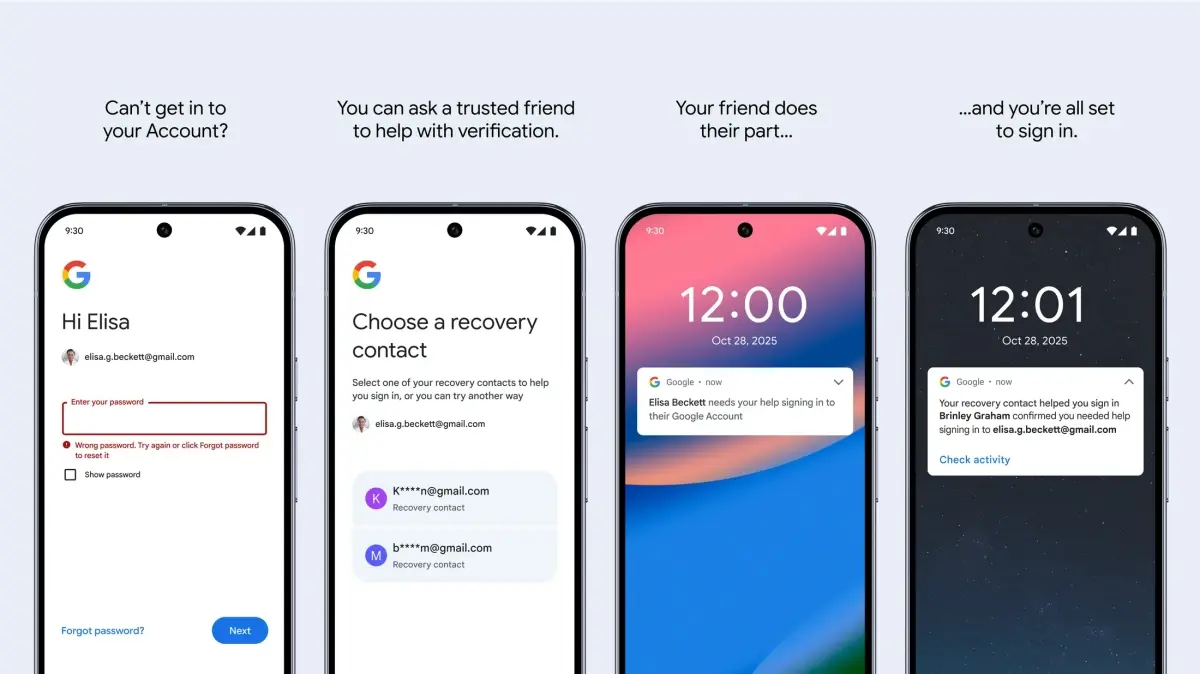
Google recovery contacts are trusted people with a Google Account who can help you sign back in if you are locked out. Add one at g.co/recovery-contacts, under Security & sign-in, then Recovery contacts. Your contact has 7 days to accept. If you are locked out later, you give them a number from the recovery page and they confirm it on their device.
Google announced the feature on October 15, 2025. This page covers setup, how recovery works, the limits and what the feature is not.
How do you add a recovery contact?
You add a recovery contact from your Google Account's Security & sign-in page, using the Recovery contacts option or the shortcut g.co/recovery-contacts. Choose Add recovery contact, enter the person's email address and check it carefully, then tap Send request. The person must have their own Google Account.
Your contact is notified with your name, email address and profile photo, and nothing else about your account. The invite stays open for 7 days. They can accept or decline from the email or from their own Recovery contacts page, and you can cancel an open request or remove a contact there too. If they decline, you are not told, and you cannot invite the same person again for 4 days. You cannot add a contact while you are locked out or in the recovery process.
How does account recovery with a contact work?
Recovery with a contact works by sending the contact a short-lived number. After a failed sign-in you land on the account recovery page (also reachable at g.co/recover), select your recovery contact and tap Get number. You give that number to your contact, who has 15 minutes to select the matching number on their device. If Google needs more verification, a temporary security hold applies and you are notified so you can deny the request if it was not you. A newly accepted contact cannot be used for recovery until a further 7-day waiting period has passed.
A recovery contact never gets access to your account, a password or your data. It is also not a recovery email: you own a recovery email address, while a recovery contact is another person.
What are the limits and requirements?
Google sets these limits, according to its support page for recovery contacts:
- You can have up to 10 recovery contacts per account.
- One person can be a recovery contact for up to 25 accounts, including pending invites.
- Advanced Protection accounts and Google Workspace accounts cannot have recovery contacts, but they can be one for others.
- Child accounts cannot add recovery contacts or serve as one.
- You can resend up to 2 invites per day if the person has not declined.
Pick someone you know well who can answer quickly, since Google suggests the contact should be able to respond within 15 minutes. The feature rolled out gradually, so you may not see the option in every account yet.
What other ways can you recover a Google account?
Recovery contacts add to the existing options rather than replace them: resetting the password, a one-time code by SMS, a recovery email address or backup codes. A passkey on another device also works. Set up several methods before you need them. The feature may help older or less tech-savvy users most, because they only need to call a relative. If you share a device and want to control which account Chrome uses, read how to stop Chrome from signing you into a Google account automatically. Google's own announcement explains the design.
Related: Transferring passkeys between devices, Passkeys on Facebook

Cool, make your Google account a present to another Person! Including payments, passcodes and everything!
What possibly could go wrong…
“You will also receive an email stating that you have sent a contact request.”
But I am locked out of my account? Maybe I read it incorrectly.
Contact Request is the set-up process to add Recovery Contacts to your account.
Recovery Contact is for when you’re locked out.
Oh, got it . . . thanks.
Just set up a second email address (Google allows you to have multiple email addresses) and set that as a recovery email address.
Will google stop at nothing to collect the personal details of every person on the planet. Now, they want you to give them personal info on other people? (probably without their consent)?
No thanks.
It’s a retarded idea.
Allowing someone’s account to recover someone else’s account?
Sounds great for phishing one of your trusted friends, then just like a worm lookup his contacts list and ‘recover’ many more friends’ accounts and so on.
Cybersecurity disaster incoming?
With recovery emails, the backup email is owned by you.
With ‘trusted contacts’, the email is owned by someone else!
Not everyone is computer-literate enough to avoid falling for phishing either…
So for such a retarded feature named ‘trusted contacts’ you could just put your friend’s email address as one of your recovery emails?
You could already do that ages ago.
Will be a great tool for abusive controlling partners.
There are some security measures to prevent unauthorized recovery attempts. https://support.google.com/accounts/answer/9412469?sjid=10572514350490480746-NC
The saveguard ist: If Google thinks something could be strange, they delay the recovery. But they don’t tell what they check.
Result: you give your account to another person with the only benefit to get a chance to recover it if your are to dumb to safe your password. But only a chance ?.
Maybe the feature is part If an intelligence test of Google? ?
Just leave them then? Not google’s fault