Windows 11 is getting a system tray shortcut to run a network speed test

Microsoft is testing a new option in the Windows 11 system tray. It will allow you to quickly run a network speed test.
The feature was spotted by reliable Windows Insider, Phantomofearth, who says that Microsoft is testing it in the Windows Insider Program. According to screenshots that the leaker posted on X, the option is available via the Windows 11's network and internet icon, or in this case, the Wi-Fi icon. Right-clicking on the button will display a pop-up menu with a new option.
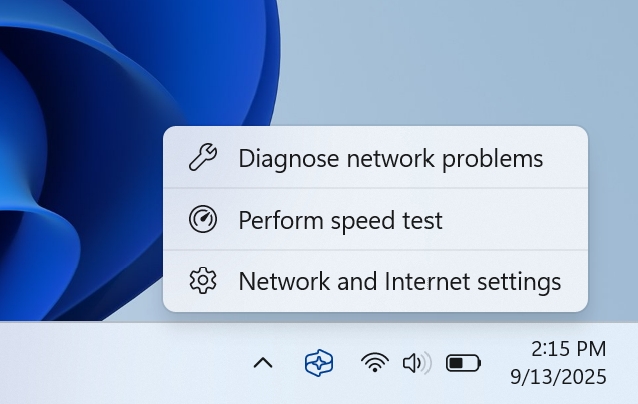
It's simply called "Perform Speed Test", and has a speedometer icon. A second screenshot shared by the leaker shows a "Test internet speed" button in the bottom right corner of the network/Wi-Fi selection panel in the quick settings page.
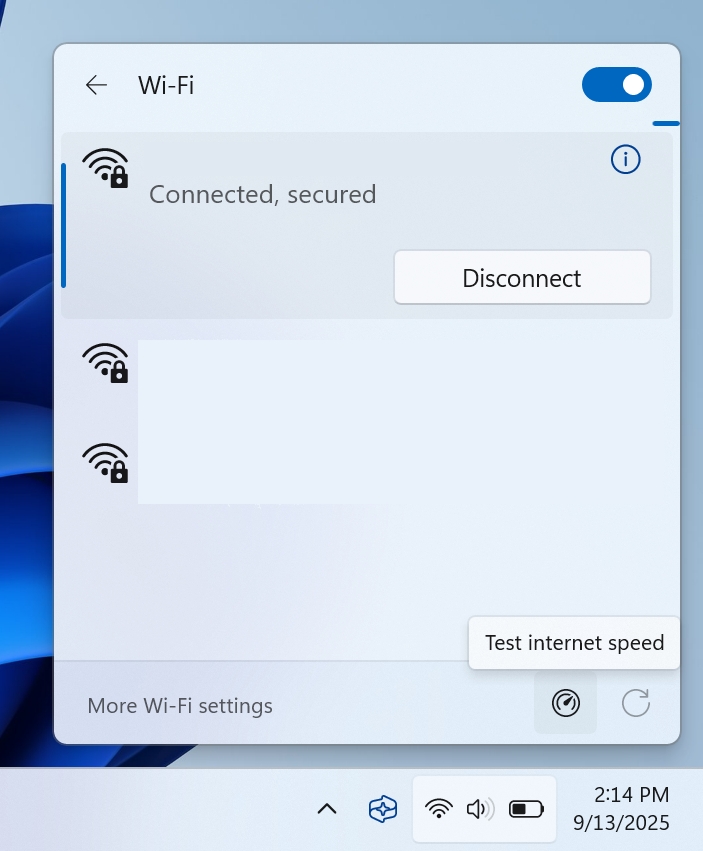
Tom's Hardware says both of these options are functionally similar. As for the test itself, clicking on either of the 2 options opens Bing in your web browser to run the speed test. Of course, it does. This is essentially a web shortcut to run the speed test, not a built-in app. You could do the same yourself, just open Bing and type speed test, and you should see a speed test widget that you can use to check how fast your internet connection's performance is.
I typically use https://fast.com/ (Netflix's speed test) because it is easy to remember, it's just four letters and Ctrl + Enter. And it initiates a speed test directly without needing any further input. I'm assuming Microsoft wants to offer a similar, faster experience with its shortcut. I suppose it might be useful for people who don't know how to check their internet's speed.
Windows 11's speed test shortcut is currently available for testers running the Canary, Dev and Beta channels of the Windows Insider Program. It might be more useful to have an actual app that does the speed test without opening the browser.

So basically Ookla now gets telemetry on (eventually, soon) all Windows users web use/traffic?
Due to certain problems I’ve been having I’ve tried a lot of different ways of measuring my speed, and if you do it five times in one minute you get a different result every time.
Bandwidth fluctuates, for a lot if reasons, mostly legitimate, unless m$ is throttling ti for their needs not the user.
They must really want to collect user Internet connection speed data, along with everything else that 70% of Windows users allows them to collect.
@Seeprime
M$ doesn’t add ” New ” functions to their closed sourced OS this ” late ” in the tech game without nefarious means.
MS is flat-out fugly from top to the bottom-most of their bottomless pit where they operate.
( The hate is real with this one )
I have used https://testmy.net/ for years and its accurate,
It’s a really dumb and lazy way to implement that feature. They should have incorporated it into the operating system or settings app, but they haven’t. The only reason for this is to increase Bing usage. This company is lazy and stupid, and not worth the time.
garbage and more garbage
@”Windows 11 Garbage Provider,” I totally understand you, because I’ve been using W11 for two weeks, very embarrassed IMHO, as it’s the operating system on my new computer. I used to work with W10, and the change has hit me hard; I can hardly imagine how bad W11 is trying to do the same tasks. Menu options are a nightmare, the ugly taskbar always stuck at bottom, the continuous problem with the Explorer, the difficult to associate file extensions to other non default programs…
Now tell us what you really think of Windows.
I quite like Windows and have zero problems with the OS–never have had issues other than self-created ones.
Speed tests–where I am, in the middle of nowhere, lightening storms are frequent; the storms knock out the electricity; with the electricity off, the modem goes out; when electricity is restored, the modem needs a reset. It’s not something anyone tells users; it’s something that needs to be checked with a IST. Quick–speed test, Ookla.