
Browser Autocomplete Feature May Reveal Personal Data

The autocomplete feature can be pretty handy at times. It helps you log in on your favorite website faster or load a website in your browser without having to enter the full web address. Researchers from Minded Security Labs have released a proof of concept that demonstrates how a third party website can get access to a browser's autocomplete entries (which means stealing).
The proof of concept works in Firefox, but the security researchers state that other browsers are also affected by it. They explicitly mention Microsoft's Internet Explorer and note that Google Chrome may be vulnerable as well.
They do however mention that an attack may not be as easy to implement for that browser due to the fact that Chrome does not "send keydown/keyup events to JS when the autocomplete drop down menu is focused".
Here is how the issue can be exploited:
It is possible to get key down / up events via JavaScript when a drop down autocomplete menu is shown. This means that it is possible to lure a user to play a game and steal arbitrary values from browsers autocomplete feature.
The proof of concept page demonstrates how third party websites can steal autocomplete information from Firefox. The page can check if autocomplete information are available for sites such as Twitter, Facebook, Gmail, Microsoft or Yahoo logins as well as three different types of inputs.
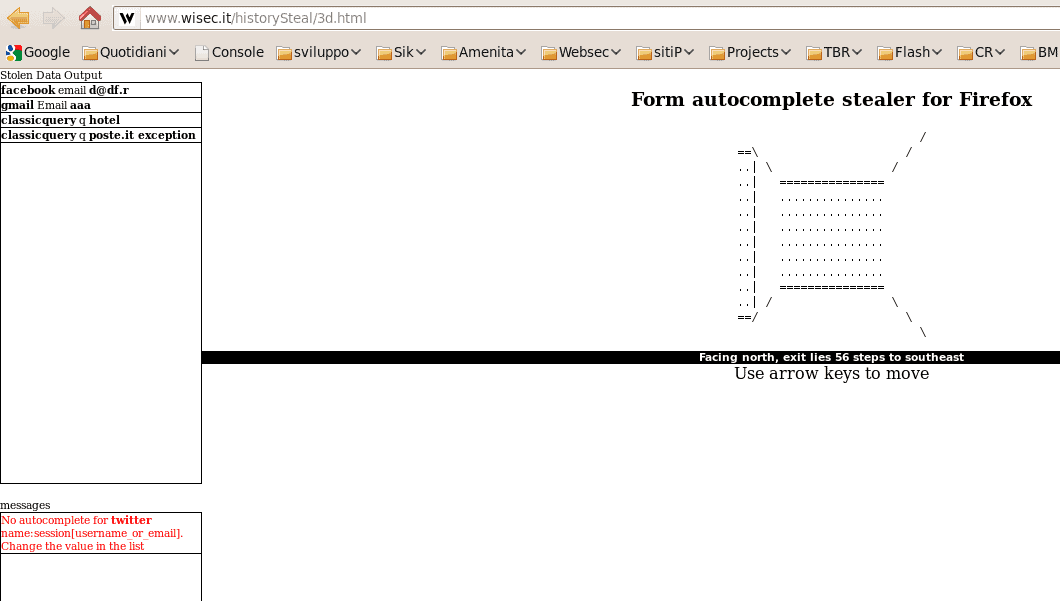
According to the security researcher, browser vendors should implement a feature into their browsers that ties the autocomplete input to a particular website. The only way to protect the data from being stolen is to disable the browser's autocomplete feature for forms and searches.
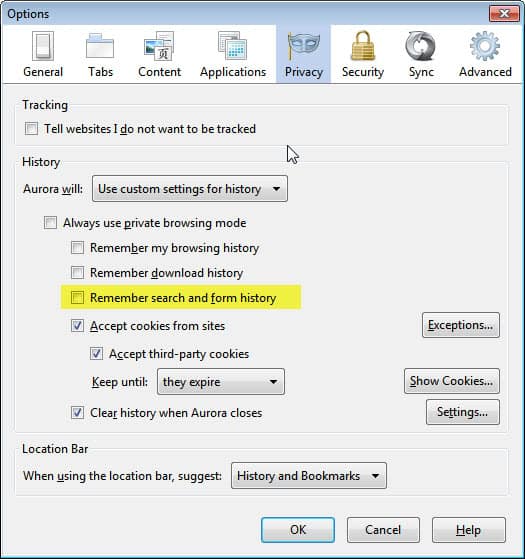
Firefox users can do that in the preferences under the Privacy tab.
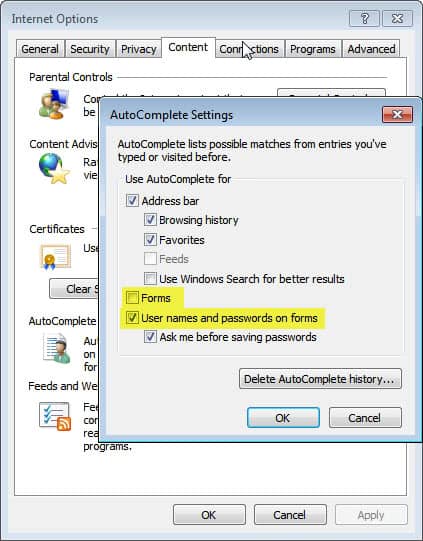
Internet Explorer users can disable autocomplete under Internet Options > Content > AutoComplete > Settings.
Are you using your browser's autocomplete feature for forms? Let me know what you think of the vulnerability in the comments. (Thanks Venkat)
Update: it is interesting to note that this is still working in recent versions of the Firefox web browser. If you use the demo page linked at the top of the article, you will find out that information are still retrieved by it even in the most recent version of Firefox (as of December 2014). I have not tried other browsers but it is likely that it is working in them as well.















I have tons of logins / passwords for various sites and email accounts. But I do not use Firefox’s autocomplete feature mainly because anybody around any PC I use would easily be able to view all my website login info when I am AFK. They just need to go into Firefox’s Tools menu, Options > Security > Saved Passwords > Show Passwords and they will be able to view Usernames / Passwords to any site I have saved, unencrypted.
My solution is to use a free “password safe†program named KeePass. I store all of my passwords on there and encrypt it with a password that is over 20 characters. There is also a KeePass portable app and an Android app so you can always have your passwords on the go. If you just want to use it at home there is a Firefox plug-in named KeeFox that integrates Firefox and KeePass very nicely.
Martin,
Any info on bookmarks in the awesome bar? Perhaps it’s just history related.
I wonder if changing location bar preferences would be sufficient enough protection.
Tools > Options > Privacy > Location Bar > When using the location bar, suggest: Bookmarks.
I’d rather not opt out of saving form data. It would create a lot of extra typing for all of the sites that I visit and waste time.
Kind of odd that they didn’t test out other browsers. Even suspicious. I mean, why just Firefox.
Thanks for the heads up with this post.
It always seemed to me like this feature could be easily exploited… Paranoia often pays off.
IIRC, there used to be an exploit that stole passwords saved by the browser (Opera specifically, I think) a while back.
Doesl this apply to saved passwords as well ?
No, it only applies to auto complete entries, e.g. usernames, searches but not passwords.
thanks
Looks like nothing is sacred or safe on the ‘Net anymore!
Too many security features and lock downs required to avoid private info.
from being stolen!
I have Firefox set to delete History, Cache, Cookies, Active Logins, etc. at shut down and when required, to avoid any invasion of my privacy!
I also have a SonicWall box that prevents anybody from accessing my system!
Seems to work well, so far!
Am I correct in assuming (From what I’ve read) that Opera have already fixed this issue (Quite some time ago)?
I had the autocomplete feature in Firefox disabled
because I am not one to save any history too long.
It looks like it was a lucky setting for security too.