Microsoft Tests Point-in-Time Restore for Windows 11, a Full System Backup Beyond Classic System Restore

Microsoft is testing Point-in-Time Restore, a new recovery feature for Windows 11 that offers a more comprehensive system snapshot than the traditional System Restore. The feature was first seen in the Windows 11 Insider Experimental preview released on April 24, 2026, and was originally announced in 2025.
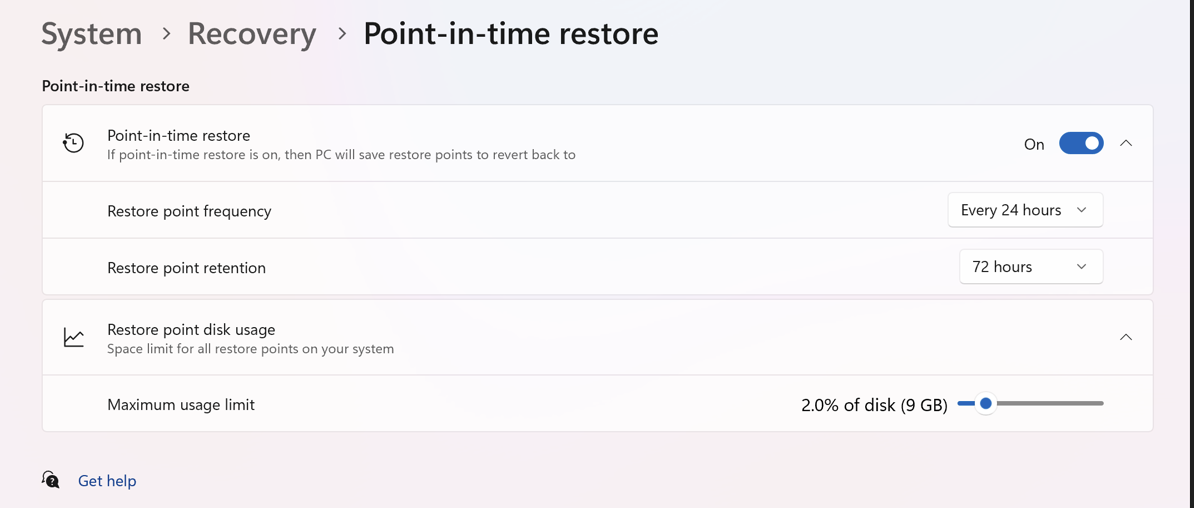
Microsoft explains that the goal of Point-in-Time Restore is to "minimize downtime and simplify troubleshooting when disruptions occur." The feature appears in the Windows Recovery Environment troubleshooting window when a PC encounters issues and can also be accessed and configured from the Windows Settings app.
What Point-in-Time Restore Backs Up and How Snapshot Scheduling Works
Unlike System Restore, which backs up system files, registry settings, drivers, and installed applications, Point-in-Time Restore includes user files, applications, settings, passwords, secrets, certificates, and keys. Files stored in OneDrive or other cloud services are not affected by the restore.
Reverting to a Point-in-Time snapshot restores the entire PC, so any local changes made after the snapshot will be lost. This includes local file edits or new files saved outside of cloud storage.
Point-in-Time Restore follows an automated schedule instead of offering the option for manual snapshot creation. Snapshots are kept for up to 72 hours and can be set to retain for shorter periods such as six, twelve, sixteen, or twenty-four hours. Depending on user preferences, new snapshots can be created every four, twelve, sixteen, or twenty-four hours.
Storage Requirements and the Windows 365 Enterprise Version
On PCs with at least 200GB of drive space, Point-in-Time Restore is enabled by default. Devices with smaller drives need to be set up manually. Storage usage is set to 2% of the total drive capacity, with options for different percentage allocations. At least 2GB must be reserved for the feature to work properly. For consumer Windows installations, this feature is optional and can be turned on or off by the user.
A different version of Point-in-Time Restore is available for Windows 365 Enterprise cloud PCs managed via Intune. This enterprise feature is always active, keeps restore points for up to a month, allows for manual creation of restore points, and relies on scalable cloud storage instead of local drive space.
Remote Management Support and Availability
Remote management support for Point-in-Time Restore is in development but not yet available in the current preview. Microsoft has said it will be included in future updates, although no specific timeline has been announced. The feature is now limited to Windows 11 Insider Experimental channel builds.
Microsoft has not provided any information on when Point-in-Time Restore will be accessible to a wider group of Windows 11 users.

Yes, at one time in the distant past home networking worked, and I could back up my desktop to my husband’s and vice versa. Now I use two USB backup hard drives and don’t bother with anything Windows offers, ESPECIALLY One Drive which is an invasive parasite!!!
I guess this is going to sit somewhere between System Restore, File History and the constant push to use OneDrive for backups to the cloud.
And then there’s still good old Backup & Restore (Windows 7) in CP.
All seems a bit of a mishmash between new toys and legacy. And then there’s that nosey elephant trying to enter the room in Recall, which although not a backup per se, still takes snapshots of user activity and stores them locally, which means reserving more storage for it
Not helpful to most users, only more confusing
Personally I just stick to tried and trusted EaseUS backup, Macrium Reflect (old free version) and testing out Hasleo Backup Suite.
Even more so, does the restoring part still error for no given reason? ….especially if you attempt a repair restore by booting a thumb drive image? This is why i’ll choose other software that is proven to work, because dependability matters, Microshaft.
Will this stop short of image copy? Like boot info etc in case of hw failure or critical file corruption eg Acronis wouldn’t like that.
There are 3rd party programs that serve to create backup versions of the OS that do a better job than official tools. I’ve never used them, but I remember someone telling me that you install Windows, you install all your programs and set things the way you want to, then create a backup and after that you can use that backup to serve as a “clean reinstall” in the future and it sets things just the way you want them to be by saving you time and effort.
I wouldn’t trust anything official by Microslop nowadays, they do things half-assed, just look at how Winslop is – just getting more bloated and worse with each update. I don’t remember in the past getting a single update and then get so many bugs and breakages that it’s unbelievable that a company and product worth billions would release such untested garbage.
No wonder people are reluctant to install updates or new versions of the OS and others moving to Linux and Mac.