Apple launches Digital ID in Apple Wallet to save a copy of your Passport or Driver's License [U.S. only]

Apple has introduced Digital ID in Apple Wallet for U.S. users, allowing the secure, encrypted storage of U.S. passports and driver’s licenses on iPhone and Apple Watch. This feature, which requires biometric authentication via Face ID or Touch ID, enables users to present their ID at select TSA checkpoints and in-app, replacing the need for a physical document in these specific scenarios.
Apple had launched the option to add a driver’s license or state ID to Apple Wallet in 2022, in certain states. The company says it is a very popular among users.
The new feature, which lets users add their Passport or Driver's License, protects the security and privacy of users during in-person identity verification during domestic travel in America. It is primarily designed for use at Transportation Security Administration (TSA) checkpoints. Apple says Digital ID acceptance is rolling out in beta at TSA checkpoints at over 250 airports in the U.S. It is important to note that the Digital ID cannot be used for international travel or crossing the border, since it is not a replacement for a physical passport.
Apple says that to add a Digital ID to your Apple Wallet, users will need to open the app, tap the Add button (plus symbol) at the top and select the card that you want to add. Follow the onscreen instructions to setup and verify the process. You will also need to scan your passport's photo page using your iPhone. Use your phone to read the chip at the back of the passport. Then, you will need to take a selfie, and complete a series of facial and head movements during the setup. Once you have completed the process, your Digital ID is securely stored on your iPhone.
TSA checkpoints have a Credential Authentication Technology (CAT) unit, essentially a biometric ID system, that takes a live photo of a person, and scans it to verify their physical passport or Digital ID. To present your Digital ID at a TSA checkpoint, double press the side button on your iPhone, select the card from the stack, and hold the phone near the card reader.
Once the TSA machine detects your ID, you will be prompted to present the required data (like in the image below). Review the request, and double press the side button again to authenticate.
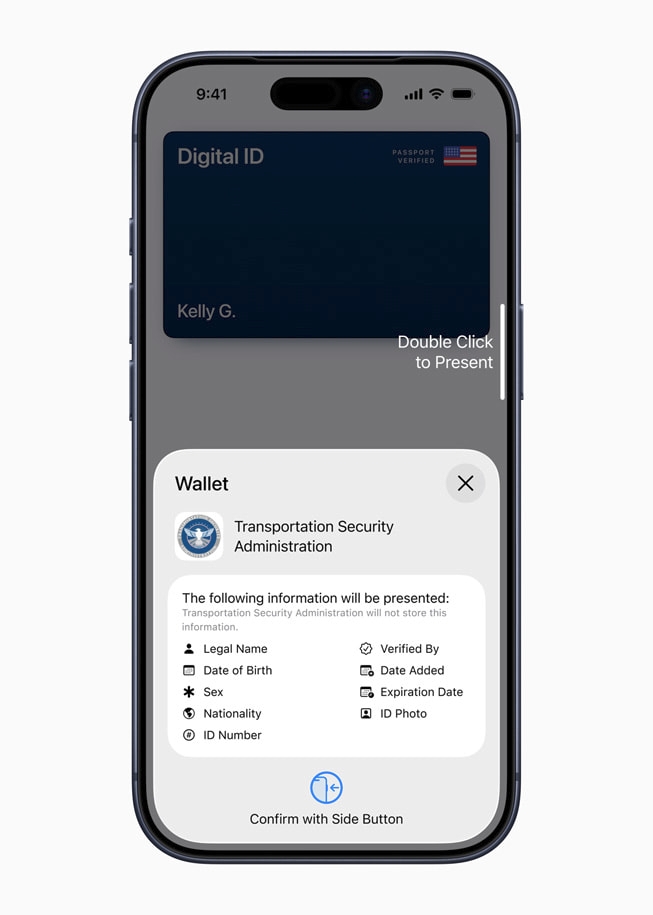
(Image courtesy: Apple)
According to a support page on Apple's website, users from the following states can add their driver’s license or state ID to Apple Wallet
- Arizona
- California
- Colorado
- Georgia
- Hawaii
- Iowa
- Maryland
- Montana
- New Mexico
- North Dakota
- Ohio
- Puerto Rico
- West Virginia
The Cupertino company says Digital ID may have additional acceptance use cases in the feature. It could be useful for age verification, which is sadly becoming the norm in many Countries and states in the U.S. Such verifications have already led to data leaks such as the massive Discord customer data breach. Can Apple's ID verification do better?

This smells ICE-ey.
Don’t know about passport requirements but in the state of Maryland, (and probably others) drivers are required to carry their physical drivers license while operating a vehicle even if it’s in electronic form on a phone. An electronic license is just another data point to track.
If data is not stored in the cloud, digital passport would actually make sense. Suppose you are in different country and forgot your paper passport at home. Having one on the phone could mean the difference between spending a few days in jail over the weekend when your embassy is closed or walking away.
Handing your unlocked phone to a cop/security officer is a monumentally stupid idea.
You’re giving access to one of your most personal devices. There have been numerous stories where cops have taken private pictures off peoples devices. Even if you think you have nothing to hide… What if one of your contacts shares a name as a wanted suspect? Or if the officer decides to put a RAT (Remote Access Trojan) on your device? Or if he doesn’t like a meme he found on your phone? You can’t enter the United States if you say anything negative about Israel, what next? This can go wrong an an infinite number of ways. DON’T USE IT.
100% on target.
I have many concerns about putting this sort of information on a device and probably a server as well. Young people especially seem overly trusting of technology and yet more and more personal data is stored in the cloud and as we read a lot of it gets hacked and exposed.
Sure, store all your personal data in the cloud, what could go wrong?
100% that lots of tech companies – like iComply and many others – are an extension of the regime just like the news syndicate has proven to be.