Google Chrome to enable HTTPS by default in October 2026

Google has announced that it will enable HTTPS in Chrome by default next year. I wrote a similar article 2 years ago, about HTTPS-first mode.
Frankly, I'm surprised it has taken this long for Google to make this change. So, what does it do? Well, as the name suggests, it is a setting that forces Chrome to connect to websites using the HTTPS protocol. HTTP requests are unencrypted and hence insecure, and attackers could potentially hijack a request, when a user clicks on a link or types in a URL, taking them to a different website. This could lead to a malware infection, social engineering attack, targeted exploitation, etc. Google says that plaintext HTTP connections are invisible to users, and could redirect to HTTPS sites instantly. It's very easy to miss it.
HTTPS (Hypertext Transfer Protocol Secure) protects against such attacks, your connection is encrypted, any communication is done only with the website's server. HTTPS is widely supported by most websites. Back in 2022, Google introduced an option in Chrome to force the browser to use HTTPS-only, to protect users. Google says that 95% of the web uses HTTPS, but the remaining 5% is still a lot of navigations, and this poses a huge security risk. The announcement notes that the largest contributor to HTTP are private sites. Google believes that this is the right time to enable the setting for all users.
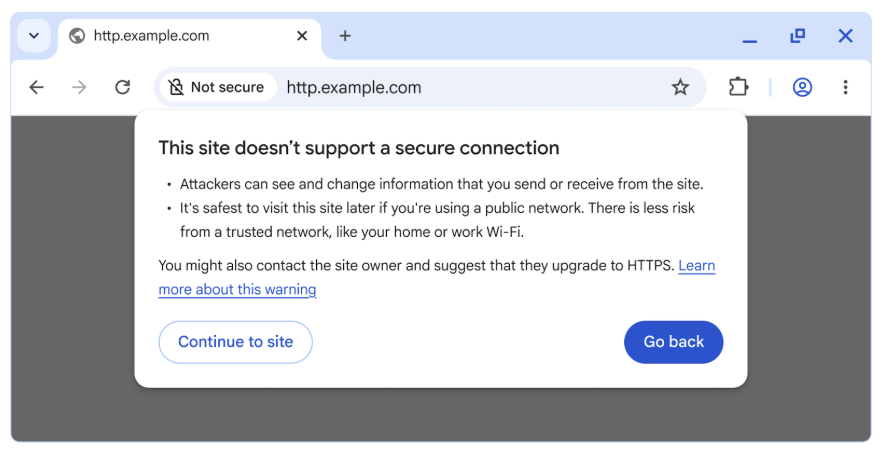
(Image courtesy: Google)
When the option is enabled, and you come across a website that doesn't support HTTPS, Chrome will warn you that the page may be insecure (as seen in the image), and you can choose to exit to safety or proceed at your own risk. This warning will only be shown on the first visit to the website.
Want to enable the feature right now? Go to Chrome's Settings > Privacy and Security or just paste this in a new tab chrome://settings/security and, you will see a section called Secure connections, which has an option that says "Always use secure connections". This option is disabled by default, this is the one Google Chrome will enable automatically from next year.

Microsoft recently announced the availability of HTTPS-first mode in Edge 140, though it's not enabled by default. Mozilla Firefox, Vivaldi, Apple Safari and Brave browser all support a similar HTTPS everywhere feature.
Google experimented by enabling the option in Chrome 141 for public sites for a small percentage of users. It says that the number of warnings that people saw was less than 3% of navigations.
Google will enable the "Always Use Secure Connections" option for users have opted-in to Enhanced Safe Browsing protections in Chrome, this will happen in April 2026, when Chrome 147 is released. HTTPS will be enabled by default for all users starting in Chrome 154, which is slated for release in October 2026.

Anotlher reason to stay off Chrome and away from Google World…
making your web connection secure is a bad thing for people now? lol
Some smaller websites screw up with certificates from time to time that break HTTPS. It just happens because not all smaller websites are maintained as well as bigger websites. As long as there is option to use Http protocol as exception, it is a good thing. Otherwise, smaller websites could be blocked for a long period of time. As always, law of unintended consequences.
What about the many free hosting sites that don’t have an HTTPS option in their cpanel? Do we have to click ‘Continue’ for all of those sites?
Of course you will do, anyway those places will soon disappear if this becomes the standard.
For as long as the option to “continue” exists, I can live with that choice.
There is no option continue … when you are on shared hosting, with https on server, but site not have own config, you see same page as if you write ip address. So different site with different name. And there are milions sites like this.