Firefox direct results in the address bar and the quicksuggest-amp.sql file explained

quicksuggest-amp.sql is a Firefox Suggest data file in your profile folder that caches suggestion data, including sponsored suggestions. It is not a virus; it can grow to several gigabytes because of a Remote Settings storage bug. Direct results are answers, such as a flight status or a local business, that Firefox shows in the address bar as you type. Turn the online part off by unchecking "Retrieve suggestions as you type" in Settings or setting browser.urlbar.quicksuggest.online.enabled to false.
This guide explains how direct results work, what the quicksuggest-amp.sql file is and why it can grow to several gigabytes, and which settings control Firefox Suggest.

What are direct results in the Firefox address bar?
Direct results are Firefox Suggest answers that appear in the address bar dropdown before you press Enter. Classic search suggestions only complete your query and send you to a search engine results page. Direct results show the destination or the answer itself.
Mozilla announced the feature on The Mozilla Blog on October 27, 2025 and gave three examples:
- Flight status: typing "ac 8170" shows an Air Canada flight from Victoria to Vancouver with departure time, arrival time and status.
- Website lookup: typing "mdn" takes you to the Mozilla Developer Network without the exact URL.
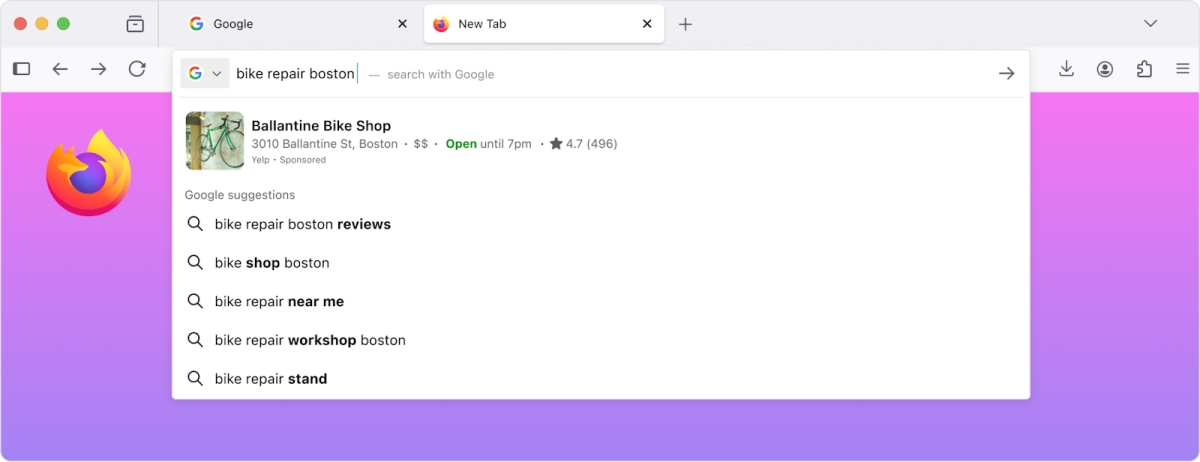
- Recommendations: typing "bike repair boston" shows a featured local shop with address, rating and opening hours.
Firefox keeps showing traditional search suggestions for every query. A direct result appears only when Firefox has high confidence that it matches what you want. Mozilla's Firefox Suggest help page lists the data partners behind these answers, including FlightAware for flight statuses, Sportsdata.io for sports scores, Massive for stock information and Wikipedia for non-sponsored suggestions.
How does Firefox keep direct results private?
Firefox protects direct-result queries with Oblivious HTTP (OHTTP), which splits who you are from what you type. Firefox encrypts the query before it leaves the browser and sends it through a relay operated by Fastly.
- The Fastly relay sees your IP address but cannot read the query.
- Mozilla can read the query text but does not see who sent it.
- Mozilla then returns a result directly or fetches one from a specialized search service.
According to Mozilla, no single party can connect what you type to who you are. Mozilla also says it tested a similar idea years earlier but did not ship it, because that version would have required sending raw queries to Mozilla.
Some direct results are sponsored to fund Firefox. Mozilla says sponsored results appear only when they are highly relevant, carry a Sponsored label, and that neither Mozilla nor the sponsor learns who a result was shown to. The help page names adMarketplace, Yelp and AccuWeather as sponsored-suggestion partners.

What is quicksuggest-amp.sql in Firefox?
quicksuggest-amp.sql is a local Firefox Suggest data file in your Firefox profile folder. Firefox downloads suggestion data through Remote Settings, Mozilla's service for pushing data to the browser, and caches it on disk so that suggestions can match as you type. The "amp" part of the name matches the label Firefox uses internally for sponsored suggestions, as in the preference browser.urlbar.quicksuggest.ampTopPickUseNovaIconSize.
You find the file in your profile folder. Type about:profiles in the address bar and click "Open Folder" next to the root directory of the profile in use; our guide to about:profiles explains the page in detail.
A normal file is small. One user on Mozilla's support forum reported about 30 MB, while others reported 1.3 GB, 2.61 GB and 3 GB files that kept growing. The large sizes are linked to a storage bug, not to your browsing data: bookmarks, history and passwords are stored in other files.
Why does quicksuggest-amp.sql get so big?
quicksuggest-amp.sql grew because Remote Settings did not delete old cached attachments. Mozilla's Bugzilla bug 2029668, "Orphaned attachments are not cleared causing excessive storage growth", explains that when a record received a new attachment, or was deleted, the old blob stayed on disk. Collections that update often, such as the sponsored suggestion data, piled up orphans fastest. The bug report mentions quicksuggest-amp.sql reaching more than 1 GB.
Mozilla fixed the bug in two parts:
- Firefox now removes the old attachment when a record is updated.
- A migration cleans up orphaned attachments in existing databases.
The fix is marked for Firefox 150 and 151. Builds without it, for example an older Extended Support Release (ESR), can still show a growing file. Updating Firefox through Help > About Firefox is the first step to try, but it is not guaranteed: users on the support forum still reported files of 2 GB to 3 GB on Firefox 151 and 152 in mid-2026. If the file stays large after an update, use the cleanup steps below.
Can you delete quicksuggest-amp.sql?
You can remove quicksuggest-amp.sql, but only while Firefox is closed, and it makes sense to update Firefox first. Firefox uses the file while it runs, which may explain why some users report that they cannot delete it or open it in sqlite3.
- Update Firefox to the latest version and restart it, then check the file size again.
- If the file is still huge, close Firefox completely.
- Open your profile folder and move the quicksuggest files to another folder as a backup, rather than deleting them outright.
- Start Firefox and confirm that the address bar, bookmarks and history work as expected.
- Delete the backup once you are satisfied.
The file holds downloaded suggestion data, not personal data, so removing it does not touch your bookmarks, passwords or history. If Firefox Suggest stays enabled, Firefox may download suggestion data again.
How to turn off Firefox Suggest and direct results
You turn off direct results by unchecking "Retrieve suggestions as you type" in the Search panel of Firefox Settings. The Firefox Suggest settings sit under Settings > Search, in the section "Address Bar, Firefox Suggest".
- Open the Firefox menu and select Settings.
- Select Search in the sidebar.
- Scroll to the Firefox Suggest section and uncheck "Retrieve suggestions as you type", plus any suggestion types you do not want, such as sponsored suggestions.
If your version does not show that option yet, Mozilla's fallback is about:config:
- Type about:config in the address bar and accept the warning.
- Search for browser.urlbar.quicksuggest.online.enabled.
- Set the value to false.
Sponsored suggestions have their own preference, browser.urlbar.suggest.quicksuggest.sponsored, which matches the sponsored checkbox in Settings. Our older walkthrough on how to disable Firefox Suggest covers the history of these switches.
Firefox Suggest settings at a glance
The table lists the Firefox Suggest controls that matter for direct results and the file size problem.
| Goal | Where | What to do |
|---|---|---|
| Stop direct results | Settings > Search | Uncheck "Retrieve suggestions as you type" |
| Stop direct results (older builds) | about:config | browser.urlbar.quicksuggest.online.enabled = false |
| Hide sponsored suggestions | Settings > Search | Uncheck sponsored suggestions |
| Shrink quicksuggest-amp.sql | Help > About Firefox | Update Firefox; if still large, move the file with Firefox closed |
FAQ
Is quicksuggest-amp.sql a virus?
No. It is a Firefox Suggest data file that Firefox creates in your profile folder, and its large size on some systems is linked to a storage bug (Bugzilla 2029668) that Mozilla marked as fixed in Firefox 150 and 151, although some users still report large files on later versions.
Are direct results available outside the United States?
Mozilla launched direct results in the United States first and said it would evaluate other regions based on what it learns, because the feature needs servers close to users to avoid lag.
What does "Show search terms in the address bar on results pages" do?
It is a separate Firefox setting that keeps your search words in the address bar on a search engine results page instead of showing the full URL. Our guide to disabling the search terms feature shows how to switch it off.
Does turning off Firefox Suggest remove normal search suggestions?
No. Search engine suggestions are a separate option in the Search settings, so you can keep them while turning off Firefox Suggest.
Related: Firefox Suggest's first test in the United States, disable sponsored top sites in Firefox, Firefox fingerprinting protections

now when i search in the adress bar, it hides the url and I see a new blue icon that says “show url in location bar” How do I disable this crap and make it always show the url?
Note: Firefox esr
I found it and actually it’s the mullvad (based on ffesr) browser.
They added a “Show search terms in the address bar on results pages”.
Displaying search results directly in the address bar will make browsing faster and more seamless for Firefox users.
I am still thinking about the advantages of this kind of search… Not so bad IMHO… However…
You can pre-emptively disable it by setting browser.urlbar.quicksuggest.online.enabled to false in about:config.
I also used the about:config fix Ashwin thoughtfully provided. It took me a full 10 seconds or so to evaluate the change and decide I never wanted to see Firefox ‘suggestions’ or recommendations on my address bar.
The update~disable routine does not bother me at all as long as the disable part remains easy to accomplish. And, of course, while rare, every once in a while there is an update that is actually useful/helpful.
Absolutely not, this implementation of AI browsing. I do not want my Browser to be an AI Search Engine before the fact. That FF would even think to go this direction has me shopping for another Browser.
Ok going the preemptive route to stop this. Thank you fou the information on how to stop this.
This is a feature that I will absolutely not want. As long as it’s not enabled by default and it stays that way in future updates, I’ll be happy.
No it won’t, my about config gutted this data kraken. Also when I use keywords for my LOCAL bookmarks it’s none of their spooking business. The only benefit of Firefox at this point is that you can make it the most privacy friendly with effort and uBlock Origin works best on Firefox (fact as told by its developer).
I will still applaud its downfall from the browser of the tech elites to a generic tech bro AI browser. Some go from Saul to Paul, the others pull it off in reverse.