PS5 Slim CFI-2116 with 825GB SSD: what changed and why a 1TB PS5 only has 848GB
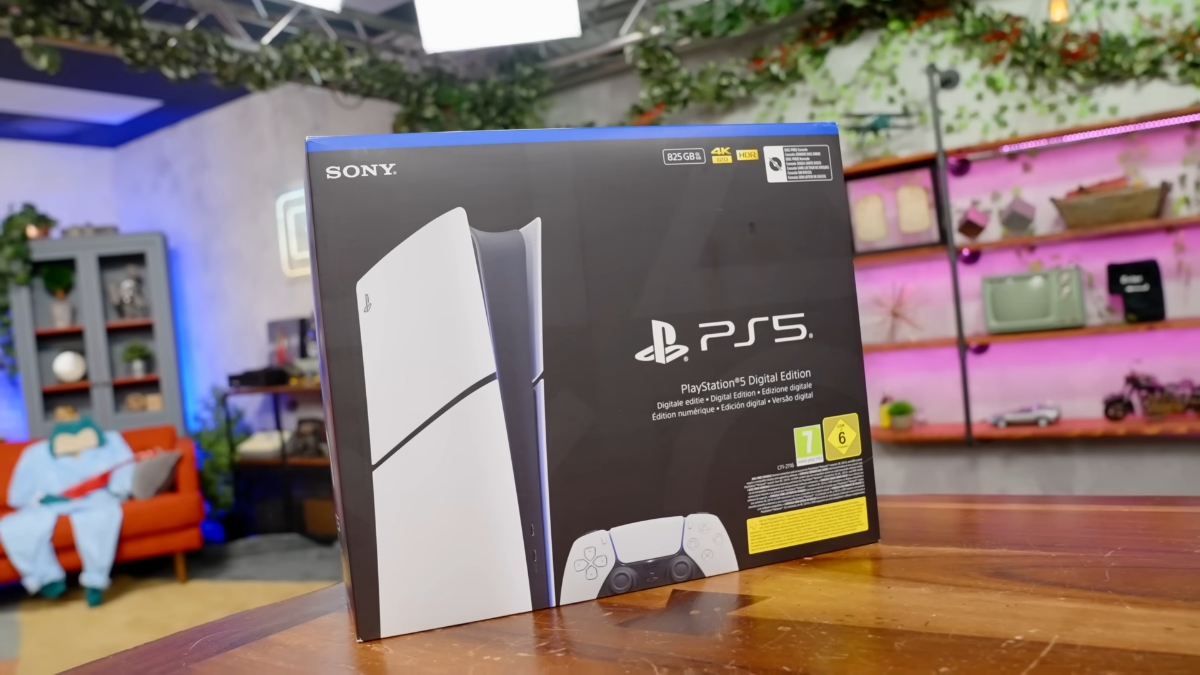
The revised PS5 Slim Digital Edition (CFI-2116 in Europe, part of Sony's CFI-2100 model group) ships with an 825GB SSD instead of 1TB, at the same price as the 1TB model it replaces. That leaves about 667GB for games, against roughly 848GB on the 1TB Slim. Sony did not announce the change; it showed up on retail listings and the box in September 2025.
This page explains what changed in the 825GB model, why a "1TB" PS5 only shows 848GB, how to tell the two versions apart before you buy, and how to add space if you already own one.
What is the PS5 CFI-2116?
The CFI-2116 is the European version of the revised PS5 Slim Digital Edition, a console without a disc drive that uses an 825GB SSD. It went on sale in Europe on September 13, 2025, without an announcement, at €499, the same price as the 1TB Digital Edition it replaced. The new capacity was printed on the box, and leaker billbil-kun had reported the change earlier that month.
Tech YouTuber Austin Evans bought a CFI-2116 in Germany and took the new PS5 Slim apart on video. His teardown shows a matte shell instead of the glossy finish, a lighter build, a revised heat pipe, an all-plastic fan shroud and a new motherboard layout. These are cost and manufacturing changes. They do not add features.
The 825GB Digital Edition later reached the US and the UK. Sony's PlayStation Direct US store lists it as "PlayStation 5 Digital Edition Console - 825 GB" in the CFI-2100 model group. The disc version of the PS5 Slim kept its 1TB SSD.
Why does a 1TB PS5 only have 848GB?
A 1TB PS5 Slim shows about 848GB of free space because the PS5 system software reserves part of the SSD for the operating system, system files and updates. You cannot reclaim that space, and Sony's own store page says part of the built-in storage is reserved, so usable capacity is lower than the number on the box.
Two more things make the gap look bigger:
- Storage makers count 1TB as 1,000 billion bytes, while software often reports capacity in binary units, which makes the same drive look smaller.
- The console comes with ASTRO's Playroom pre-installed, which takes about 11GB until you delete it.
The 825GB models have the same reservation, which is why the original 2020 PS5 and the new CFI-2116 both leave about 667GB free. Moving from 1TB to 825GB costs you about 180GB of usable space, roughly one in five gigabytes you could have used for games. With many big releases now over 100GB each, that is one or two fewer games installed at once.
825GB vs 1TB PS5 Slim: storage compared
The 825GB CFI-2100 Digital Edition has the least usable space of any current PS5 Slim, matching the launch PS5 from 2020. The table uses the usable-space figures reported for each drive size.
| Model | SSD on the box | Usable space (approx.) |
|---|---|---|
| Original PS5 (CFI-1000, 2020) | 825GB | 667GB |
| PS5 Slim (CFI-2000, 2023) | 1TB | 848GB |
| PS5 Slim Digital, revised (CFI-2100, 2025) | 825GB | 667GB |
Price did not track storage. In Europe the 825GB model launched at €499, the same as the 1TB Digital Edition, and in the US it launched at $499, also the same as the 1TB model. PlayStation Direct US has since listed it at a higher price, so check current pricing before you buy. For the same money you get about 20 percent less usable storage, which works out to a hidden price increase. It followed the PS5 price increases of 2025.
How to tell which PS5 Slim you are buying
The quickest way to tell the 825GB PS5 Slim from the 1TB version is the storage figure and model number on the box or product listing. Both versions are digital, look almost the same and may sell side by side at the same price.
Before you buy:
- Look for "825 GB" or "1 TB" on the front of the box or in the listing title.
- Check the model number: CFI-2116 is the 825GB European model. Earlier 1TB Slim models use CFI-20xx numbers.
- Ask the seller if the listing only says "PS5 Slim Digital", since some stores sold both versions under the same name.
- Compare prices. If the 1TB model costs the same or less, it is the better buy.
If you already own a PS5, Sony's M.2 SSD guide links to a page that shows where to find your model number.
How to add storage to a PS5 Slim
Every PS5 Slim, including the 825GB model, has an M.2 expansion slot that takes a second SSD for playing PS5 games. According to Sony's requirements, the drive must be:
- A PCIe Gen4 x4 NVMe M.2 SSD (SATA M.2 drives do not work)
- Between 250GB and 8TB
- One of these sizes: 2230, 2242, 2260, 2280 or 22110
- Fitted with a heatsink or heat transfer sheet, within Sony's size limits
- Fast: Sony recommends 5,500 MB/s read speed or more
Update the console's system software first. Then install the drive and follow the formatting guide that appears when the PS5 starts. To install games there, go to Settings > Storage > Installation Location. To move games, open the Game Library, press Options and choose Move Games and Apps.
USB drives are a cheaper option for storage, but you cannot play PS5 games from them. You copy games back to internal or M.2 storage to play them. For PS4 games and backups, a USB drive still works well.
Related: Valve's Steam Machine and its console-style design, Steam Deck downloads with the display off, 007 First Light release and gameplay

“That’s the price you pay for being a console player, which is worse and inferior to being a PC player.”
Not always the case. A lot of current games that are coming to PCs at the same day as Consoles are not optimized well for PCs. I believe (personal opinion as game tourist) for casual player who wants to get game on day 1, Consoles could be a better option.
You can not blame it on tariffs because it is European prices. Just like Microsoft, Sony is trying to increase prices. They failed so many times in a live-service gaming area recently, they had to increase prices somewhere else. Every failed product increases prices of successful product’s prices. Welcome to real economy. If Google’s or Microsoft’s AI products fail eventually, I fully expect them to raise prices somewhere else.
That’s the price you pay for being a console player, which is worse and inferior to being a PC player. I think consoles are very consumerist-oriented and it’s all about paying for all the comfort possible, but in terms of actual number of games available, it’s very limited – you don’t have a lot of PC games, you don’t have previous generation console games, only exclusives, some non-exclusives and some F2Ps that got released on consoles accidentally.
I don’t play nearly as much as I used to years ago, but if I want to play, I would pick either PC or Android, because you can install emulators and play pretty much anything. Linux for some reason is also doing a better job with emulators, probably because Japanese OSes for PS or Nintendo use something with a Linux kernel.
I haven’t used a console since the NES days, which for me were between 1997 and 2004 where most kids had Chinese knockoff NES consoles and richer kids had N64s or PlayStations and around 2003-2004 everyone started getting PCs. So I jumped from NES straight to PC and I saw the freedom that gave me and I don’t want a console. Even if everything is paid for me and I only have to use it, I will still choose a PC. I had a coworker who was complaining to me about buying a PS5 and not using it, realizing he has to pay for PS Plus and other things to access basic features that are free on PC, finding out many games or services are unavailable without internet connection, games being expensive and eventually decided to sell his PS5, because he barely used it.