Gmail Purchases tab: what it is and how it tracks your deliveries
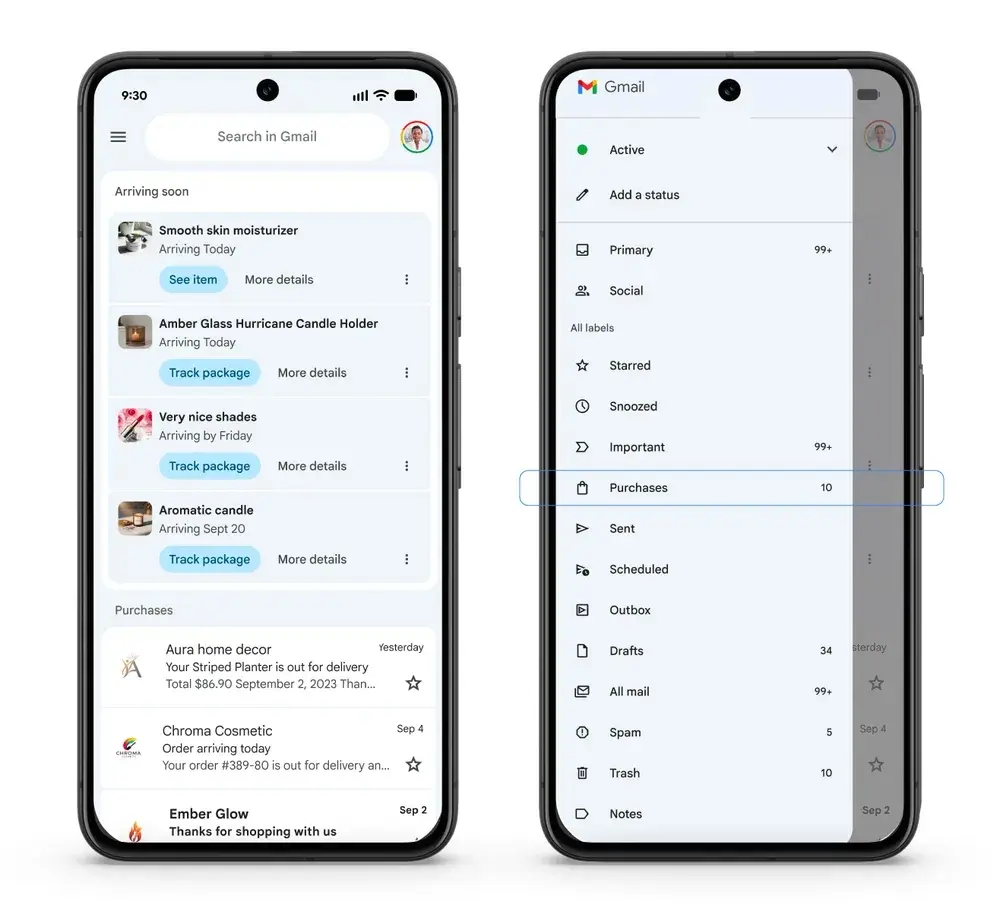
The Gmail Purchases tab is a view that gathers your order confirmations, shipping updates and delivery details in one list, on the web and in the mobile apps. Google announced it on September 11, 2025 for personal Google accounts. Packages due within 24 hours appear as "arriving soon" cards, and your other purchase emails are listed below them.
This page explains how the Purchases tab works, who gets it, how it differs from Gmail's older package tracking, and what Google has said about the Promotions tab change that came with it.
What is the Gmail Purchases tab?
The Gmail Purchases tab is a single list of purchase-related emails and package updates, according to Google's announcement. It is rolling out on mobile and web for personal Google accounts. Google's post does not mention Workspace accounts, so work and school accounts may not get it.
Gmail has shown package tracking banners since 2022: when you place an order and get a confirmation mail, Gmail shows a summary at the top of your inbox. That still works. Packages that arrive within 24 hours keep showing at the top of the primary inbox, and in a summary card within purchase emails.
The Purchases view adds a central place for everything else. If you have several active orders, you see several summary cards, and each one shows a thumbnail of the item and action buttons. Purchases are listed below the "arriving soon" cards. The buttons should work like the existing shortcuts and open the tracking page on the shop's site or app, without opening the email.
How to find or turn off the Purchases tab
Google says the Purchases view is rolling out on mobile and web, so look for it in the Gmail navigation on your device. If you do not see it, the rollout has probably not reached your account yet, or you are using a Workspace account.
Google's Inbox categories help page lists only Primary, Social, Promotions, Updates and Forums, so the Purchases view is not documented there. Google does not document a dedicated switch for it. On desktop, the general way to change what Gmail shows is Settings, Quick settings, Inbox type, then Customize, where you pick the categories you want and save. Check whether Purchases appears in that list for your account.
Privacy and the old purchase tracking debate
Gmail has read order emails to build purchase information for years. In 2019 Martin wrote about how Google tracks your purchases and makes them hard to delete. The Purchases tab turns that data into a visible feature. If that bothers you, review your Google account's data and history settings, see our guide on how to delete all Google history.
A more relevant Promotions tab
Google also announced a change to the Promotions tab: you can sort promotional emails by "most relevant", or by "most recent" if you prefer the current behavior. Relevance is based on the emails you interact with, so unread mail or mail you delete straight away counts for less. Google said this rolls out on mobile for personal accounts in the following weeks. Google also described nudges that highlight upcoming deals and timely offers. If you do not want promotional mail sorted into its own tab, you can switch the Promotions category off in the inbox settings.

Related: How to delete all Google history, How to delete your Google web and app activity automatically

I hate it! I have a great system that I use for filing my emails. This one is awful, not a part of my program so there are too many extra steps in my organizing system. Google: STAY AWAY FROM MY ORGANIZING MY FOLDERS! Arg!
Sadly, many people want AI without considering the hidden costs … the provider snooping on your purchases.
Another way to track what you are buying I would assume as if Google needs any more tools to track you. I already get text, emails, and direct tracking through carrier. Not sure why I need yet another notification but OK.
Google has become brazen, using AI as an excuse to gather all the data it can from you. This is just one more example. Apple is looking good at the moment, as much as I hate to say that.
I do not think this “feature” has anything to do with AI. It is just one more advertising channel for Google.
Yep. They know how we use gmail, so clearly lots of people tracking their online purchases in gmail.
And, yes, another tab, another 2+ ads they can display in as faux emails per gmail account.