Microsoft Copilot is now available on some Samsung TVs and monitors

Microsoft and Samsung have partnered to bring Copilot to Samsung TVs and monitors. It's about time! Wait, who asked for this?
Unlike Copilot in Edge, Windows, Xbox, etc., this version of the AI is not a gen AI tool. Copilot for Samsung TVs and monitors is a voice-powered AI assistant. Microsoft describes it as a "Voice-powered AI meets visual companion for entertainment, everyday help, and everything in between."
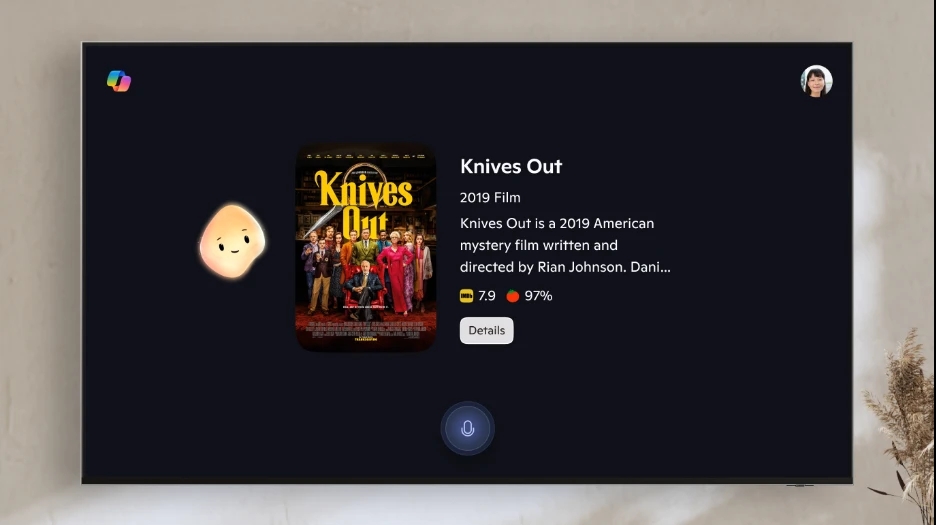
Now, if that doesn't make sense to you, let me provide some context. Back in July, Microsoft unveiled something called "Copilot's Appearance", which is a weird blob thingy, that represents the AI on the screen. This talking blob, ahem, "friendly, animated presence" will react to you and lip-syncs as it speaks to you, the animated expressions will match the tone of your conversation. That was a weird sentence.
To use the AI, open the Copilot app and just tell it what you want it to do. You can ask it to provide spoiler-free recaps, suggest shows or movies, weather updates, etc. After processing your query, the Copilot will present the response with a mix of visuals and voice. Microsoft says that families and friends can use Copilot together, to help groups decide what they want to watch.
Ready to try it? Pick up your Samsung remote, press the mic button and start talking. Copilot can be accessed through the Samsung Tizen OS home, Samsung Daily+ and Click to Search, in natural conversation. Yes, you can talk to the remote in your hand, and see a blob on the TV screen animate and lip-sync in response, and make your TV do things. It's totally natural.
Jokes aside, this sounds like it could be useful, not the blob's reactions, the assistant's features. Using a remote to navigate and type is a real pain, I hate using the TV because of that, so anything that improves the experience is a good thing. Though, with AI services, there are always concerns about privacy. Speaking of which, Copilot for Samsung TV can be used without a Microsoft account, though users can choose to sign in via a QR Code for a personalized experience, including memory.
Copilot is available on 2025 Samsung TV models including Micro RGB, Neo QLED, OLED, The Frame Pro, The Frame, as well as the M7, M8, and M9 Smart Monitors. The announcement says that the AI features are available in select markets, though it is unclear which regions are supported.

There have been a number of incidents reported in the Press just lately where a user interacting with AI has been actively encouraged to kill themselves and sadly has succeeded in that endeavour. https://fortune.com/2025/08/27/adam-raine-openai-chatgpt-wrongful-death-lawsuit-lawyers/
This whole industry needs to be regulated to protect childrens lives. It’s all very well for Microsoft, Google and Meta to provide this technology for free, but do they understand the consequences of what it can lead to.
There needs to be a set of responses built into the app which will discourage ending ones life as the solution for what may be regarded as a minor issue when examined by the medical profession. Suicidal types are rarely rational and relying on AI is a recipe for disaster.
All tech people on YouTube recommend never to connect Smart TV to Internet. Buy a streaming box (almost any would do, with appropriate specs). All of them for now have more customization and privacy options than Smart TV apps. Unless you buy gaming TV, a streaming box can do everything else that TV apps can do. And if one operating system gets too annoying or invasive, just switch to another system on a different streaming box. It is still possible, and streaming boxes cost a fraction of Smart TVs.
You may ask, “Why?” Microsoft’s Copilot is a Trojan horse that spies on you and uses your personal information to train their models for free.
How to, disable Copilot on Samsung TVs
To turn off Microsoft’s Copilot on your Samsung TV, follow these steps:
Method 1: Using the Remote Control
Access the Home Screen: Press the Home button on your Samsung remote.
Navigate to Settings: Use the arrow keys to scroll to the Settings icon (gear icon).
Select General: In the Settings menu, find and select the General option.
Find AI Settings: Look for an option related to AI or Copilot.
Disable Copilot: Toggle the setting to turn off Copilot.
Method 2: Voice Command
If your TV supports voice commands, you can say, “Turn off Copilot” or “Disable Copilot” to deactivate the feature.
Method 3: Sign Out of Microsoft Account
Open Copilot: Activate Copilot using the remote or voice command.
Access Settings: Navigate to the settings within the Copilot interface.
Sign Out: Choose the option to sign out of your Microsoft account, which may disable personalized features.
Also
If you want to completely remove Copilot, check for any software updates or options to uninstall the app if available.
The steps may vary slightly depending on your specific Samsung TV model and software ve