Firefox users say that Smart Tab Grouping is using too much CPU, battery

Mozilla released Firefox 141 last month, and with it came an AI-powered feature to organize tabs. Now, Firefox users are saying that the feature is causing high CPU usage.
Firefox uses the Inference process for the AI-powered tab groups feature. It's called Smart Tab Grouping, you can find its source code on GitHub. The feature is privacy-friendly, and runs locally on the device. It is designed to suggest a title for a tab group created by the user, it can also detect tabs from the current window and suggest adding them to a group. OMGUbuntu says that feature is imperfect, and missed a lot of tabs in their test. And the suggested title was completely irrelevant to the tabs.
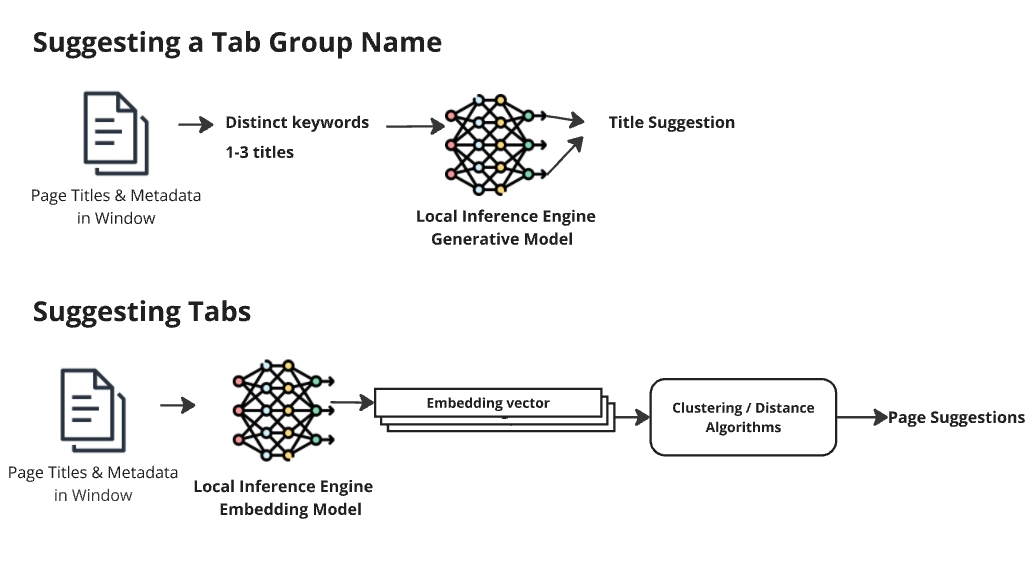
That's not the main problem, users have been reporting that the Inference process was causing spikes in the CPU Usage. This in turn has been affecting the battery life of the computer. A couple of users said the latest version was causing their PC fans to run loud, which normally doesn't happen unless many tabs were open, and the culprit was Inference. You can open about:processes to access Firefox's built-in task manager and monitor the usage.
Check the user reports in these posts on reddit (1, 2, and 3). So, why does the AI have high CPU usage? Instead of activating when a user right-clicks on tabs or tab groups, it probably runs in the background continuously. It's either that, or badly optimized code, which raises the question, how was this approved to the stable release?
Note: Firefox's Smart Tab Grouping is disabled by default, it is rolling out to users.
If you like the feature, you may still want to disable it until the issue is fixed.
How to disable AI-powered Smart tab grouping in Firefox
1. Open about:config and search for this:
browser.tabs.groups.smart.enabled
2. Set the value to false.
3. Restart Firefox.
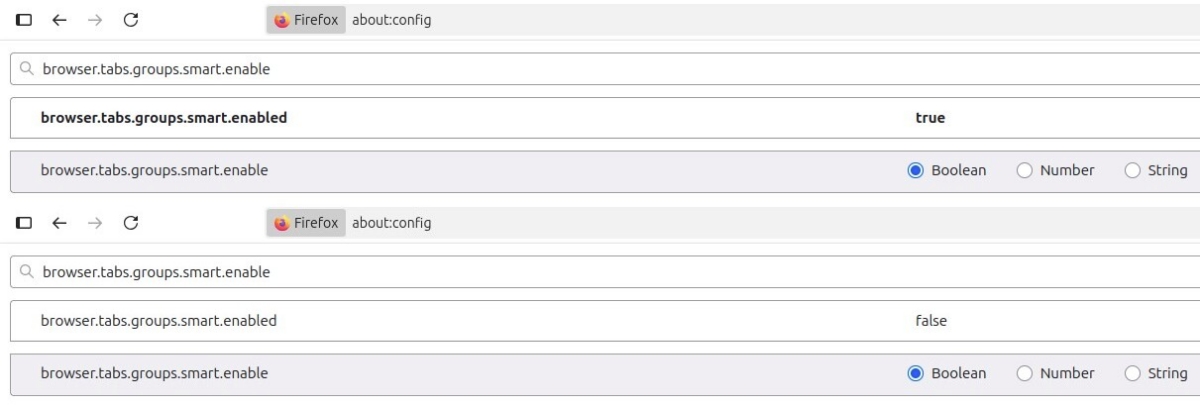
While you are at it, you may as well turn this off: browser.ml.chat.enabled. AskVG's article says it removes all AI features in Firefox (thanks Tom for the tip).
Is there a need for the feature? Apparently, it was requested by users. Here are two threads (1 and 2) on Mozilla Connect that discuss the requests. Automatic Tab Grouping may be useful for tab hoarders who have dozens of tabs open, or even hundreds. I don't use it, but that doesn't mean it is a bad feature. It's a personal choice, I prefer to organize my tabs manually because this way there is little room for error. Other users may find the AI-powered feature to be convenient, even if it may be inconsistent, as reports suggest.
I'm no fan of AI that rely on user data to train their language models. Privacy is king, to me. But, AIs that use on-device models can be useful if they maintain the user's privacy, and help simplify things, or even do tasks that a person isn't skilled at. E.g. If an app offers automatic and offline translations, or can auto generate subtitles for a video, that's useful.
Firefox's on-device automatic tab grouping falls under that category. Mozilla mustn't rush AI features just to attract or please users, and keep the AI features optional, i.e. disabled by default.
Do you use Smart tab grouping?

This is not relevant to tab groups at all. I miss the good old days when ghacks did its own research instead of copying every clickbait.
This one too:
browser.tabs.groups.enabled false
Firefox has been trying to stay relevant since around 2010 and version 4. Desperately trying to copy what Chrome does. As a result, for the last 15 years, it has lost 80% of its market share and user base, now in 2025 sitting at 2.5% compared to 30% in 2010.
It’s a clear sign they are obviously doing something very wrong. Such loss is a catastrophic failure.
This AI thing is not needed and should be optional. Again I will repeat myself. Browsers need to ship with bare bone functionality and provide all their additional features as optional extensions that are hosed on their extension store. And accompanied by a welcome screen that details all the optional functions and an easy way to install them.
By the looks of it, Firefox will be gone soon and this is one of their last graspings at straws.
@Allwynd
Google received an offer by an AI company to buy Chromium. So unless you love AI browsers, you may be switching to Firefox, or one of it’s forks.
@Josie Thornton,
Even if that happens, I don’t live in fear over ones and zeroes in cyberspace. I won’t worry about something that hasn’t happened yet and there is no guarantee it might happen.
Currently I’m content with Brave and I can disable its AI components through about:flags. There is not a chance I will switch to Firefox as I haven’t used it as a main browser since around 2009-2010 when Chrome appeared. Firefox since then has proven to be an inferior experience – outdated, slow, bloated.
Even now, in this article it talks about AI causing problems inside Firefox, why would you even suggest I switch to Firefox when it already paves its way to incorporate AI in hopes to stay relevant? Firefox also uses an inferior rendering engine that has problems with supporting web standards, I’ve used it recently and it has problems with multiple websites whereas Brave doesn’t, I have no reason to use it.
Also the way things are going, Firefox might stop existing soon. So no reason to force myself to use something inferior with a questionable future.
If it ever comes to Chrome being bought by an AI company, it will be interesting to see how Chromium forks will handle it. Also there are Ladybird and Orion coming to Linux, so I’m looking forward to that. Alternatively, there are other browsers on Linux I can use that are not Chromium-based and Firefox-based, like Epiphany, Konqueror, Falkon and others. They aren’t very good, but if I want to stop using Chromium, there are alternatives.
I hate to say this, but I told you so. But then you can call me old fashioned, not wanting to sport the latest in hi tech fashion statements, :)
Welcome to the land of the flat battery, high energy costs, compromised personal security, and an increase in the adoption of the name Winston Smith, all born around the time when the clocks were striking 13, and the cloning centres were all at their highest production rates, churning out Windows 11 users. But what do I know ? I’m just old fashioned, right?
Over the years the Linux community has taught me how to be aware of security, efficiency, and a whole range of other things to look for, in an application and in an OS.
For those whom do not bother to critically question these things, and look for genuine practicality within the realms of these so called innovations, enjoy your emerging 1984 reality.
But what do I know ? I’m just old fashioned, right?
Peter Newton [London UK Linux user since 2004]
In ‘about:config’, search: ‘browser.tabs.groups.smart.enabled’ , tun to ‘false’ and that’s all …
Here with Firefox 115 ESR users are not confronted to enabling or not ‘Smart Tab Grouping’ and ‘AI features’ as a whole; I’d disable both otherwise : privacy is king, to me, as well.
1- As I understand it, disabling ‘AI features’ (“browser.ml.chat.enabled : false”) is a master switch that will disable de facto ‘Smart Tab Grouping’ (“browser.tabs.groups.smart.enabled” // Default=false) should the latter have been enabled.
2- ‘Smart Tab Grouping’ specifically: I imagine that the reported CPU spikes are proportional to the number of opened tabs, and when I read users reporting dozens (and even hundreds!) of tabs in their browser, thoughts of encouragement for the CPU fill my heart :)
Is Firefox, is any browser shifting to the AI fashion really improving?
When ESR gets updated again, it will become an inevitable addition. If you use Firefox and want to hold off on such updates, you will have to use and old version and never update it, which is not ideal. Even more so if you use Windows where an unsafe browser can make the whole OS unsafe. With Linux is somewhat better, because viruses still predominantly target Windows and I’m confident that browsing the web on Linux (even with an old and unsafe browser) is 90% more safe than on Windows, because if something targets you, it most likely can’t do anything, because your system is completely different as the virus probably can’t even work so you won’t even know you’ve been “targeted”.
Right now I’m looking for alternatives to Brave, but nothing really spectacular is out there unless it’s still Chromium-based, other rendering engines provide some browsers, but they aren’t very good and suffer from performance issues.
@Tom, That’s an interesting point. But, one of those users mentioned “rapid cpu and power spikes” that shouldn’t happen unless 15+ tabs were open. That’s not a high number to be causing these problems. Something’s screwy about the implementation.
IIRC, Vivaldi is the only browser that has refused to add AI features. That’s cool, but it also makes me sad that Mozilla didn’t do the same. I hope they don’t go all-in on AI just for the sake of it
That means that even with less than 15 opened tabs cpu and power spikes arise?
Maybe an illustration of the fact that it is not always the quantity of items to process but as well the quality of the very process which may affect the cpu, both interact of course but maybe a good process applied to many items may be less CPU-stressing than a bad process applied to very few items. This is rather an intellectual approach (when you can’t make the girl dream, make her laugh) for a technological area in which I navigate half-blindly at least.