
Hide Extension Buttons In Google Chrome

Now that a stable version of Google Chrome with extension support has been released to the public it is time to concentrate on some of the usability issues of the web browser.
One of these usability issues is that most extensions add buttons to the Google Chrome toolbar. This toolbar can fill pretty quickly with buttons if you install more than one or two extensions which reduces the available space for the remaining items on the Chrome address bar.
There is currently no way to hide or move extension buttons so that only those are displayed that are relevant to the user or the specific situation.
Hide Extension Buttons In Google Chrome
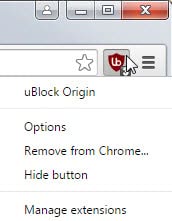
Update: Recent versions of Google Chrome ship with built-in options to hide extension icons in the interface. Simply right-click on an icon and select the hide button option there to remove it from the main toolbar. This won't hide the extension icon completely though, as it is moved to the Chrome menu instead where you find all hidden ones listed. At the time of writing this update, there is no option to hide Chrome extension icons completely from the browser UI.
The latest Chromium developer build - Chromium is the core browser that is used by Google to create Google Chrome - contains a first step in the right direction.
It adds a movable separator to the Chromium toolbar which the user can move to the right or left to decrease or increase the space that the extension buttons get in the Chromium toolbar.
Note: The separator has been removed in newer versions of Chrome but you can still adjust the width of the toolbar area reserved for Chrome extensions. Simply move the mouse cursor over the end of the address bar until it changes into a scroll icon. Hold down the left mouse button then and move the mouse to the left or right to increase or decrease the area reserved for extension icons in Google Chrome.

Update: You may now change the order of icons in Chrome as well. Simply click and hold down the left mouse button when it hovers over an icon to drag and drop it to another location on the toolbar or the Chrome menu.
The following passage is no longer valid:
This is not a perfect solution yet as there is no way to sort the extension buttons in a different order so that those that are used the most are displayed in the visible area while others are not.
The extension buttons on the left are the ones that have been added first which means that a user could theoretically uninstall all extensions and install the most popular ones first so that they are displayed even if the slider is used to hide some of the buttons from the toolbar.
It is very likely that Google will add that slider to Google Chrome eventually and that the slider is just one of the new usability options in the web browser. An option to customize the placement of toolbars and elements on those toolbars just like Firefox offers would be welcome by most Chrome users.
The latest Chromium release can be downloaded at the Chromium snapshots site (via Techie Buzz).
The new features are available in all versions of the Chrome web browser by now.
















Thanks, I didn’t even think to see if I could drag (there’s no bar) the edge of the address bar. I don’t need such a long address bar, but it’s better than having all those logos there unnecessarily. By now in version 6, you can, of course, drag the icons into a different order. (You probably know this, just mentioning it for anyone who comes across this post as I did.)