
KlamAV: Outstanding KDE front-end for Linux anti-virus

You don't usually here that phrase spoken "Linux anti-virus". But it does exist. One of the more popular Linux anti-virus tools is ClamAV. But to most users (especially new users) ClamAV is a bit challenging to use. That is where KlamAV comes in. KlamAV does an outstanding job of making ClamAV a user-friendly tool.
Unlike ClamAV, KlamAV is a GUI tool. So there's no need for opening up a terminal window and learning commands in order to scan either KMail or Evolution for viruses. And KlamAV is full of user-friendly features. Let's take a look at how this gui tool can give you and your users even more of a security edge than they already have thanks to the Linux operating system.
Getting and installing
More than likely KlamAV and its requisite ClamAV are in your distributions repositories. So if you open up your Add/Remove Applications tool you can install KlamAV using the following steps:
- Do a search for "klamav" (no quotes).
- Select the resulting KlamAV listing.
- Click Apply.
- OK the dependencies.
- Sit back and watch the installation happen.
When the install completes, you are ready for your first KlamAV run.
First run
When you run KlamAV for the first time you have to walk through an easy-to-use setup wizard. This wizard will have you locate your signature database and quarantine locations (the defaults will work) and that's it. When the wizard completes you will more than likely be told your installation (or signatures) is out of date.
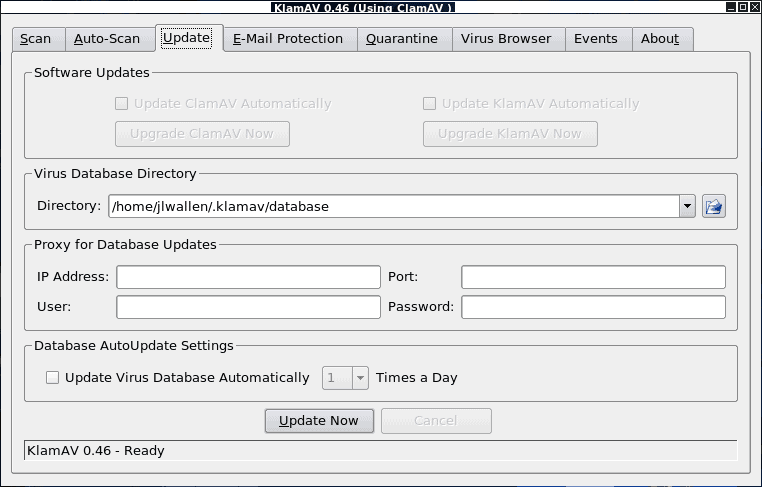
As soon as KlamAV is running for the first time you will see the Update tab of the KlamAV window (see Figure 1). Automatically a new virus definition will begin downloading. Once that is finished you are ready to start scanning.
The first thing you want to do is go to the Email Protection tab and select your email client. As stated earlier, KlamAV can protect both Kmail and Evolution. If you use Kmail KlamAV can set it up automatically. If you use Evolution you have to set up a filter in Evolution to pipe incoming and outgoing mail through klammail. Once that filter is set up you have to create a second filter to send any email with "virus-found" in the header to a quarantine folder.
If you click on the Scan tab you will notice a directory tree. From here you can scan files with the help of the kernel module Dazuko. So you can manually scan your directories for viruses.
Auto update
You can also set KlamAV to automatically update your virus database (definitions). To do this go to the Update tab and then click on the "Update Virus Database Automatically" and then select how often you want it to be automatically updated. You can also manually update the database by clicking the Update Now button.
But why?
You may be asking yourself "why employ a virus scanner on Linux when the vast majority of viruses can't harm my machine?" That is true, but those viruses can harm all of those people you might forward an email to who use Windows. To protect them why not scan all of your outgoing email. Better safe than sorry in that regard.
Final thoughts
Even if you are running the Linux operating system, you would do well to employ some form of anti-virus, even if only to protect users you forward email to. And if you do look for a Linux anti-virus, KlamAV is one of the best.
Advertisement












Sadly KlamAV seems to have ceased development, the most recent version was released in 2009, and unfortunately doesn’t seem to really play well with versions of linux and versions of clamav released after that time, for example there are issues with file permissions and with updating the virus definition database, when you close the gui you get an error saying the update process died, and leaving the gui running for what should be a sufficient time period for it to update the definitions still results in the same error message (confirmed on 2 separate systems both running Kubuntu 10.10 32 bit). It would be very nice if someone with the appropriate programming knowledge for KDE4 would port this program to be able to work with newer releases of linux, sadly I am not such a person.
Other than the lack of update features and mail scanning features ClamTk seems to be a viable alternative in terms of providing a gui to enable scanning specific files/folders using clamav.
oh its really helpful for begainer linux user.thanks
I want to use ubuntu software. But I only worry about virus attact. I Cannot use credit card or paymet according to our county’s policy. So I am looking for free antivirus software for ubuntu . Other ubuntu users in our country told me that they cannot watch vcd or dvd s in ubuntu window. We also use yourfreedom software to by pass the our surver firewall . I also want to know that this software can work in ubuntu or not.
Pls answer me .
Walter from Burma
If you’re going to use clamav it’s much better to use lenny-volatile repository than ‘regular’ Lenny repository.
http://packages.debian.org/lenny-volatile/clamav
I think Clamav is the best antivirus. I’ve used for years. I use gnome though. I use Clamwin for my windows computers. Kudos to Clamav team.
green.
ClamAV is primarily designed for Linux servers that have Window’s hosts as most of it’s definitions are for Window’s viruses (particularly mail viruses). Good to see this though as Linux popularity grows it will obviously become of bigger use for Linux in the future.
you can also try avast anti-virus home edition..
Thanks a lot this will be ferry useful, hopefully you will keep on writing, in near future, more security for the linux system like trojan horses, keyloggers, etc.
Oh, thanks!
I think it will be useful.