
Get To Know Linux: Desktop Environment vs. Window Manager

Ever since the inception of GNOME and KDE there has been confusion among new Linux users which is which and which is best to use. The former question is fairly simple to answer. The latter question, however, is a bit more complex due to user-specific needs/wants.
With that in mind let us begin by illustrating the differences between a desktop environment and a window manager. We'll begin by showing how the Linux graphical desktop is layered.
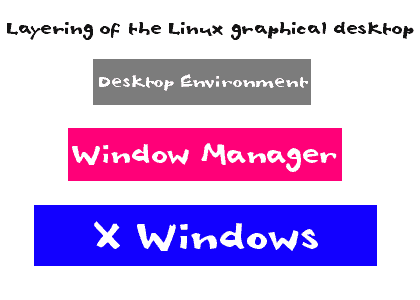
As you can see, in the image below, there are basically three layers that can be included in the Linux desktop:
- X Windows - This is the foundation that allows for graphic elements to be drawn on the display. X Windows builds the primitive framework that allows moving of windows, interactions with keyboard and mouse, and draws windows. This is required for any graphical desktop.
- Window Manager: The Window Manager is the piece of the puzzle that controls the placement and appearance of windows. Window Managers include: Enlightenment, Afterstep, FVWM, Fluxbox, IceWM, etc. Requires X Windows but not a desktop environment.
- Desktop Environment: This is where it begins to get a little fuzzy for some. A Desktop Environment includes a Window Manager but builds upon it. The Desktop Environment typically is a far more fully integrated system than a Window Manager. Requires both X Windows and a Window Manager.
A Desktop Environment generally includes a suite of applications that are tightly integrated so that all applications are aware of one another. A Desktop Manager will also include some form of panel that includes a system tray where small widgets can be placed for quick action or information.
Much of the confusion starts to peek out when you examine such Window Managers as E17 (Enlightenment 17).
The most recent iteratio of Enlightenment includes many of the elements usually found only Desktop Environments even though Enlightenment is still considered a Window Manager. To this point I generally refer to such desktops as Desktop Managers.
There are two main Desktop Environments: GNOME and KDE. If you are curious as to which is right for you, here is some advice. The latest default GNOME will make users of OS X feel right at home, KDE 3.x will make Windows XP users feel at home, and KDE 4.x will make Windows Vista users feel at home.
As to which Window Manager is best suited for which user? Since there are so many Window Managers I will highlight my favorites.
- Enlightenment: You want plenty of eye candy but not something as resource-intensive as KDE or GNOME.
- Fluxbox: You want minimal and fast.
- Afterstep: You want something old-school to give you hours of tinkering fun.
- Xfce: You want a Windows-like interface without the bloatware of GNOME or KDE.
- Compiz-Fusion: This is a full-blown 3 dimensional window manager rife with plugs that do just about everything. If you want something to seriously impress your friends, this is where you want to look.
One of the most wonderful things about the Linux desktop is that it is only limited to your imagination. You can make the Linux desktop look and feel exactly how you want it. You can go from complete minimalism to the full-blown 3D goodness of Compiz-Fusion. I will give you one warning: Playing with the Linux desktop might be as much of a time-suck as World of Warcraft.














I found this article very helpful. Enlightening to a small degree. I’m a pre-newbie browsing and reading about switching to Linux.
LXDE + Openbox is a winner here. Compiz causes too many issues on even basic stuff to make it worth using.
@supert0nes: another -5 to you. Please read Jack’s article again. He NEVER said any one of the UI components was the best. He only highlighted his favorites. Re the comments about DE’s, he said if you like a certain OS than you might find a certain DE to be familiar or to your liking.
Please try reading more carefully in the future before you get so pontifical.
I remember running in to guys like you in the forums when I first started working with Linux. But despite your condescending, self-important manners I persisted and I’m glad I did.
BTW, kudos to you, Jack. A very timely article. I just talked with a teenager today that has tried Linux and would like to learn more so he doesn’t have to pay the MS tax anymore. I’ll recommend this article to him. Keep up the good work.
Small problem here. Your article was meant to clear up the difference between wm and de, yet, while listing your favourite window managers, you lumped a desktop environment in there. XFCE is a desktop environment. Please stop perpetuating the confusion. Aside from that one rather large oversight, the article does a great job of explaining the difference.
I started with XFCE in Xubuntu, but reading a book based on Gnome I found that I miss things in XFCE that can be easily done in Gnome. So I moved to Gnome.
One my LJ friend likes E17, but after I read how much he had to mess with it to get it working – I prefer to have just clean Gnome. :)
@supert0nes: -5 to you. Why must readers such as your self, continually find something to complain about? Jack is merely trying to educate some of us on a subject that is a little confusing for some. He is only hitting on some of the most popular topics and desktop environments. If he were to blog on EVERY point and topic possible on this subject it would just end up being something else that a lot of users wouldn’t understand. Ever heard of “information overload”?
IMO, Jack is doing a wonderful job and I look forward to his posts. +10 to Jack! GNOME FTW!
-1 for inaccuracies
Why you would skip kwin and metacity is beyond me. Your article does nothing to explain window managers independence from their desktop environments. For instance, you can run kwin in gnome and metacity in kde. Your so called advice as to which DE to run is your opinion and helps lead to misinformation The best advice would have been to try both and see which DE works best.
If you really want to know the difference between gnome and kde start with learning a bit about gtk(gnome) and qt(kde)
KDE 4.2 FTW!
Compiz rules, I’d reccomend Gnome+ Compiz, if you use Ubuntu you’d get this combo.
KDE 4 is a mess.
Gnome is far superior than the Windows desktop and do not get me started with a Gnome vs Aero comparison. Aero is the most bogged down and slowest interface ever designed… period…hell Windows 3.1 had a faster interface…
Compiz-fusion is also very impressive and requires less juice than Aero for the same eye candy if not better. The only thing I would really like in Gnome is a right click contextual menu to edit the menu to add/remove links but this is very minor. Btw, I don’t like linux in general but I know how to recognize things done right :) And the Gnome desktop is most definitely one of them.
Quote: “Gnome is far superior than the Windows desktop and do not get me started with a Gnome vs Aero comparison.”
Not so much. I am running Windows 7 on two 1.5Ghz, 1Gb machines (aka slow.) They both run great, better than XP, even with Aero activated.
I installed a dual boot of Linux Mint on one of them and, OMG, things slowed down to the pace of Grandma — just like Vista… and Windows 3.1. I guess this is attributed to Gnome and Compiz-fusion? I am working it out now, and my next step is to try XFCE with and without Gnome I guess. That’s what led me here.
Thanks for the clarification on these concepts.
Yep! Getting rid of Compiz worked (Search for “compiz” in your package installer.)
I also tried XFCE by itself and it was very fast. But I didn’t like the lack of convenience in the menus and panels so I put Gnome back on without the extra applications I don’t need.
Thank you! _This_ is why I love Ghacks! When I saw this post in my RSS feed I thought to myself “same old, same old” but it turns out that you manage to explain things at a level which has never been explained before for simple users. These “Desktop Environment” blog posts are usually KDE vs. Gnome vs. XFCE and never touch upon the meanings of the terms, rather, they seem to use conflicting terms interchangeably. But you’ve cleared up the whole mess and explained the different terms, and shown where the lines blur. Thank you Jack!