
Autopatcher Updater is back !

Microsoft killed the Autopatcher project some months ago which was a shock to everyone who used their monthly Windows Update collections to download updates for Windows or Office directly without having to rely on Windows Update or Microsoft's Download center to do so.
The core advantage of Autopatcher is that you get all released updates in one go. While Microsoft makes available monthly update DVDs, you will have to download them individually for each month which can take quite some time and uses a lot of bandwidth as well.
The Autopatcher team was busy and have releases an early beta of a software they call Autopatcher Updater. The process of obtaining the updates has been changed. The Autopatcher Updater lists the latest updates for the operating system and Microsoft Office and downloads the files from Microsoft and Autopatcher afterwards.
This is a early beta version and there is not much information yet on the process but it looks like that Autopatcher Updater is contacting the Autopatcher domain requesting a file and this information is then used to connect to Microsoft Download and download the update in question.
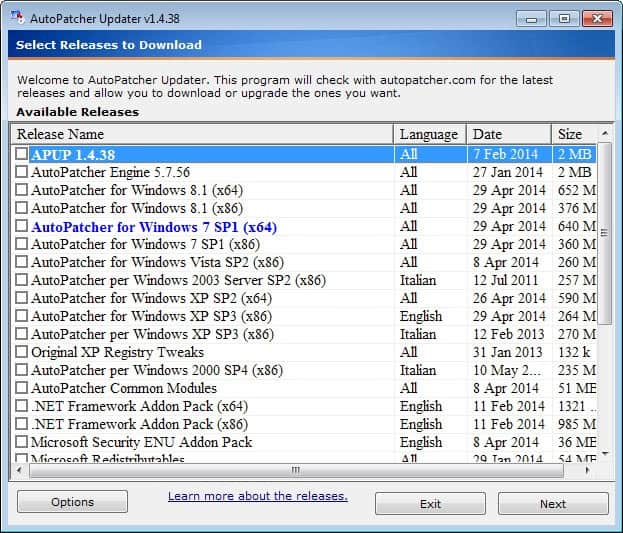
The main Autopatcher Updater interface:
The download window:

When the updates are downloaded you need to run autopatcher.exe which will then give you the option to install some or any of the updates that have been downloaded.
Since this is a beta some problems emerge every now and then in particular a Runtime Error bug for some users which will probably resolved in the next release.
Nevertheless I'm glad that the team is back and it will be only a matter of time until they add more comfort and options to the updating process.
Update: You need to click on "The Autopatcher download" link in the forum linked above to download the latest version of the application to your system. Extract the archive afterwards and run apup.exe which you find in the root folder.
Here you find listed all available releases. Next to AutoPatcher for various versions of Windows you will also find Microsoft Office listed here (only Office 2003 and 2007 it seems), as well as add-on compoonents such as Java, Adobe Air, Microsoft Redistributable files or the Net Framework.
All releases are displayed with their last update date and size. Once you have made the selection, all files get downloaded to the local system from where they can be installed or moved to other systems.


















Microsoft thinks that distribution of these so called free packages makes there business lose??!!
Weirdos in Redmond.
Anyways we’ll stand for Autopatcher. The War has just began.
Long Live Autopatcher!!! This nifty tool has saved me more times than I can recall!
vance: you need to “access the Web” only once, then you can actually move all the downloaded files to the target computer(s). These computers can be all offline – it does not matter!
not as promising as before hehe.. autoopatcher was the best patching software before where you don’t need to access the web to installl updates,
but still props to the autopatcher team, it took them months to recreate the program and now its back.
That’s a good news! :)
Long life to Autopatcher