WhatsApp for iOS Improves Clear Chat With More Control Over What Gets Deleted

WhatsApp is testing an updated Clear Chat experience on iPhone that makes it harder to delete the wrong things when cleaning up storage. The tool is not new, but the flow has been reworked to separate messages from saved items and media types, with clearer prompts and size estimates before anything is removed.
The change shows up when iOS users clear or delete a chat. Instead of a single confirmation prompt, WhatsApp now presents a two-step process that spells out what will be deleted and what can be kept. The aim is simple: free up space without accidentally wiping content that was intentionally saved, like starred messages or specific media categories.
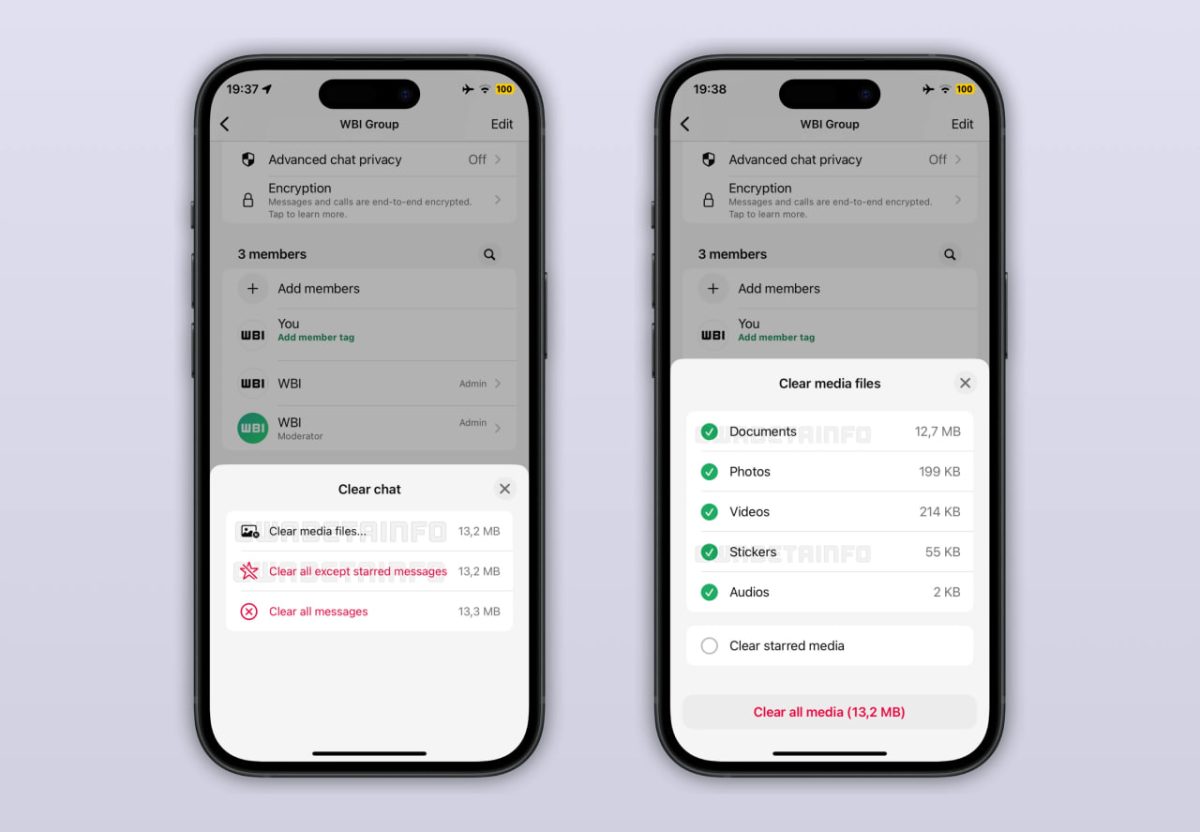
The first screen adds quick actions for clearing messages in bulk. One option removes all messages. Another keeps starred messages while removing the rest. From there, a "Clear media files" option opens a second screen for more granular cleanup.
That second screen is the bigger upgrade. It breaks stored chat media into categories and lets users choose what to remove: documents, photos, videos, stickers, audio files, and voice messages. Each category shows a size estimate, and WhatsApp displays a running total so users can see how much storage will be recovered before committing.
Starred messages also get special handling. WhatsApp explicitly asks whether they should be kept or deleted during the clearing process. This matters for long-running chats where starring is used as a lightweight bookmark system for addresses, receipts, links, or important notes. The new flow reduces the chance of clearing a conversation "for space" and losing those saved items in the process.
The updated Clear Chat tool can be accessed from more than one place. Users can reach it from a chat's info screen, and it is also available from the main chats list, with the same detailed options in both entry points. That consistency helps because people tend to clean storage when they notice WhatsApp taking up space, and they may start from different parts of the app depending on habit.
What changed in practice
Older versions of WhatsApp's chat cleanup were easy to misread, especially if the goal was "delete media but keep messages," or "clear a chat but don't lose starred items." The revised prompts split the decision into smaller choices and attach storage numbers to those choices.
That combination does two things:
- It slows users down just enough to prevent accidental deletions.
- It makes storage cleanup more predictable by showing what each type of content costs in space.
For users trying to reclaim iPhone storage, the new screens also make it easier to target the actual storage hogs. In many chats, videos and documents dominate size, while messages contribute comparatively little.
How to use the new Clear Chat options on iPhone
This is currently in beta, so the exact labels can vary slightly, but the behavior follows the same pattern.
- Open WhatsApp on iPhone.
- Go to the chat you want to clean up.
- Open the chat info screen (the chat header at the top), or start from the chats list entry for that conversation.
- Choose the option to clear chat or manage chat storage.
- On the first confirmation screen, pick one of the quick actions:
- Delete all messages, or
- Delete all messages except starred.
- If your goal is storage cleanup, select Clear media files to open the second screen.
- On the second screen, pick exactly what to remove:
- Documents
- Photos
- Videos
- Stickers
- Audio
- Voice messages
- Review the size estimates per category and the total space to be freed.
- Confirm the deletion.
If you rely on starred messages, treat the starred prompt as the critical checkpoint. That is where the new flow prevents the most common "cleanup regret" scenario.
Limitations and rollout status
The updated Clear Chat experience is rolling out gradually to users on the WhatsApp beta for iOS, specifically version 25.37.10.72, and it is not yet available to everyone. WhatsApp has not provided a public timeline for wider release.
Beta features can change before general rollout, including where the options appear and how the prompts are worded. Users who do not see the new screens are still on the older Clear Chat flow.
WhatsApp is also doing the right thing here by adding friction. Cleanup tools are destructive by nature, and the cost of a mistaken tap is usually higher than the benefit of a faster UI. Once media is deleted, recovery is not guaranteed, especially if the content is not saved elsewhere.
The new Clear Chat screens are a practical improvement for anyone who uses WhatsApp heavily, especially in large group chats where files accumulate silently over months.

My all date