
Ashampoo Snap 7 Review

Taking screenshots of programs and services is part of my job. When I started to write on the Web, I used the print-key to create the screenshots to edit the captured screen afterwards in an image editor such as Paint.net or Gimp.
Once you have installed your first application to handle screenshots, it is unlikely that you will ever go back to the print-key solution to take them.
Ashampoo Snap 7 is a brand-new version of Ashampoo's screen capturing software for Windows. It supports both image and video captures, and ships with its own editor that you can use to edit the captures before you save them locally or remotely.
Ashampoo Snap 7 review
The installation of Ashampoo 7 is straightforward and you should not run into any issues here. The installer is clean and does not contain any third-party offers.
Once the installation has completed, the program is automatically started and a small help text is displayed on the screen that informs you about the program's main functionality.
Snap 7 displays a bar at the top of the screen that is barely visible when retracted. It is basically a small line that you see there. Once you move your mouse over it, the bar is displayed and you can use the functionality it provides you with.
Tip: You do not have to use the Capture Bar if you do not need it. You can disable it in the program options under General. Here you can also disable the splash screen on start-up. The alignment of the bar can be changed here as well, so that it is displayed on the left, right or bottom of the screen instead.
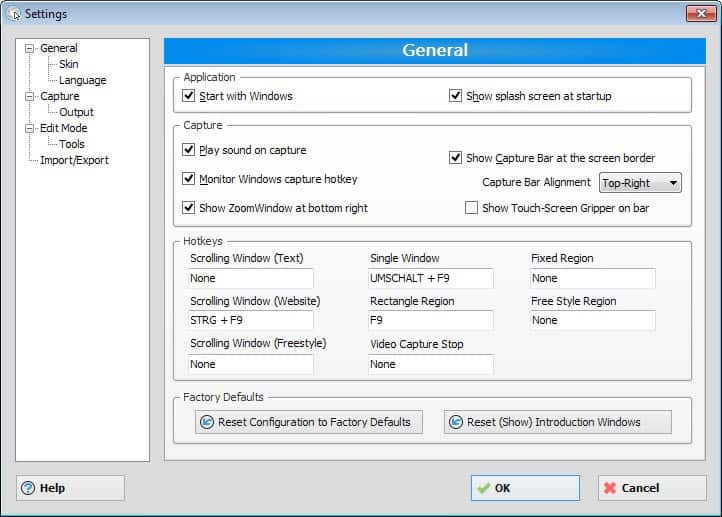
The bar displays the various capture modes that Snap 7 supports, as well as options to launch a color picker and enable or disable the program's multi-shot functionality.
If you prefer to use keyboard shortcuts for that or the system tray icon, then you may want to disable the capture bar to avoid activating it when you hover the cursor over it in that area.
The program maps the print key automatically so that it invokes print functionality in Snap 7, and adds several other hotkeys to the process.
You can define hotkeys for all screen capturing variants that Snap 7 supports. Here is a short overview of what is supported by the program:
- Full screen
- Window
- Scrolling window (website or freestyle)
- Multiple windows or objects
- Rectangular region
- Fixed region
- Freehand
- Capture Menus
- Timed captures
- Video capture
Basically, you can take a screenshot of anything that you see on the screen easily.Depending on the select type, Snap 7 will either open the editor automatically, or provide you with options to select the area that you want to capture manually. Freehand on the other hand puts a dark semi-transparent cover on the whole screen to highlight the selection that you make.
How that is handled depends on which type you select. If you select window for example, you can hop between all open windows using the mouse, and click to make your selection.
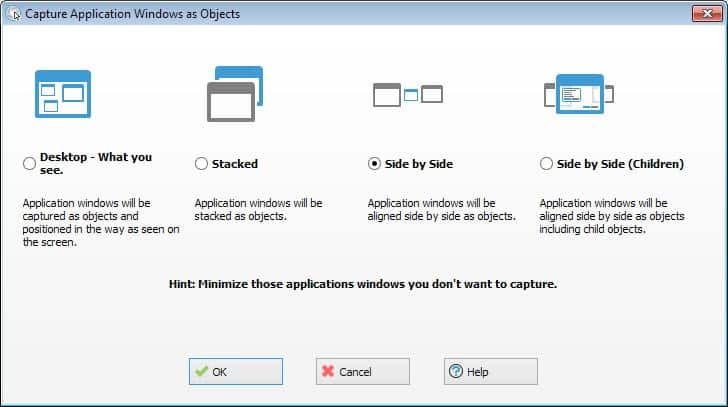
A new option that you have here is the ability to take a screenshot of multiple windows or objects visible on the screen at once.
Editor
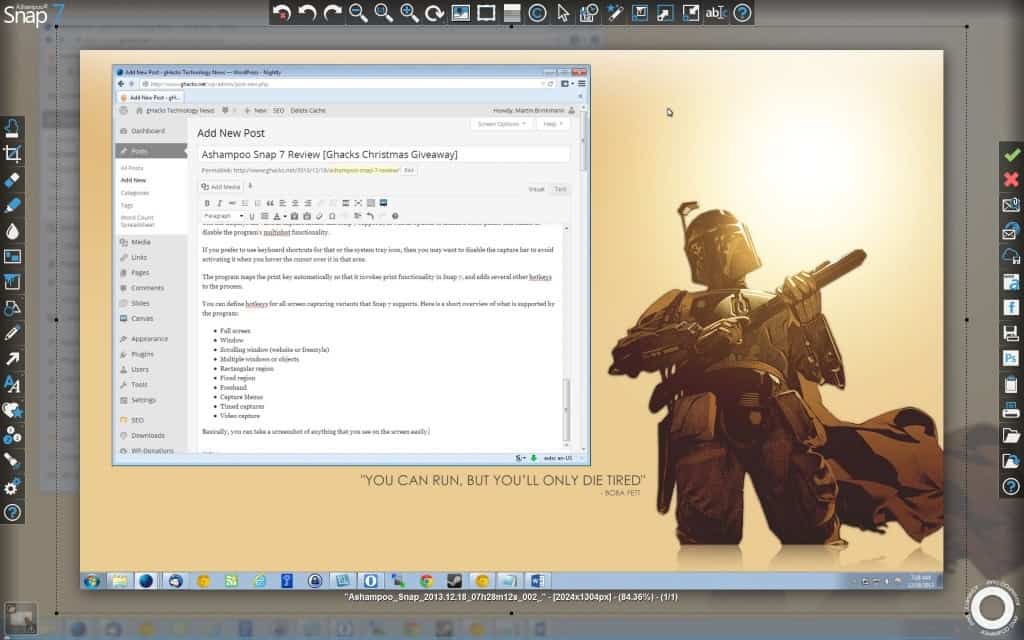
When you take a screenshot, you are taken to the editor afterwards automatically which always opens in full screen. That's great for users who do not want any distractions while they edit images, not so great if you prefer to have more control over the editing window.
From here, it is possible to save or share the screenshot right away, or use the editing tools made available on the screen to modify it first.
The tools are aligned to the left, top and right border of the screen, with the screenshot displayed in the middle of it. The left and top icon bars display the majority of editing options. Use them to resize the screenshot, add annotations such as text to it, draw on it, or use the accentuate feature to highlight certain parts of it.
Changes made here can be undone either step by step, or by reverting to the original image directly to start over.
The tools that I use regularly, blur, resize, highlight and text are all there and work really well. Once you have made the necessary changes to the screen capture, or none at all, you can use the right menu to save it locally or remotely.
Here you find one of the improvements of Snap 7 over its predecessors. Sharing has been improved, with new services such as Dropbox, Google Drive and Microsoft SkyDrive integrated into the program. The application detects the root folders on the system automatically and will integrate the services that it has discovered, so that you can save your screenshots to those folders if you so desire.
It is alternatively possible to share to Facebook, the company's own Webspace service, or to share screenshots via email. Email support has been improved in this version, as several webmail providers are now supported.
Ashampoo has built-in support to export the screenshot as JXR or PSD files which can be loaded in programs such as Adobe Photoshop for further processing. Besides that, you can also save images as JPG, PNG and BMP, as well as PDF and Snapdoc format.
You can access previous screenshots in the editor, as they are kept there unless you remove them explicitly from it.
Video capture
Video capturing works for the most part just like screen capturing. You can select to record a rectangular region that you select, a fixed region that you specify, a single window, the whole desktop, or a webcam.
Snap 7 uses presets that define the quality of the output. You can either select one of the available presets, or customize the selection. If you do the latter, you get to select the video and audio codec that is used for the video recording, as well as the frame rate, bitrate and audio record format.
Once you have made the selection, the area that will be captured to video is either selected automatically by the program, for instance if you have selected desktop, or manually. Either way, you start the capture with a click in the recordable area, and stop it with a hit on the Pause key on the keyboard.
The editor is displayed afterwards, albeit with less editing tools. Only the sharing and saving options are displayed here, which you can use to save the video locally or remotely.
Videos can be saved as wmv or avi files, and you have options to encode them on the fly, or cache the recording on disk and process it once the capturing ends.
Issues
Ashampoo Snap 7 has a couple of smaller issues. There is for instance still no option to save screenshots directly to disk. When you take a screenshot, you are automatically taken to the editor even if you have no intention of using it.
Verdict
Snap 7 leaves little to be desired. It offers all screen capturing modes that one would expect and then some, like the multi-window mode, that the majority of other screenshot taking tools do not offer.
The editor is powerful and easy to use at the same time, and while I'd wish that the program would offer an option to save directly to disk bypassing the editor, it is not as much of a nuisance as one would think, as you can do so with a single click in the editor interface.
The ability to capture video sets it apart from the majority of free screen capturing applications, and while others such as Snagit support the same, it is not as expensive as the popular counterpart.
If you are looking for a screenshot taking tool that supports image and video captures, a powerful editor and excellent exporting options, then you cannot go wrong with this one.
Advertisement


















Great giveaway. Count me in please, thanks!
i don’4 6sw any app. of kind
I still use my very old snagit version.
Thanks for this giveaway.
Currently using TNT. I love most of Ashampoo’s products and would like to have this one. Nice giveaway.
Have a wonderful Xmas.
I just bought it, so no need for a license. I also just bought a new monitor (felt like a dinsosaur with my old CRT). Anyway, my monitor has a resolution of 2560 x 1440. But the video capture only takes 2048 x 1440. Rather clumsy.
I use to use ZScreen but that changed into a much improved ShareX which I like for it’s customizability.
I currently use Snap 6… it does its job for what I use it for. However, it appears that Snap 7 may be a much better app, plus a bit easier to use!
I use “Awesome Screenshot” which is an add-on for Google chrome.
Count me in for the giveaway please!
Thanks!
I, use Ashampoo Snap 5 and it has many functions.
I like it very much and I like to use version 7 !
I hope to win a licence !
I’ve had a Snagit license for years but it looks like Snap7 might have more going for it.
Thanks for the offer for a free license for Ashampoo Snap 7. I’m currently using Snap 6 and enjoy its features. I had been using the pricey Snagit, but have found Snap 6 to be a worthy contender and feature rich.
I’m using windows integrated snipping tool.
Thanks for this giveaway.
Ashampoo Snap 5
i use windows key + prt sc and also snipping tool. i have downloaded something for videos but haven’t installed it yet.
Love the review,
I currently use Windows Snipping Tool along with Paint.NET.
Has served me well so far but would love to get my hands on this awesome program to make life alot easier.
Thanks for the giveaway.
I’m using SnagIt 10 to take screenshots.
Thank you for the giveaway!
Nice give away. I am using Ctrl+ Print Scr. Please count me also.
Looks like some nice features in version 7, I take a screenshot at least twice a day
Happy Holidays ghacks
I use WinSnap. It’s a paid app, but very good…
Please count me in.
currently using Faststone Capture.
Thanks, Merry Christmas !
I just use PrtScn and Irfanview.
Very nice,please count me in! I like the features and style. Thanks
I don’t have a screen capture program and would like to win this.
Hi i use the windows default!
Thanks for this article. I use the Windows SnippingTool.exe
PrtSc
I use PicPick which also has a editor but lack video capture.Snap has this also the editor looks good from the image above.I would really happy to have it.Thanks
Currently using Greenshot.
It’s nice to have snap 7 as it has more features.
I use Snagit to capture screen… Its also really awsome…
PicPick also [PrtScn] followed by paste.
oh I see, you don’t like people posting about bugs, do you? Nice…
The option to choose the File Output Format is missing! It was there in Snap 6…
I use PicPick for taking screenshot and make some edits.
Thanks Martin. Currently I’m using PicPick to take screenshots. Would appreciate if you could count me in. All the best.
Currently using Jing for my screen capture.. would be nice to have a little more power behind my current screen capture software.
Thank you!
I would update my Snap 6. ;-)
I have an earlier version Snap 5. Sound like a great upgrade would love to have this version. Count me in.
Greetings and Solicitation!
PrintScreen and Paint…. that’s my current state.
Snap 7, Sounds like it might be…… simply the best, better than all the rest, better than anything….. anything I’ve ever seen!
Hi there,
I have Snap 6. Please count me in, please.
I would love a copy,please. I am using the trial version presently.
great review; love to have a license!
Oh, yeah. Using PicPick and old version of SnagIt
I use the old version of Snap 3 to take screenshots. This is the best program ever! Hope to win! Thank You!
Printscreen and paint
PrintScreen and Paint
Using Snap 6. Would save me having to upgrade. Thanks.
Interesting and thanks for this giveaway.
I simple use print-key and paste it into application needed.
Looks like it is a viable programme, better than my current programme, Would welcome a chance to get it.
I’m using the print-screen key and then Irfan View. The Ashampoo product sounds like a big step up!
I use Faststone Capture, but the scrolling capture doesn’t work right in Firefox, and there is no video capture.
Thanks Martin for the giveaway.
I’m using Snap5 currently.
Hope to win the new version.
I am currently using Ashampoo Snap 6 and have been using all their earlier version because of the rock solid performance as with ALL their software, in my opinion anyway. A free upgrade of any Ashampoo software should never be sneezed at so please add me to your selection list. Cheers from “down-under”….Bryan
Nice program. Please let me have a download a copy.
I use Capture.Net free…. and thanks for share this!
Merry Christmas!
I’m currently using Gadwin PrintScreen, which is pretty good for a classic freeware app but is definitely surpassed by the functionality of Snap 7.
Hope I win a free license, but even if I don’t at least now I know about it – wasn’t previously aware that Ashampoo made a solid capture app.
I have used paint until my eyes crossed! Please give me a license before I go blind!
at the moment i’m using the default screenshot taker of windows! but it has limited functions.
Porn. I really need this to capture pron video that eludes my video capturing programs. thanks. Pictures too, lots of pictures. Thanks.
At the moment i use lightshot.
Thanks :)
Hi Martin,
I use an old version of Snap and would love an upgrade.
Thanks for the great giveaway,
Richard
Hi Martin, thanks for the giveaway. I use Snap 6 and Camstudio. Would like an upgrade, count me in.
Bob
I still count on windows built in ms paint to edit my capture.
But I had the previous version of ashampoo snap and it works really great.
Please kindly to count me in too.
My favorite screen capture utility is FastStone Capture. It just works great. Does everything I need it to and with ease.
tried a few screen captures, last one being “Awesome screen shot plus” (add on for firefox) but usually end up keying a print screen and pasting into my trusty old macromedia fireworks 3.0 (from back in 1999! lost my installation cd but fortunately copied entire programme directory over from an old machine and it now works from a taskbar shortcut to the exe). Fireworks loads quickly (less hungry on resources than photoshop) and has some functionality edit wise. doesn’t capture video though, which would be handy.
If Ashampoo snap runs happily on very limited ram running win 7, then please do count me in.
*crosses fingers hopefully*
I’m currently using Screenpresso. It works OK, but Ashampoo UI looks much nicer and more modern.
I was searching for a software of this kind. Thanks for the chance.
I am a big Ashampoo fan and use almost all of their products.. previous Snap issues excellent value
Martin:
I find Snap to be perhaps the easiest-to-use screen capture utility. I love of copy of his new version.
Thanks for the giveaway.
Thanks for the review. I’ll have to try it out.
Nice giveaway! Thanks!
Print Screen + Paint
I use the well coded Snipping Tool that keeps it simple. Some days I just wish more power…
I currently use Screenpresso. Thanks for the giveaway.
I use Ashampoo Snap 6. Excellent software. Never had a problem with it.
The new features make upgrading a worthwhile decision.
I currently use a combination of Print Screen for images (with editing in Paint) and Screenpresso for videos (with editing in Photoshop for gifs). I’d love to try Ashampoo out
I use windows 8 snipping tool. Like to try Ashampoo Snap . Please count me in.
I am still that guy hitting Print Screen (or alt+Print Screen) and mucking around with images in FastStone Image Viewer or Photoshop. I could really use something like Ashampoo Snap. Thanks for the chance to win it!
Sounds like a great program and something that I don’t have. Would love to win this.
i’m using Ashampoo Snap 6 to take picture from desktop . i found it GREAT !!
Thanks ghacks for this giveaway .
Martin, Thank you for the excellent review and for the giveaway. I have been using v5 of this software for quite some time. I have v6, but have not installed it. Winning v7 would be a wonderful Christmas gift. Please count me in.
I use “Print screen” and then Picasa. Would really like a decent alternative. Thanks.
I currently use Greenshot or PicPick. Thanks for the chance to win a license of Ashampoo Snap 7.
I currently use Ashampoo Snap-6 for screen capture. It works great! I’d love to win drawing for Snap-7 so I can try the additional functions it offers. Thanks to Ashampoo and Martin for this chance.
I use an old free version Ashampoo Snap 5
Thanks for the giveaway.
Would love to get this.
I’m using “Lightshot” currently, it’s free and good as well.
Count me in!
Using ScreenShotCaptor but an integrated image editor is a worthy plus.
Thank you!
I’m currently using Snap 6, have been a fan of this software since purchasing Snap 3, and am looking forward to this new release. I’d like to be entered in the drawing–thank you for making it available to your readers as a Christmas Giveaway.
(And thanks for all you do the whole year through too. Happy holidays!)
I’ve Ashampoo Snap 5 and use it every single time when I need to take screenshots. This is awesome giveaway. Thanks much. Hope I win one license for Snap 7.
Good software. Thanks for the giveaway.
Now i am use Screenpresso Free.
I wish to get it,
Thank you very much
I’m using Faststone Capture 5.3. Not a bug-free experience; there have been crashes with scrolling windows.
I use an old free version Ashampoo Snap 5
Thanks for the giveaway.
Please count me in :-)
I’m using “ScreenHunter” to Capture. Ashampoo Snap is a outstanding screen capturing software, thank you for the gift.
Hi,
I use JetScreenshot Free and i would like to try this program made by one of the best brands in software products.
Merry Christmas to all
I use Greenshot.
Count me in for this giveaway.
Hallo,
Now I am using Microsoft’s screenshots tool
Thanks
I use version 6! This is the best soft of it kind, for me!
I will be very happy to win one of this licenses!
Good luck to all ;)
Using Snap 5 & PrintScreen. Would love to win a license. Thanks.
Good update and great features. Thanks for the giveaway.
I use an old free version of “FastStone Capture” and would love to try this out.
Checked it, very good.
Thanks