

Martin Brinkmann is a journalist from Germany who founded Ghacks Technology News back in 2005. Martin started his career as a tech support representative at a large German financial corporation which he used to finance his college education in English, Information Technology and History.
He quit college and his job when Ghacks began to attract a large enough readership. He made the decision to become a full time blogger and webmaster, and has not looked back since.
Martin is interested in all things tech. His primary focus is on desktop operating systems, web browsers, Internet services, and privacy related topics.
He published the book The Complete Windows 10 Privacy Guide: Windows 10 Fall Creators Update version in 2017. Martin writes a weekly column for fellow tech site Betanews as well.
You can reach Martin on Facebook or on Twitter. Please use the contact form at the bottom of the page to contact the author directly.
Martin has been quoted or mentioned in many major online and print publications, including Forbes, Lifehacker.com, ComputerWorld, LinkedIn, Reddit, Betanews.com, Bleeping Computer, TechCrunch, PC World, Tom's Hardware, Slashdot, Hacker News, The Register, and more.
Martin's articles on Ghacks

Microsoft released a new Insider build for its Windows 11 operating system to the Canary channel yesterday. This new build is all about improving the Copilot AI in Windows. One of the […]

Mozilla Firefox 123.0 is the new Stable version of the open source web browser. The official release date is February 20, 2024. Mozilla releases Firefox 115.8 ESR on the same day. Firefox […]

Microsoft is preparing the fifth Moment Update for its Windows 11 operating system. Currently available in the Release Preview channel, Moment Update 5 is included in the February 2024 optional updates for […]
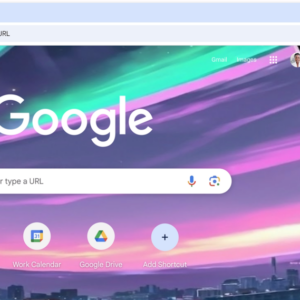
It is probably only a matter of time before all Chrome users gain access to Gemini directly in the browser. Microsoft led the way with its integration of Copilot in Microsoft Edge. […]
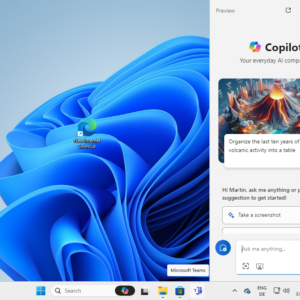
Microsoft has changed the position of the Copilot icon on Windows 11's taskbar in the latest stable version of the operating system. Previous versions of the operating system show the Copilot icon […]

It has been less than a week since the new interim CEO took over the reigns from long-time Mozilla CEO Mitchell Baker. Today news broke that Mozilla is changing its product strategy […]
This is the Microsoft Windows security updates overview for February 2024. Microsoft patched 73 different security vulnerabilities in its products and six non-Microsoft vulnerabilities on today's Patch Day. Our overview is a […]
Microsoft is working on the next feature update for Windows 11 currently, which it calls Windows 11 version 24H2. The company confirmed the name of the update this month and ended speculations […]

Mozilla has a new CEO. The announcement on Mozilla's official web blog confirms that Mitchell Baker is no longer Mozilla's CEO. Mozilla's new CEO is Laura Chambers, who has been a Mozilla […]

Today, Google launched a series of updates for its AI products. Google Bard, the company's main consumer AI product, is no more. Google changed the name of its core consumer AI product […]

You may have heard of Google Graveyard. A website dedicated to all the products and services that Google terminated over the years. Google Podcasts is one of the latest products in the […]
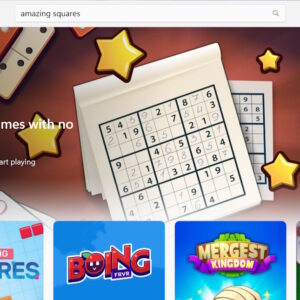
Microsoft has just launched a new feature in the official Microsoft Store that allows users to play games instantly on the Store. Select games do not have to be installed anymore to […]

The developer of the free password manager KeePass has released version 2.56 of the Windows application. KeePass is a local password manager by default; this means that it does not require a […]

The migration from the classic Mail and Calendar app to the new Outlook app is in full swing already. Microsoft announced the deprecation of the classic apps in favor of a new […]

The Document Foundation has released a new version of the open source Office application LibreOffice. LibreOffice 24.2 is already available for all supported platforms. Existing installations of LibreOffice may inform users about […]

Microsoft Edge's latest AI feature helps users put open tabs into groups for improved management. Tab Groups, introduced in Microsoft Edge in 2021, is a useful feature to improve tab organization in […]

Google is known for a lot of things: search, advertisement, AI, Android, security and more. The company dabbled in gaming as well, but its Stadia project did not meet Google's high expectations. […]

Brave Software released a new stable version of Brave Browser earlier today. Brave Browser 1.62 is a feature and security update for the Chromium-based web browser. The update is available already and […]

Quetta is a new web browser that is now available for Android. The developers of the browser promise strong privacy protections and features. In this first look review, we will be taken […]
Google released new version of its Chrome web browser today. Google Chrome 121 Stable is now available and already in distribution. The browser update patches several security issues and introduces several new […]

Mozilla Firefox 122.0 is the latest Stable version of the open source web browser. The new browser version fixes several security issues and makes a few changes to the browser's functionality and […]

Brave Software announced that it will remove the strict fingerprinting option from its Brave Browser. The company cites several reasons for the removal, including that it has been a major website breakage […]

We do not know much about Microsoft's plans for 2024 and beyond when it comes to the Windows operating system. Rumors suggest that the company could release Windows 12 this year, but […]

How much RAM do you need to work without any drawbacks on Windows PCs? The answer depends on what the PC is used for. Several tasks, including gaming and video editing, benefit […]
If you use an application or service that requires a Google username and password, then you may not be able to use it anymore after September 30, 2024. This may impact third-party […]
AdGuard, best known for its content blocking solutions, has launched a temporary email service. Temporary email, also known as disposable email, gives Internet users access to email addresses that they may use […]

Microsoft Edge, like many other web browsers, has a screenshot tool. Called Web capture in Edge Stable, it lets you capture screenshots quickly by drawing rectangles on the screen. Microsoft launched a […]

"Microsoft account is already here" is an error message that you may receive when you try to switch from a local account to a Microsoft account on Windows 11 or 10 devices. […]

Google published a list of changes to some of its products and services that it plans to launch before March 6, 2024 to users from the EU. Companies like Google react to […]

Windows 11 users who use the Mail and Calendar app and have steadfastly refused to switch to the new Outlook app will be redirected to the new Outlook app forcefully. Microsoft announced […]

Ubuntu 24.04 LTS is expected in April 2024. The new long-term service support release of the popular Linux distribution may receive up to 12 years of support. The extended support range was […]
Google released an update for its Chrome web browser a moment ago that fixes four security issues in all desktop versions and in Chrome for Android. One of the patched security issues […]
Google is rolling out a change to the Incognito Mode disclaimer of the company's Chrome web browser. It admits in it that it is tracking users even while the mode is active. […]

Microsoft's Xbox console supports the recording of game scenes. Gamers may record their favorite scenes from games to watch them again at a later point. What some Xbox users do not know […]

Some Windows users who tried to install the January 2024 security updates for their devices received the error 0x80070643 Error Install Failure during the process. Microsoft provided background information and a workaround […]

When you buy an app or game digitally, you don't really own it. What this means is that it can be taken away from you at any time, usually without compensation. The […]

Start back up may be displayed in File Explorer on Windows 11 if you open certain folders. The command is displayed in the path field and its placement may irritate some users […]

Reports suggest that Google may have implemented yet another anti-adblocking technique on YouTube. After slowing down the loading of YouTube for people with adblockers and showing ad blockers are not allowed by […]

AdGuard is a popular commercial content blocking solution. It is available for a wide range of platforms already, including major operating systems and browsers, and now also for Android TV. If you […]
When it comes to recent announcements regarding AI by Microsoft, none discussed as controversially here on Ghacks as the announcement of the dedicated Copilot key. The Copilot key is a new key […]
