
Test if your router's UPnP is exposed to the Internet

Universal Plug 'n Play (UPnP) is a technology that enables devices to communicate with each other (meaning discovering and connecting) without authentication. So, instead of having to configure devices manually for that, devices like printers, game consoles, the fridge or fax machines use UPnP tp do so automatically so that they can provide their functionality on the network and use other functionality provided by the network, e.g. Internet access, automatically as well.
A issue came to light recently that highlighted that many routers expose UPnP to the Internet as well which in turn provides hackers and malicious users with options to expose this security issue to attack underlying systems through UPnP. This is a big problem as UPnP has been designed to provide its functionality only on local area networks and not public networks.
You can watch the Security Now 389 show which talks about the UPnP issue in detail below if you are interested to find out more about the issue.
In the article linked above I have mentioned a tool that you can use to scan your router to see if it is exposing UPnP to the Internet. Shields UP over at GRC has that functionality now as well. The core benefit here is that it does not require Java which the other tool did.
So, head over to the website right now and click on the proceed button and on the second page on the GRC's Instant UPnP Exposure Test button to check our router to see if it exposes UPnP or not.
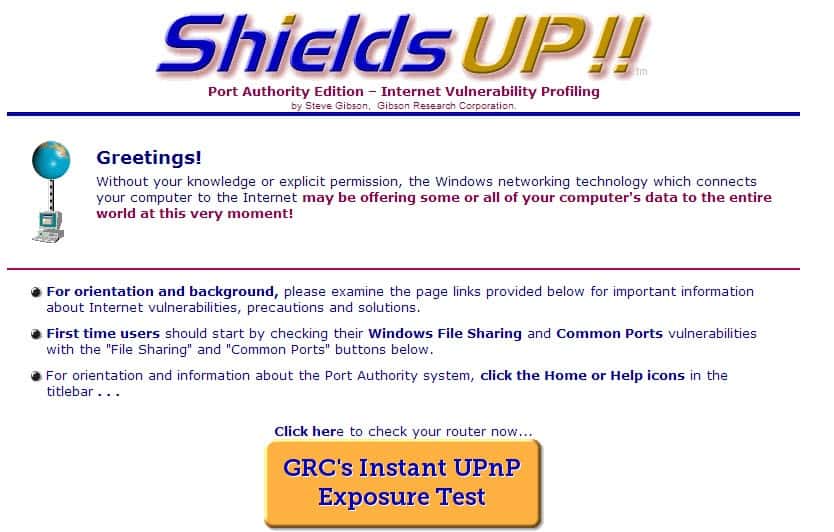
So what is happening when you hit that button?
This Internet probe sends up to ten (10) UPnP Simple Service Discovery Protocol (SSDP) M-SEARCH UDP packets, one every half-second, to our visitor's current IPv4 address in an attempt to solicit a response from any publicly exposed and listening UPnP SSDP service
It should not take longer than a second for the results to be displayed. If you receive the message that "the equipment at the target IP address actively rejected [the] UPnP probes" then you know that UPnP is not exposed to the Internet by your router.
If you receive a message that the information are exposed, you need to react immediately. You can either check the router manufacturer's homepage to see if there is a firmware update available that resolves the issue, disable UPnP or go out and shop for a new router that does not expose UPnP to the Internet.
Advertisement














Came across this site, video, and article doing some research on my router (and whether or not it’s failing). It’s been almost 2 years since you’ve posted this. Can you offer an update on Upnp? Are the ISPs managing this (for us), are the manufacturers of routers creating products that address this problem? My DIR-655 firmware is up to date even though it’s dated 2008. I know I haven’t had the router that long though. I did however go in and disable the Upnp, but I’m not sure it’s necessary at this point. My son used to have an XBox system – I remember checking for this in the router settings a couple of years back when he began playing Live and I think it was enabled by default. The gaming system is no longer used but I wonder if I’ll run into connectivity issues as a result. You mentioned Skype in the video… still an issue? And lastly, can you list or even recommend router manufacturers who have “fixed” this? Thanks in advance!
So I got the bad news that my router (a plain-vanilla installation about a year ago of one from D-Link) “DID RESPOND TO OUR UPnP PROBES.”
Unfortunately, the Gibson site throws me back on my own resources to reset the firmware, which I have no idea how to do. Is there a step-by-step guide, or, better yet, an automated script?
Chester Wisniewski from Sophos published a short, concise article on this UPnP issue last week which covers the basics with many useful links. The reader feedback is also worth reading.
http://nakedsecurity.sophos.com/2013/02/05/upnp-flaws-turn-millions-of-firewalls-into-doorstops/
Regarding your defective router and what do about it — Chester does a 15-20 minute podcast called Chet Chat every couple weeks (varies). Brief, informative, expert participants and often funny. In the most recent episode 102 Feb 12 they cover precisely this point in detail. Check it out.
http://www.sophos.com/en-us/security-news-trends/podcasts/all-podcasts.aspx
I see my router has upnp disabled by default and that test-site said “Good news”.
On Windows there’s a related service… What do we do about that? Better disable it or leave it as is, since UPNP in router’s seettings is disabled anyway?
great resource, Martin. And my machines passed the test :D
thanks for this!
These information nuggets that you offer makes us all come to ghacks :)
Yay! Passed! Thanks for the write up. Good info.
Been to the site & it showed me the good news. The problem is it also sees something that it says the ISP I’m subscribed to put what it calls a string or a machine name that can make me uniquely identifiable to any web site I visited. So there is also a bad news. I wonder if the ISP has the right to do this or, if it is legal & not a sort of hacking the subscriber.
In case this wasn’t a joke, could be your IP address !
No, it’s not a joke, nor my IP address. It’s a privacy concern. As a matter of fact, I’m also having hard time posting this. Two previous posts are nowhere to be found. That was in reply to Transcontinental. Thank you anyway.
@Transcontinental, it isn’t a joke as a novice understand it. You see, that string/machine name I saw is made up of letters, symbols, dots & the name of the ISP. If you compare that to an IP address the difference is just too obvious & apparent.
@Transcontinental, It isn’t a joke as a novice understand it. You see, that thing called string/machine name is made up of letters & symbols, a dot & the name of the ISP. If you compare that to how an IP address look like, it’s just too obvious to see the difference.
*the ISP I’m subscribed to put what it calls a string or a machine name in my computer…..*
We have proceeded with success ratification :)
It had been some time I hadn’t visited Gibson’s Shields Up. Great site.
Well this is what I expected when I ran the test:
THE EQUIPMENT AT THE TARGET IP ADDRESS
DID NOT RESPOND TO OUR UPnP PROBES!
(That’s good news!)
Btw they continued this UPnP subject in the first part of SN Ep 90 including info about the router test itself.
You know for all those overloaded websurfing maniacs who can’t find the time to kick back and watch (or listen) to an hour – hour 1/2 program Gibson provides transcripts for all his shows. I often save these for quick reference — saves time not having to search around in the audio.
http://www.grc.com/sn/sn-390.pdf
As an overloaded websurfing maniac, I wholeheartedly thank you for the transcripts info :D