
Remove duplicate bookmarks in Firefox

Bookmarks are both my bread and butter and also the bane of my existence. Honestly, I began collecting them in the mid 90's and still have the same file, although a steadily added-to version of it.
In the early days I backed up the file to a CD and later an external hard drive. Then Xmarks came along to save me. Now Xmarks-like ability is built right into browsers like Chrome and Firefox.
However there are two big problems with my growing 15 year old collection -- it contains duplicates and it is rife with broken links. Today I want to look at a way to solve the former and in the future we will tackle the latter.
Update: Bookmark Duplicate Cleaner is not compatible with Firefox 57 and newer. We suggest you use the compatible Bookmarks Organizer instead. Bookmarks Organizer detects duplicate bookmarks but also broken and redirecting bookmarks. End
Bookmark Duplicate Cleaner
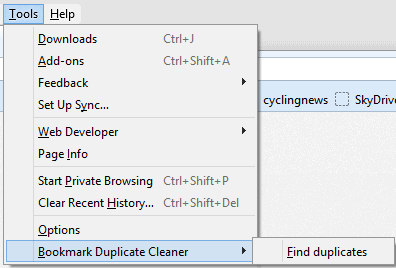
A Firefox plugin called "Bookmark Duplicate Cleaner" is the tool I decided to use for this task. Once installed, it is accessible by clicking on the Tools menu and then Bookmark Duplicate Cleaner.
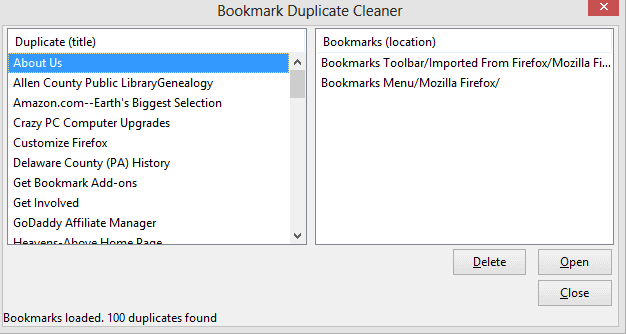
The app will immediately pop up a box that displays two columns. The left shows the duplicates that have been found and clicking one will display where it is duplicated within the right column. The bottom gives you an option to open the bookmark if you care to double-check it. However, the Delete button is probably what you will want to use in the vast majority of occasions.
Closing Words
The extension is very simple to use, but if you have a lot of duplicates found then you may expect to spend some time here. However, if your bookmark file has become as unwieldy as mine then apps and extensions are pretty much the only way to solve this problem.
If you are looking for a Chrome solution then you may want to check out SuperSorter which can do a similar thing. As for Bookmark Duplicate Cleaner, it is new -- version 0.1 -- but it holds some promise and will likely provides quite a bit more functionality in the future. For now, though, I still found it useful in cleaning up some of my multitude of bookmark problems.
Related articles
- How to import Bookmarks, Passwords and other data to Firefox
- Sort Bookmarks add-on for Firefox
- StorURL: cross-browser bookmarks manager for Windows



















Your search title is bookmarks and you are talking about hard drives?
What the hell, I search for something and it is a waste of time. Why don’t you revise your post and add airplanes and boats and trains also?
This add-on is not compatible with your version of Firefox.
Fantastic Add-on! Just installed on new Win10 / Firefox 50.0.1. Gives just enough info & options to get the job done without worrying about loosing important bookmarks.
I had first tried Bookmark Deduplicator but there were no options at all. Didn’t even show paths to compare and dupes were not listed in alpha order. Only a Delete button.
I was a bit concerned as Bookmark Duplicate Cleaner had this note: “This add-on has been marked as experimental by its developers” and it seems to be old but worked perfectly.
Hi
I’ve been searching for a solution to Bookmark duplicates in Firefox.
My problem was the few bookmarks I had, seemed to be ‘mirrored’ (same bookmarks in reverse order) in the list.
I fixed this by right-clicking on ‘View Pocket List’ (under Bookmarks) and clicking on ‘Hide Recently Bookmarked’.
Problem solved!!
don’t be absurd. if you have the problem of too many bookmarks a tool that takes so many clicks or keystrokes to remove a single bookmark is absurd. bad sync features have created well over 10000 book marks on each synced device. and I’m far from the only one
Those frustrated by the inability of Bookmark Duplicate Cleaner to automatically clean duplicates instead of having to select them for deletion one-by-one will like Bookmark Deduplicator:
https://addons.mozilla.org/en-US/firefox/addon/bookmark-deduplicator/
I had over 8000 duplicates from successive cross-browser imports, and this cleaned them with a single click.
“By Alan Buckingham on January 21, 2013 ”
Sorry guys. :)
re:Ken Saunders comments
Well Martin, if you did not author the 2 replies above, who did? Those replies are not highlighted.
I authored the comments but not the article ;)
I definitely need this. Thank you!
Martin, I like the new .content-box-blue here, but your comments aren’t highlighted.
I prefer it when they are. :)
They are only highlighted if I’m the author.
@PixelWizard
how The delete button is greyed out?
i can not use delete buttonit say AM-DeadLink can only check url for dead link ,its not possible to edit or delete url in AM-DeadLink
Oops. I see now that the duplicate finder button in AM-DeadLink does work. (The delete button is greyed out.)
I think Deadlink can’t delete Firefox bookmarks due to the way they are stored.
This looks good as a duplicate detector/deleter.
But to check the current viability of bookmarks without manually opening any, I’ve been running a standalone called AM-DeadLink every year or so.
See http://www.aignes.com/deadlink.htm
It’s not too difficult, it’s freeware, and it works with the bookmarks in a variety of browsers – IE, Firefox, Opera, and Chrome. It’s for Windows 7/8 (32/64 bit), Vista, XP, 2000.
Maybe I will use both; AM-DeadLink doesn’t facilitate deletion of a bookmark from within the software.
Thanks for the info Alan. I have been using Xmarks for some time to keep all my bookmarks synchronized. I ran into some problems when using it with different browsers though. When I was trying out Chrome, Xmarks would repeated duplicate my entire bookmarks collection. In Chrome it would create a new folder called “Imported from Firefox” that had my full collection. Then when I would open FF again, Xmarks would sync that new folder, which doubled my collection. This process would repeat each time I used Chrome and resulted in my bookmarks being duplicated, even nested, many times over. I have many thousands now and they are not arranged in any sort of neat and orderly fashion. Cleaning them up is a project I don’t relish.
I tried the duplicate cleaner in Xmarks, but it was too aggressive in some cases and left many duplicates in others. It was more work than it was worth. I’ll give this one a try and see if it does any better. Thanks.
X-marks was my go-to for syncing for YEARS but, it has worked worse and worse after Firefox upgraded to Quantum. 2 days ago it stopped syncing completely. now i have tons of duplicates that started appearing when Firefox self-upgraded to Quantum. Also, the Firefox add-on Duplicate Bookmark Cleaner is NOT compatible with Quantum. It says so right on the Add-on page.