
Do Not Track Plus Makes Sure You Are Not Tracked On The Web

If you read tech blogs and technology oriented sites regularly you notice that privacy is a hot topic on those sites. Most readers who visit those sites cherish their privacy, while the majority of Internet users are likely unaware of how their privacy may be compromised on the Internet.
Tracking is directly related to a user's privacy online. Tracking happens in a number of ways, but they all have in common that they track the user globally and not only on a single domain or website.
This is done with a number of technological tricks, cookies for instance, unique identifiers or even a user's IP address if it is not dynamic.
User profiles are generated that are either sold to other companies, or used to display targeted ads to that user.
Do Not Track Plus is an extension for the Chrome browser that informs users about tracking on websites and at the same time blocks those scrips from being executed.
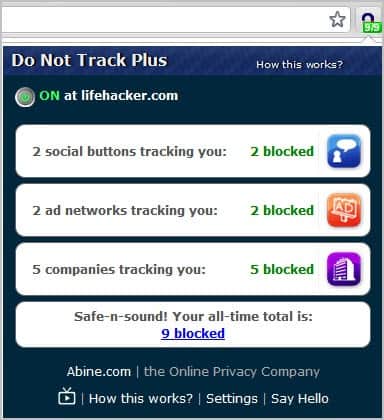
When you visit a website you will see the extension's address bar icon indicate the number of tracking related scripts that run on the site. All tracking related scripts are sorted into the three categories social buttons, ad networks and companies.
You can click on an entry to see a detailed listing of the scripts that run on the site.
Social buttons are blocked from sending out information. They remain active though which means that you can still like, tweet or +1 posts when you click on them. If you do, the functionality is activated again by Do Not Track Plus.
Ad networks display the scripts that track your activities on the current site. The extension links to opt-out information to prevent those sites from tracking you automatically (for as long as the cookie stays on your system, that is).
The third and final group is a list of all scripts that are tracking you on the site. You can unblock specific companies here. Keep in mind that this is a site-specific setting. If you disable the blocking of Adsense here on Ghacks, you will still have it blocked on all other sites by default.
Why would you want to unblock ads on some sites? To support the webmaster and site operators of course.
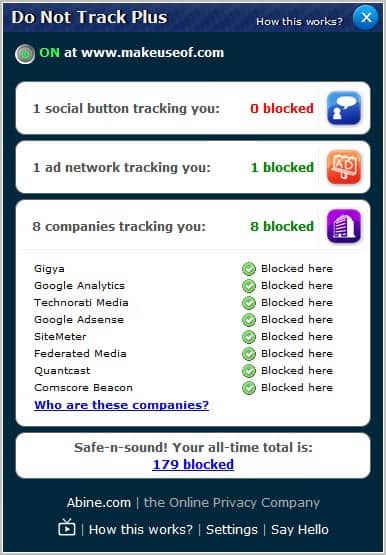
The extension furthermore computes an overall score of tracking related scripts that it blocked for you. You can turn off the extension on particular sites with a click on the On button in the top left corner of the screen. One of the issues that you will experience if you turn it off completely or on a per-script basis is that you need to reload the page manually before the changes become visible.
A click on Settings displays all companies that the extension recognizes on the web. Here you can unblock a specific company globally.
Watch the video below for more information:
The core issue that I personally have with the program is that it is not available in the Chrome web store, but only on the developer's website.
Chrome users can download Do Not Track Plus from that website.
Update: The add-on is also available in a version for the Firefox and Opera web browser.
Advertisement















DNT+ may be useful, but it has its own pop-up tips that are quickly becoming annoying.
It they keep up, I’ll need to find another solution.
Good blocking capabilities.
However,the firefox version is trial .
After a while,it informs you that you’re license has expired and asks you to visit http://donottrackplus.com/expired.php?k=nokey
Stick with Ghostery, Noscript and tracking lists
What about the brilliant NoScript add-on, as far as I know it performs the same function also?
Yes it does.
I added the EasyPrivacy subscription to AdBlock Plus which claims to do the same.
Therefore for me I presume this extension would be redundant and unnecessary.
I also presume either one would not prevent Google from tracking if signed in.
Former name of this addon was https://addons.mozilla.org/pl/firefox/addon/targeted-advertising-cookie-op/
but this one is simplier, and does the same
It would be nice to compare Do Not Track Plus and Ghostery
Its for Firefox too and its very efficient! Just try it out guys
http://donottrackplus.com/
That’s good news, thanks for letting us know about it,
Sounds interesting, only wish it was for Firefox!
They do have it for Firefox (and Safari). http://donottrackplus.com/
go to the website http://donottrackplus.com/, click DOWNLOAD using Firefox.
For Firefox (and OPERA!) you can try Ghostery instead!