
RogueKiller, Remove Rogue Security Software On Your PC

Rogueware, or rogue security software, is a class of malicious software that disguises itself as legit security software. These programs often have the look and feel of antivirus applications, but instead of protecting the computer from malicious software, they do the exact opposite. The majority of rogue applications fake infections of the system to scare users into paying for a necessary upgrade to remove the infection from their computer system.
It is sometimes difficulty to remove rogueware from a PC, as they may block legit antivirus software and important system tools from running on it while the rogue software is running.
RogueKiller is a free small program that analyzes the system for rogue software. It works in this regard similar to Fake Antivirus Remover, a program which we have reviewed in the past here on Ghacks. The program scans known rogueware locations, including running processes, the Windows Registry, drivers, the hosts file and the master boot record.
The following screen is displayed after you start the portable software.
The developer suggests to close all other programs running on the system before you start the program. First thing that you may want to do then is to scan the system. Just press 1 on the keyboard and hit enter afterwards to run the scan. This takes less than a minute, and a protocol is displayed as a text document afterwards.
This protocol lists relevant findings sorted by type.
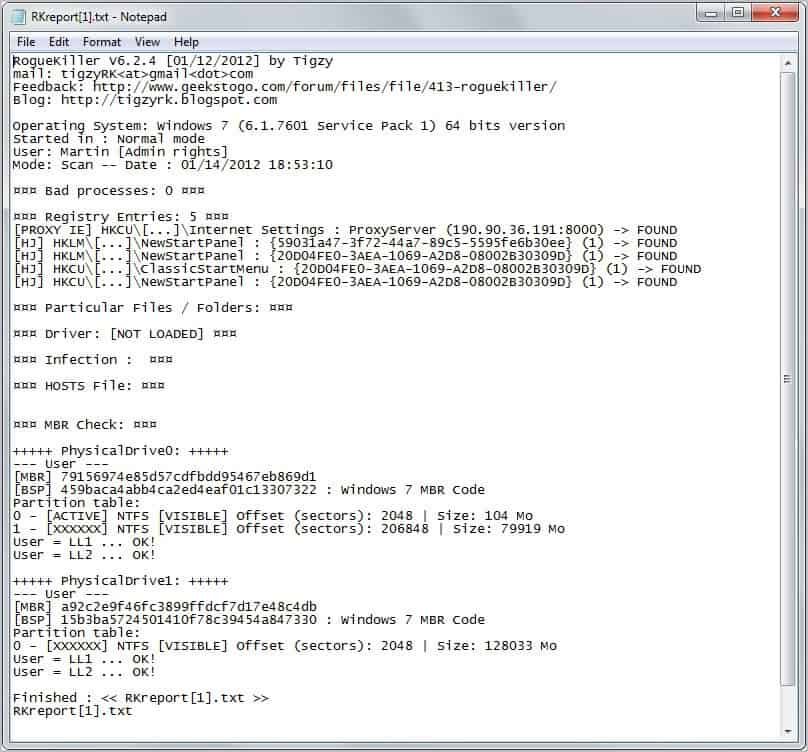
The program detects dozens of rogue antivirus software including MicroVaccine, CheckSpeed, ProtectCop, SmartSafer or MicroPC. You may need to analyze the text file to see if the rogue software has modified core system settings and locations. The program ships with options to delete or repair some of them automatically. This includes options to delete Registry settings, fixing the host file and proxy setting, and fixing the domain namer server settings.
The software is fully portable and compatible with recent 32-bit and 64-bit editions of the Microsoft Windows operating system. You can download the latest version of Rogue Killer from the French developer website.
Advertisement


















Hello
There’s another official website for english people here:
http://www.geekstogo.com/forum/files/file/413-roguekiller/
;)
What does this do compared to say MSE & Malwarebytes?
Do I need yet another piece of software to fill the holes in the above software???
Mr. Brinkmann.
This appears to be a very good program like the one offered at http://www.bleepingcomputer.
Question: Can I get an English translation of this French website?
TR
Brooklyn NY USA
You can use Google Translate for that for instance.
Lately I don’t repair much computers anymore. But need to try this one out the next time I do and encounter rogue software.
Martin, wouldn’t it be better to use the real +1 button instead of a direct link to +1 / share full screen page? Then you also stay on ghacks.net and not navigate away.
You can middle-click the button to open the website in a new tab.
Thanks Martin, a really good piece of tools that sometimes need!