
Kaspersky Password Manager Review

Kaspersky Password Manager is a free and paid program for Windows, Mac, Android and iOS, to manage passwords across all your devices.
Most password managers today offer more than just a secure storage space for passwords. Most come with options to generate secure passwords, automatically fill out sign in forms on the Internet, or to record notes and other related information.
The core purpose of a password manager however is the secure storage of passwords. With password managers, users can select secure and unique passwords for their online and offline accounts, without fear of forgetting the password at a later time.
Users without password managers often select easy to remember passwords like qwerty, abc123 or password. The problem with those passwords is that they are also easy to guess. Complex passwords like qmBU2tTW3oAC0rRJ4h are hard to remember even when no special symbols are used. Imagine having to remember dozens of strong passwords for your online accounts.
Kaspersky Password Manager is a free and commercial program for the Windows operating system that offers functionality that you would expect from a password manager. The free version is limited to storing 15 passwords and one identity card which is not much but good enough to test the software to see if it matches your requirements.
Kaspersky Password Manager
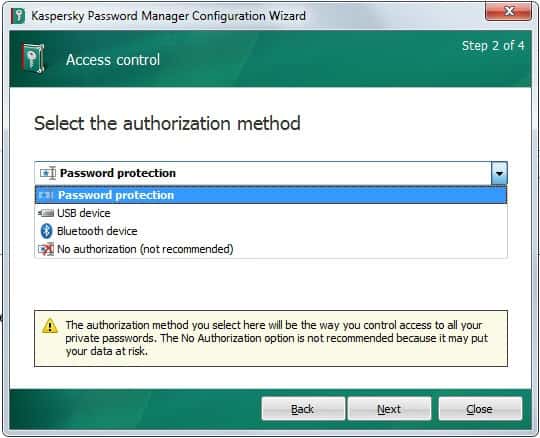
Users on first run need to select a master password to protect the database from unauthorized access. They can furthermore select a different authorization method, using USB devices or Bluetooth devices, if they so desire, or select no authorization but that would leave the password database wide open to anyone with local access.
Kaspersky integrated a virtual keyboard into the app which you can make use of to enter the master password without having to fear the majority of keyloggers that may be running on the host system.
Passwords can be imported from the web browsers Internet Explorer, Chrome and Firefox, the email client Thunderbird, AI Roboform and KeePass.
Kaspersky Password Manager integrates with Firefox, Chrome and Internet Explorer.
This does not mean however that users with other browsers cannot use the password manager, as it is still possible to access the program's functionality on the desktop. Only automatic sign ins and recognition of account creations is limited to those browsers.
You can select the supported browsers that you want to connect the password manager with. Connecting offers several advantages. The application will notice sign ups and sign ins on websites automatically, and offer to add them to the password database.
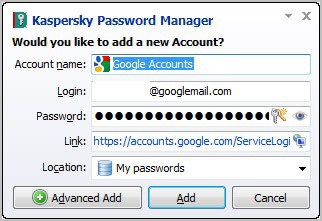
Accounts can also be added manually or by importing from other password managers. All user accounts that have been added to the program become then available for one-click selection. Chrome users for instance see a Kaspersky Password Manager icon in their address bar by default that displays a list of all web passwords for fast access.
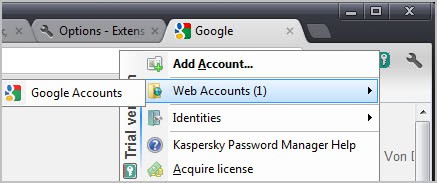
It takes two clicks to log in to any service this way. The same option is offered by the program's system tray icon. A right-click on the icon displays a context menu with options to log in to any service saved in the password manager.
Another interesting option is that Kaspersky keeps track of frequently used passwords. These accounts are displayed prominently in both context menus (in the browser and system tray) for direct access.
The right-click context menu links to the built-in password manager as well. Here it is possible to generate secure passwords according to specifications. You can for instance create a 20 character password with upper and lower case letters, numbers, and selected special symbols. Generate passwords are automatically copied to the clipboard for easier pasting into web apps or local programs.
Web addresses can be added to the list of ignored urls. This basically prevents the password manager from interacting with those websites.
The program ships with an option to create a portable version of the password manager. That's ideal for users who want to access their passwords on the go. Kaspersky has created mobile applications for Android and iOS which can also be used while on the go.
The identity manager makes form filling on the Internet a pleasant experience. Instead of having to enter the same data over and over again, it allows to create identities that contain pre-filled information that can be automatically filled out when needed.
A recent update introduced data synchronization across devices. You had to rely on third-party services for that previously, but can make use of the functionality directly.
Using it, you may sync data across all Kaspersky Password Manager instances you use on all of your devices.
Verdict
Especially Chrome, Firefox and Internet Explorer users benefit from Kaspersky's Password Manager as it integrates directly into those browsers. The program ships with everything one would expect from a password manager, from secure storage over password generation and identity management.





















I have been using Dashlane for much the past year. Have also used AiRoboform, Last Pass, and several others. Would be interested in trying the Kaspersky one also.
what does “website” box call for?
not using any manager–sometimes have trouble remembering, locating pswrds
little notes, sometimes hard to read
would help a lot if secure
Cool, very nice tool
Thanks
Tal
actually i’m using msecure coz aviliable for different platform such as pc – mac – smart phone
at the end i’m using kaspersky manager password now. it is great application but it is not aviliable for ios or androied os
I don’t have a password management system, other than a text file on a usb key.
I very much need this product. I’ve been using Kaspersky Internet Security for the past two years and will continue using their products. Fast, effective and low on system resources.
I currently use RoboForm Free and love to try kaspersky
I use lastpass extension in my browser. Kaspersky password manager looks way better & more secure than Lastpass. Please count me in for this great giveaway. Hope I will win a license of this great program..
It’s really great: whatever, thank you so much…!!!
I do not have password manager
Nice giveaway, hope to win
I’m currently using Roboform’s free trial version. It is wonderful but I’d like to go beyond the limit of 3 Custom field entries.
I’m using RoboForm, willing to try something else too :)
I currently use password keeper on my Blackberry. I would like to have a program that I could integrate with my various web browsers.
Well ,… i don’t know if the giveaway is over.
However I ould like to say that I’ve been using keepass since one year. I am pretty satisfied but I would for sure test this kaspersky password manager!
Who knows…
nice giveaway..I will try KPM to more secure…
I am using lastpass now for managing my password. It is very good. But am using the free one. Might be this Kaspersky password manager will do better. we’ll see if i win this. Thanks
I save my passwords in a text file in an encrypted archive.
Cool Thanks
Nice Giveaway, Please Count me in…
Thanks For Giveaway
i don’t like password manger application my mind if enough to remember strong password….
i used many program for managing my password….no one impressed me..
lets see….can kapersky impressed me…??
thanks…
Thank you for the nice contest.
My current password manager is LastPass,I hope to win one license of kaspersky password manager.
Thank’s
This would be nice to win. I believe the Kaspersky Password Manager is re-branded version of Sticky Password Pro. Thanks
At the moment i save only all passwords with Firefox.
I think, the kaspersky password manager is a perfect solution.
Merry Christmas.
i missed out on KPM , at present i do not use a password manager, used to use roboform, one morning i received a message from a gentleman, farouk muhammad@ – – – – , wherein he told me that my master password at roboform was – – – – – – -, and it was a complicated one and he was correct.
i had 4 bank accounts in there plus accounts with about 50 online sportsbooks all with money in them , he did not touch one cent, thank you sir.
he claimed that he could get anyone’s P/W out of roboform, merry christmas to all.
I would love to try this app. It must be as great as the antivirus. Please count me in.
I currently have no password manager. I use Kaspersky as my anti-virus software and would like to try their password manager.
Please include me in this giveaway. Currently I am using LastPass.
Sorry been using Roboform for a number of years. Cheaper and does a great job.
Nice program. Thanks for giveaway.
I don’t have a password setup so I really need this product.
Please count me in. This software looks very promising and it is from kaspersky. I currently use Sticky Passowrd.
Thank you for the giveaway.I use free Keypass software.Kaspersky makes one of the best security products.I would love to win Kaspersky’s Password Manager.Please count me in.
unfortunately this kind of s/w still leaves users open to the manufacturer copying all created passwords to some server. why you ask? well, if Microsoft, Oracle, and Cisco agree to put backdoors in their s/w to make it easy for the NSA and CIA to snoop around, do you think that the russian intelligence services such as the FSB would not have the same kind of deal with russian s/w companies? they are in the info gathering business, among other things… so why would they not seize such a golden opportunity to get their hands on millions of passwords without having to do all the hard work of cracking the encryption? therefore if those guys are doing there jobs properly, you can assume that they have your passwords.
my point: no one is secure or enjoys privacy when online, unless you take the following steps:
1- disguise your identity by never using your real name for email addresses and other online accounts, which also means spoofing or obfuscating your source IP address as well as your computing device’s MAC address
2- never using a password manager and never storing UID/PWD info on any device in the clear or encrypted
3- never trust commercial s/w
4- only trust open-source s/w IF AND ONLY IF you are able to examine the source code and recompile it yourself
then maybe you will be able to surf the web in total anonymity and security.
but i guess if your only concern is to prevent wily non-governmental hackers to steal your info, then by all means use password manager and internet security s/w. just make sure there are not rootkits keyboard loggers running on your system or it’s all useless.
cheers.
Fine giveaway :)
I`m using a free version of lastpass but it would be nice to have sthing better.
So, count me in of course
I would to love to try other password manager. Last pass user here [currently]
hi … I use last pass now….
But a Kaspersky is always great …
Plz let me have it …
ghacks , keep hacking :)
I’m managing a lot of passwords. I would like to try this new password manager.
Please count me in.
Thanks Martin.
I’m currently using the save password feature of Firefox browser. But after reading ur article that these passwords could be easily accessible using the sql database browser, I’m scared.
Please count me for this giveaway, so that I could protect/save my passwords.
Thanks,
Grr
I have KIS 2012 but don’t use any password saver except yjr one in Firefox so winning this software would be a good way to increase security on my computer.
I use Lastpass, and install the plugins for all browsers i use (ie., IE9, Firefox9, Chrome16, Safari)
Could always use a good password manager. Count me in. Thanks.
Thanks Martin for the giveaway. i am currently using keepass.
please count me in.
I am interested in this Kaspersky Password Manager. I want one, thank you! :)
My Password Management is a txt file I keep copies of on my Laptop harddrive, a USB Flash Drive & on Google docs!
Each Website has its on txt file with Username, Password & eMail Address on it. If it sounds like a lot of work… IT IS! Please put my name in the bucket for the drawing of this GREAT Password software! As you can see from above… I NEEDS IT!!
I am currently using both Roboform and Sticky Password as I am not sure which one I like better. They both seem to have certain aspects that the other does not have.
Please count me in for this giveaway
Best contest! I’m currently using KeePass 2, and I would love to win the Kaspersky Password Manager. I KIS2012 and well these programs would complement each other.
Please, one license.
Cool! I’m using lastpass with KIS . I like to try all Kapersky products. So please count me in Thanks and Merry Christmas
Well, i have migrated to KeePass 2, and this program has more features than kaspersky, plus open source.
This looks a nice product. Thanks for the great review and giveaway. I am currently using Keepass and would surely like to try this one. Please count my name for the draw. Thank you and best regards.
Good software for security. I want free license :)
KeePass has treated me well, but I often keep a look out for something better. It sounds from the review like Kaspersky might be it.
I hope I can win with this giveaway.I like Kaspersky products they are top rated.
This looks like a terrific product. would love to have a copy!
I use Sticky Password Pro, Kaspersky Password Manager seems new which want to try since its not available for sale here.
Regards
App looks good,hope i can get a license.
thanks GHACKS
Thanks for giveaway.
Count me in.
I currently use Roboform, but it is in need updating.
I’m using RoboForm now, but am open to trying something new
Hi!
An interesting program. To use the password I use to Secure Login for Firefox and Password Commander. A lot of good reviews I read about the program to work with passwords Kaspersky Password Manager.
So you see today offered by the program, I was happy, hoping to get a license key. I hope that I’m lucky.
Best regards!
I only use LassPass for all the browser across the network for easy access to my logins and forms.
Thanks for the giveaway!
nice software! thanks for the giveaway! count me in plese
I Subscribe this to my email and Share this on my Facebook
my facebook name
abo bahaa ali
i am using mozilla default password manager.
count me in. thanks.
thanks.
I do not have any password management software currently, so count me in.
john d
Undoubtedly a very useful and high quality program.
Count me in please. Thanks.
Martin thanks for drawing my attention to this interesting software. I currently use Roboform and have tried Lastpass and Sticky passwords and Keepass – about all the big names in password management.
I am surprised that Kaspersky makes a password manager and thought they only made security applications. I would be very interested in a license of this to see how it stacks up against the other main password managers – especially Roboform.
Thanks for setting up the giveaway and count me in the draw and have a good XMAS and NY!
i never used a password manager, but this kaspersjy one i think i can trust. i want this one.
Thanks Martin Brinkmann for good review and great giveaway. I am currently using few selective passwords remembered by heart for all kind of logins, but love to have separate password for each site. I have heard good words about Kaspersky Password Manager and after reading your review, I would love to have it on my system. Please count me in. Hope I will have a license (with future updates support) and will use it via Google Chrome. Thanks in advance.
I am currently only using the build in manager in FF, I have never really had a need for a 3rd party program, but would like to give it a shot!
I’m using Keepass & Keepass plugin for firefox. I am not interested to put my passwords file online.
It is good to have a good password manager, thanks for the chance.
I am using KeePass at present, and would like to try this one primarily out of the reputation of Kaspersky.
Currently not using any password manager so I hope to win a license. Thanks.
great software and great contest! thank you for this!!!
https://twitter.com/#!/Alex77toy/status/150230524110184449
http://www.facebook.com/permalink.php?story_fbid=157341134370978&id=100003055787962
I’m interested.
I’ve abandoned AI Roboform for some time now, and I am searching for a password manager with my data kept local, as with this new “Kaspersky Password Manager”.
Thanks to gHacks for offering a chance to get it via Santa :)
Currently I didn’t use any password management tool..all the password is memorized so wish to get one of the license to make my stuffs and all locked documents neatly. thanks.
thanks for this giveaway sir.I have account on more than 20+ different websites and due to this it is impossible for me to remember all the account passwords and that’s why i want Kaspersky password manager.
Hope i win.
Regards,
nizxb
Please count me in. Thanks.
Merry Christmas.
I want this software, I am currently using roboform as my passwordmanager…
I am currently using Last Pass password manger. I am interested with something else.
currently i have free lastpass with wot installed on both chrome and firefox
It is excellent Kaspersky Password Manager like all their software me fascinated this program now will use the vercion trial and I facino but already the tube uninstall hopefully that can be licensed greetings and thanks for your attention
I currently use LastPass (free), but the program is bugging me, so I’ve actually been looking for a new password manager for quite some time (I haven’t found anyone that’s perfect, but KasperSky looks perfect based on your review!).
Thanks
Because this password manager leaves little to be desired I want to switch from lastpass free manager.
It’s not hard to describe my current password management setup. I don’t have one. I haven’t found anything that I trust. I wasn’t aware that Kaspersky offered this software. I currently use KIS 2011 and have full faith in it. I would trust Kaspersky with my password info. I would very much like to win a license. Thank you for the review and chance to win.
I would like one.
Thank you for this nice giveaway. Please include me in contest, because I have several login to effectuate and is ever more difficult to remember all the data!
Currently using no password manager, but this one looks interesting. Please count me in.
I currently use RoboForm Free, but I reached the limit of logins for the free version and would like to have a new manager that does the logins.
Currenty I don’t use any password manager but this is very difficult. I registred many accounts and must remember a lot of password and login. This software is very useful. I hope I win.
Great software!
i need it to manage my password
Thanks for the Giveaway.
Great! really X-mas is time for magic and unbelievable gifts! this program is cool. Thanks for reviewing it so well. i am not using any password manager program now. And this giveaway is just on time for me. thank you again, I would be really glad if you count me in.
PS. good luck to everyone because everybody needs it!!!
https://twitter.com/#!/william_of_pale/status/150189090749415424
http://www.facebook.com/permalink.php?story_fbid=259008510829963&id=100000509041253
I can not wait to try this great application, this time I only had an account last pass, I want to try a different application
Thanks for giveaway this I want to win but but every budy is help less so may be this time I will win
thanks for win count me in
I currently use LastPass( free version ). Kaspersky looks very good. Thanks for the giveaway. Good luck to everyone and Merry Christmas.
I never use any password manager before. I would like this to my KIS 2012.
Please count me in.
Thanks.
For me my password management is in my mind!
I was a bit eager to post my comments and forgot to mention that the only Password Manager that I use is the one built into Firefox!
Kaspersky P M would be the one of my choice! :)
I want one….thanks
Currently I’m using KeePass 2. Count me in. Thanks for the review and the giveaway. Merry Christmas, Martin!
Seem great. Just watched about it on youtube find it quite impressive. Great review of article too nicely done! :)
I never use any password manager before but I would like this to be my first.
Please include me on this giveaway Thank in advance.
Here my tweet https://twitter.com/#!/coolng1990/status/150160991395643392
Cheer.
Great piece of utilities. I am very active on various forum and site where require me to have a lot of account. Currently I never use any password manager but I do use Last Pass to help me sort my stuff but I got rid of it when I reformat my system some time ago and never bother to install it again.
Very promising would like to give it a hands on. Thank for this giveaway please count me in!
https://twitter.com/#!/CoolCrackerz/status/150160754383929344
Cheer and Merry Christmas :D
Nice!
Thank you for the nice contest. My current password manager is LastPass (free). I would gladly changed it for Kaspersky Password Manager. I hope that this time i manage to win :) Sorry for my english :)
I am currently using Last Pass as password manager.
This would go nicely with KIS 2012, which I just renewed, as they both compliment each other, so of course, I hope to win this giveaway!
Merry Christmas and all the best of the season to you, Martin and all the readers on Ghacks!
I’m using LastPass, willing to try Kaspersky.