
Identity Finder Premium Review

Do you know how many personal information you have stored on your computer? And where? Most PCs are filled with documents and emails that may contain information like credit card numbers, social security IDs, passwords, email addresses or scanned certificates that are all there in plain sight and accessible by anyone looking for them.
The core problem besides the fact that the information are stored without protection is that most users have them scattered around on the computer's hard drive. Places to look first are the documents folder and email clients, but there are other locations where information may be stored.
Identity Finder has been designed to prevent identity theft by scanning a computer for personal information. The findings are then displayed in the program interface to alarm the user of their presence, and tools are offered to deal with the information.
You can start a basic scan right away, use the search wizard to customize the search or load the advanced interface which enables the program's full feature set. Identity Finder can locate credit card numbers, passwords, bank account numbers, email addresses, phone numbers and a variety of other information during searches. One of the program's strength is the ability to create custom keyword searchers for information (like a name for instance).
Identities for additional countries (Australia, Canada and United Kingdom) can be included in the search as well. The standard scan processes all files in My Documents, email mailboxes and web browsers locations. Advanced users can add the Registry to that and custom locations that they want included in the search.
The time it takes to finish an identity search on the computer depends largely on the selected locations, parameters of the search and the computer's performance. Scans not only look at file names but also inside documents to find personal information. Advanced search options are listed in the settings. Here it is for instance possible to include mapped network drives and shadow files in the scan, or to ignore certain file types that you do not want included.
When it comes to email, Identity Finder will search Outlook, Exchange and Thunderbird mailboxes automatically. You can enable additional programs (Outlook Express and Windows Mail), files (Outlook PST files) and mailbox files in the program settings.
You can also locate exact identity information during scans. Identity Finder can be configured to scan for specific credit cards, bank account numbers or other values of importance.
Search results are displayed in list form afterwards. A results wizard can be used to walk through each result individually. Actions depend on the location and type of information. Identity Finder can suggested to securely delete information (for instance emails) or to secure the file type (for instance a Microsoft Office document) to protect the information from third parties. Securing items usually means adding password protection to prevent unauthorized access to the files.
Secured files are kept in their original location. An alternative is the quarantine option to secure and move the file to another location and shred the original file in the original location, and the scrub option to remove the information from the selected file.
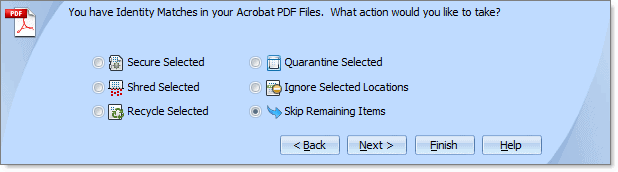
Identity Finder ships with a set of security tools that further enhance the program. Tools available include a password vault to store passwords securely in the program, a file vault to store files securely, a file shredder to delete files permanently from the computer or a browser security module which for instance reminds Firefox users to set a master passwords if they have passwords saved in the browser.
Scheduling and logging options are available as well. Scans can be scheduled to run regularly using the built-in task scheduler. Professional users can make use of the program's logging and report generation features.
Feature Overview
- Find Credit Card Numbers and Passwords, SSNs, Bank Accounts, DOBs, Phone #s, Driver Licenses, Personal Addresses, Canadian SINs, Australian TFNs, UK NINO and NHS #s, and more
- Create custom searches using keywords or regular expressions
- Search browsers such as Firefox and Internet Explorer (Windows Only), files within the My Documents Folder, on local or removable drives, shadow volumes, previous file versions, emails and attachments, and the Registry
- Supports both common document file types such as Word, Excel, PowerPoint, Adobe PDF, text, html, rtf, compressed files and all other file types
- Options to securely delete or password protect files, scrub information and to quarantine files are available
- Identity Finder integrates with Windows Explorer
- Results can be saved, printed or export as web page or CSV files
Verdict
Identity Finder Premium is an all-in-one program to find and secure personal information on a computer system. The ability to create custom search parameters, logging and reporting, along with multiple options to handle information that are found on the computer leave little to desire.
Interested users can download the free - limited - version of the program from the company website.
Giveaway
We have 14 Identity Finder Premium licenses for the giveaway. Leave a comment below to be included in the draw. Let us know what you would use the program for.
Advertisement


















I would like to use this to organize my personal private information, please count me in
Count me in.
Hoping for a licence.
In these days of clever computer hackers and malware, this is one way to protect yourself.
The loss can be devastating.
What if some one wiped out your life savings.
This should be promoted more widely as a public service to be more careful about bank account numbers, online banking passwords, etc…
Useful program. Count me please. Thanks
Thanks for this Giveaway. Please count me in. This program looks great. Hope to win one of the license keys.
Best regards
Thanks a lot. Looks very interesting. Please count me in. Regards
Nice information!!!
thanks
OMG I want this.
Count me in :D
Wow…this will be an amazing program to try out…please count me in…Thanks
looks interesting. Count me in!
Thanks for this Giveaway. Intersting tool. Please count me in. Regards
hi,i like this software.
count me in.
thank’s
Seems like something I could really use. Thanks.
Hi from Israel
I need the pro version to protect my data.
As an Israeli – it is very important
Thanks
Miki
I do on-line banking and lots of shopping, could use this to find what I’m leaving behind.
Good luck to all
Would love to have this!
Very good system for your computer.
If this does what it says it does it will be a godsend. I know I have personal info all over my computer and I try to control its access by locking down the computer and the network. It would be nice to find a tool to show me where all the bones are buried so I could eliminate them at the source.
I’m also interested to have this.
BTW there’s another great app on giveaway – Zentimo: http://zentimo.com/giveawayd11.htm . A lifesaver for those who have lots of removable USB drives.
A very good and nifty software and a good review. Such gems are hard to find. Please include me too in the draw.
This looks really interesting. I’ve not seen a program like this before. Thanks for offering it as a giveaway. Please count me in.
Program very innovate. Very good option.
same as the other comments I have to say, Its seems to be a good piece of work where I have to try & have never tried before… Hopefully to win the giveaway… thanks
This is very interesting – I have many documents and bank records, bill payments, tax records and other personal information on my PC – most is encrypted but because data has been copied from PC to PC you never know if something was created in a hurry or just missed – this really could be another useful layer of security – please count me in the draw for this. It looks like a very interesting program!
This looks like it could be very useful! Would love to give it a try!
This sounds as a cool program, Please count me in for the giveaway… I could really have use for this program, both on my home-computer, but definitely on my work-computer…
its always useful to have software that identifies problems…this being a BIG one. owning the pro version would be a great addition to my toolset for work-up of client/friend PCs…and not to mention, probably greatly appreciated by them as well. much better review than other sites. thx!
It is very good program. thanks for giveaway.
Very good software. Thanks for this contest. I really need Identity Finder Premium, so please count me in.
Looks really interesting, so count me in, please!
Wow. I ddn’t know this kind of product existed. I have often been concerned about this and would love to have it.
Je voudrais bien l’essayer aussi.
Sounds very useful. I have so many files it’s quite possible there may be info sitting in them that I’ve forgotten about.
Sounds like a very useful program. I am interested in finding personal info on several computers that I am about sell. Thanks for the heads up !
me too pls!
After my Visa card was hacked – I was billed for several items I did not purchase – I had to go the long route of replacing cards, canceling payments, filling forms, etc. Now I wish I had known about your product before. I firmly believe that with Identity Finder Premium this will not happen again.
I certainly hope I can win the free Premium version.
Nice Giveaway, Please Count me in…
Thanks For Giveaway
So it a anti-data-theft software, right? I’ll be testing the free version and hope to win the premium edition license.
Great piece of software! The need though to understand Identity Theft and its ramifications are not given the proper press. There are 6 recognized types of personal identities Social, DL, Medical, Character, financial and synthetic. There is only one company in the works to date that will restore your stolen id’s that is Kroll Backround America and only one company that will look after the legal fall out that is ‘Legal Shield (SM) Please be aware as a retired cop I know of what happens to the victims of this crime. Not enough of us are though aware of that fall out. Gerry at themountie.com
Very cool… I’d use this to scan my laptop and desktop PC’s to see how much personal information I have not managed to shield.
Always worried about malware that hunts such data in my hard disk and then sends it to some rogue site when the PC is connected to Internet.
Especially bank related data,
That’s an awesome giveaway! Please count me in, I use the free version since 1.0!
Thanks and regards!
I would like my laptop and desktop pc scanned by this program. Very curious what it would find.
I would love to be considered for a license for this fine software. Thanks
Gees, I wasn’t aware of this. I’d like to scan my computers.
Thanks for this giveaway count me in!
bob
Looks like an interesting software that could be useful in cleaning out one of my old computers at home.
This sounds like an excellent program to have. Since identity theft is so prevalent in today’s world, the more one can control, or at least be aware of, personal information on the web, gives one just that much more ammunition for prevention.
I’m going to go visit this company’s site and try out the demo version. Even if I don’t win the license, it’s quite likely that I’ll end up purchasing it anyway,
Thanks you for alerting me of this program!
I would use Identity Finder Premium for finding all kinds of personal info on my PC and take care of it appropriately.
Regards
I would be interested in what this program produced on my systems.
This is something I will have to do someday : checking for such sensitive data on my computer and I can’t imagine doing this by hand !
Thank you very much for this giveaway.
Please count me in.
very useful and needful software! I think I would have used the program to search for and the protection of personal information.
thank you for the giveaway and thank you for the chance to win a license!
Would be very useful in securing your private data.
Thanks
Count me in Please.
to help protect my privacy
Thanks merry Christmas !
Have used the free version before but it doesn’t really go deep enough to know that you are truly secure. Would love to win the Pro version to have that peace of mind!
Looks like fantastic software. Never use it before. but love to test it. Plz Count me in. ghacks are all ways rock. Thanks
Cheers..!!
Hi,
This program would be nice to have because I spend most of my time on the internet. This software looks like a must have for people, like myself, that do spend mega hours on the WWW. I fill out a lot of forms and submit information about myself. I don’t give out sensitive information but in this day and age it is very easy for dubious website owners to find out my sensitive information. Peace of mind is a very good thing.
Thanks so much for this giveaway opportunity!
NRL
Excellent & useful program. Please count me in the draw thanks.
I’d like to let this one scan all my computers to see what it can find.
I would so love to have this!! I do lots or online purchasing and paying bills that I can definitely put this to good use. Please consider me!!
I didn’t hear yet of this program. I’m always in for trying.
What I would do with the program? Let it scan my PC to see what personal data it reveals.
I just try the free ver…..but… It doesn’t check my email…only search result….pro ver.. woud be ultimate option…..great product review….. plz count me
After years of bank, ccard and other transactions would like to know what is on my computer.
Thanks for this Giveaway.Please count me in.
.Hope i win one of the license key.
I haven’t tried that soft yet but i want to try it.
Morning Fellow G-Hackers!
This Program looks Marvelous. I will try this program for myself and if it works as advertised; then, I will recommend same to my friends; neighbors and colleagues!
Thank You,
TheRube
Cool program I will try the free or trial version later. I had lost several important data on my computer hope with this can help me recover them. Please include me in this giveaway.
https://twitter.com/#!/coolng1990/status/147673026618593281
Thank you for such awesome giveaway :)
Thank for this giveaway please count me in! I would like to use this software to search for my left behind data which still can be trace on my computer and got it eliminated to prevent it being stolen or exploit. Please count me in!
https://twitter.com/#!/CoolCrackerz/status/147672705913733121
It is interesting. It seems like a very useful application. Thanks.
It would be very helpful to me because I am very cautious about my security.
Have 20+ yrs of documents online, would be quite valuable to check how life has changed over that timeframe
I have info scattered across 4 computers. Would like to know where all my personal info on these computers resides these days.
well, looks like i wanna try his program as describe, may provide me more security, finding out sensitive information on my computer, sounds promising so eager to try it, really a great giveaway, hope to win one license, thanks alot……..
Thank you for this opportunity. I think this may be a useful tool, and I’d like to experiment with it.
Thank you for this review. I am always concerned with privacy-issues.
It should be really a useful tool for me!
Please, take me into account!
Lello.Siddi.
I am hoping to win a premium license. I would use this app to see what compromises my identity and privacy.
Would like to try out this cool application.
Thanks!
OK.I don’t use online banking but often store user id and password in browser itself. Can it find that too? Also I have some file-folder encrypting software but who cares to password protect each and every folder frequently.Let us see what this tool can detect?I am in.
Thank You
It detects Firefox passwords if no master password is used to secure them.
Just trying the free version but note it doesn’t check emails or attachments and only searches files in My Documents. So I’d love to have the Premium version which removes these restrictions.
Please count me in Dear Martin. I like to have this software to track about my windows feasibility especially it’s weakness.
https://www.facebook.com/asrielrusdyawan/posts/126201444162664
https://twitter.com/#!/asrielrusdyawan/status/147628465615667201
THX, LJBU!
Protect my own privacy, preventing any misuse with my identity.
Very useful indeed. I once got a portable PC from a pool and was so surprised so see so many personal data in temp folder…
Count me in please.
I’ll use it to make sure there’s no unencrypted identity data on my machine. Thanks for the giveaway opportunity!!
Identity Finder will search your hard disks for SSN, Credit card numbers, Passwords, Phone No’s, Email ID’s, and more such personally identifiably data which are vulnerable to hacker attacks and could be used to financially ruin you!!!!
nobody should be without one installed !!!!!!!!!!!!!!!!!!
Premium v would be the ultimate! gift ; ]
Kol
This is a very useful program that every computer user should have.
Identity theft is rampant and can cause serious problems once people’s personal information gets hacked.
Great product review, Martin! Count me in for a license.
Keep up the great work!
Interesting program. Thanks for the write-up.
This looks like it could be very useful! Would love to give it a try!
something truly worth looking into. thanks for the heads up on this. I am going to try the free version and see what it finds. thanks for the info.
Cool application, im discovering thanks to the review.
Will give a try to the free version while waiting for the draw and hopefully a win o a pro license.
Thanks for the offer.