
Perfect365, Easy To Use Makeover Software

Have you ever had troubles finding the perfect profile picture for your Facebook profile or another site on the Internet? Or maybe you have taken the photo of a person and need to modify parts of the photo because they do not appear right, or do not reflect the person in front of the camera. If you are Photoshop wizard, you could simply fire up the image editor and work your magic to remove everything that you do not like about a particular photo.
If you are not, you do not really have that much choice at all. Perfect365, a free makeover software for Windows and Apple iOS devices, could be a solution.
You are asked to load a portrait when you first start the application. You can alternatively use one of the sample photos to test the program's functionality.
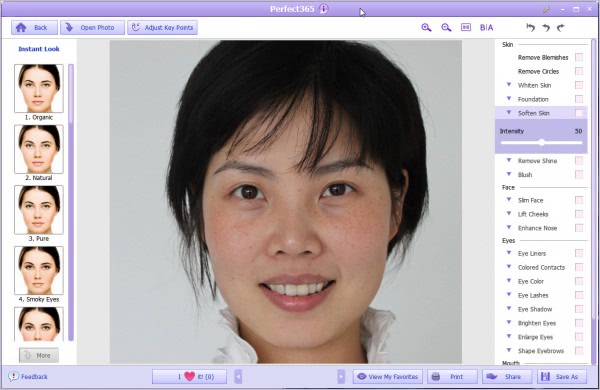
The portrait is displayed in the middle of the interface once it has been loaded. It is then possible to use one of the modification profiles or filters on the left, or make changes to particular areas of the face on the right side.
The application ships with 21 instant looks that can be applied with a single click. This ranges from organic, natural and pure looks to a wide variety of looks that are only interesting to modify female portraits as they add eyeliners or lipsticks among other things. If you ever wanted to find out how you look with red lipstick, eyeliners and colored contacts, it is your chance to find out.
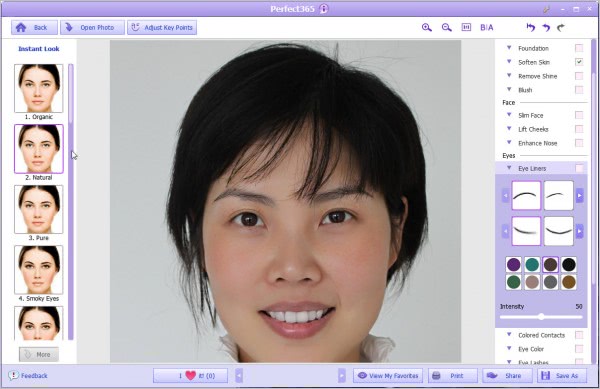
The options on the right are very extensive. They are displayed in groups like skin, eyes or mouth. Each group lists multiple modifications that can be made to the portrait. From removing blemishes or circles to whitening the skin or teeth, lifting the cheeks, enhancing the nose or deepening the smile. Most of the options are configured with sliders that range from 0 to 100. checkmarks indicate which modifications are currently active.
If you upload your own photo you should click on Adjust key points first to make sure that the program uses the right proportions. You are basically asked to click on certain locations like the ears, eyes, mouth or nose.

Once you are satisfied with your modifications you can print the photo, share it on social networking sites or save it to the local computer. The free version supports a maximum resolution of 600x600 which should be fine for profile photos or photos on most websites.
Interested users can check out the Perfect365 website for additional information and download options. The program is compatible with all recent 32-bit and 64-bit editions of the Windows operating system.
Advertisement


















