
Clear Your YouTube Viewing History, Workaround

Did you know that YouTube saves information about every video that you view on the video hosting site when you are logged into your Google account and also when you are not? And that those video views are saved indefinitely by the service?
The saving of YouTube video views may be a privacy issue to some users. While you could say that logging out of your account after using the computer resolves the issue, it is not that easy. Why? Because YouTube keeps track of viewed videos even if you are not logged into a Google account or a YouTube account.
Just visit the site, make sure you are not logged in and start watching a video. Once you are finished visit the YouTube History page. You should see that video listed there along with other videos that you have watched in the past while logged out of your Google or YouTube account.
YouTube uses cookies to monitor a user's viewing history even if they are not logged in. Is that a privacy issue? I say it is, especially if you are not the only user who uses the computer.
To make matters worse, there is only one option to delete the viewing history. Visit the YouTube viewing history page. Actually, you need to visit the page twice if you watch videos when you are logged in and logged out.
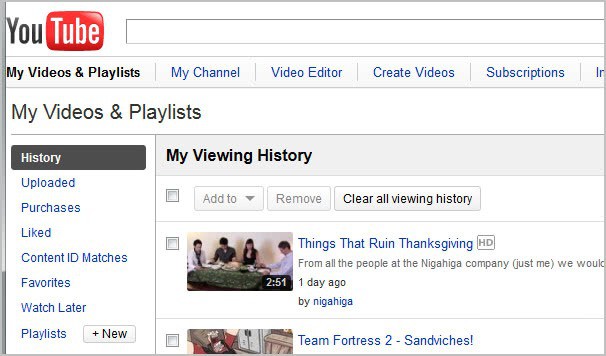
You can delete individual videos by selecting them first and clicking the remove button afterwards, or all videos with a click on the clear all viewing history button.
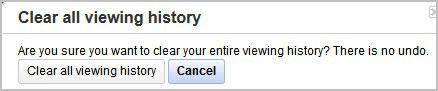
This triggers the following prompt where you have to confirm the removal.
If you are never logged into Youtube or Google when viewing videos on YouTube, you can clear the viewing history automatically by deleting all YouTube cookies regularly (for instance on shutdown of the browser). Check out How To Clear Individual Cookies In Google Chrome or Selectively Block Cookies on Internet Explorer and Firefox In Realtime).
Users who are logged into their account when they view videos need to clear the viewing history manually regularly if they are concerned about their privacy.
There is another option for users who do not need a YouTube account but want to view videos. The core issue here is that YouTube will record the history when they are logged into other Google services. One option would be to launch YouTube in private browsing mode. Chrome users could use the Ghost Incognito extension to automate that process. This would log out the user automatically when logged in, and also clear cookies and other data on exit.
Does anyone know a better way of clearing YouTube's viewing history? Let me know in the comments.
Update: YouTube has added an option on the history page for users who are signed in to their account to pause the watch history feature.
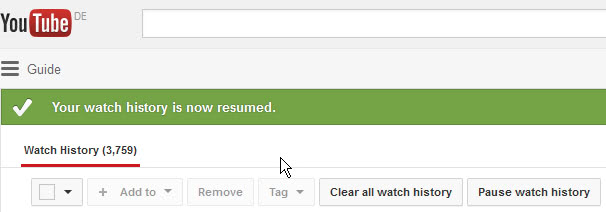
This pauses the recording of new videos, but won't delete the video history on YouTube, and also won't prevent the recording if you are not signed in to your account. But, it is an option if you do not want YouTube to record the videos that you watch and if you are signed in at all times or most of the time when you are using the video hosting website.
Advertisement
















I blocked YouTube cookie as well. So far no problems.
not working at all! you tube is feeding based on IP address.
You are correct. You can clear all your cookies completely, automatically and manually, but YouTube still tracks your viewing activity using your IP Address. Sometimes, YouTube will show you suggested search results based on your viewing activity even if your cookies are deleted. YouTube will always show you ads and recommendations based on your viewing activity even if your cookies are deleted and whether you are logged in or not. You can even restore your computer to its original condition and YouTube will still give you the same results because the record of your viewing activity is kept on their servers for up to three years. The only way to delete your viewing activity is to delete it from their servers. Basically, there is nothing you can do about it. There is no solution.
Not a problem for me with Opera’s Cookie Manager.
For me, I can
1. Go to http://www.youtube.com
2. Right-click a blank area and select ‘Edit Site Preferences’.
3. Select ‘Cookies’ from Edit Site Preferences.
4. Delete all the current cookies.
5. Select the checkbox “Delete new cookies when exiting Opera”.
With that option available – it’s a set and forget task.
Since I deleted all the current cookies in Step 4, when I browse YouTube it would be ‘new’ cookies that will be stored. So since these cookies are marked as ‘new’ they will be deleted when I close Opera?
How’s that? Does any other browser offer an option to delete cookies for A PARTICULAR website when exiting?
Fat chance YouTube (which of course is Google-owned) would ever offer a history disable option! I’ve been looking to block the YouTube history with a Firefox add-on. Or maybe a Greasemonkey script or *something* that auto-clears it would be good.
I searched among official Firefox add-ons and off-Mozilla-site add-ons – found nothing current that’s relevant. Once upon a time there was a Firefox add-on called ‘YouTube History Bleach.’ No longer available.
I did come up with a just little bit of extra Firefox convenience for manually clearing the dreaded viewing history.
Of course some users may already have used this trick for something else. But the ‘Toolbar Buttons’ add-on (I already use anyway) has *options* – never noticed that before. One of them allows you to specify a URL for ‘Favorite Page. Used for the Favorite Page button. Kind of like a second home page.’
Insert
https://www.youtube.com/my_history
into that option field.
Now you get to slide that Favorite Page button (which looks like a small house with a chain link superimposed at the base) onto the browser’s toolbar or statusbar: very quick access to the process outlined above.
You could also add it to the bookmarks bar if you have it displayed.
we need a config. option like “dont keep videos history”, check box, save. th end.
Why we dont have this option yet?