
Supercharge The Firefox Reload Button With Reload Plus

Did you know that there are actually several reload options available for page reloads in the Firefox web browser (actually those reload options are available in all modern Internet browsers)? When you click the reload button you do a standard reload of the web page which will use the browser's cache for faster page rendering times. Sometimes though you may want to force the browser to reload the page completely from the Internet server bypassing the cache. Firefox users can do that with the keyboard combination Ctrl-F5, holding down Shift and clicking on the Reload button in the user interface or holding down Ctrl and Shift while tapping on the R button on the keyboard.
While it is possible to work with those two versions of page reloads in Firefox, some users may want additional options or an easier to access functionality.
The Firefox add-on Reload Plus supercharges the reload button and functionality in the Firefox browser. Once installed, it improves the reloading capabilities in the following ways:
- Left Mouse (or F5) = Standard Reload
- Ctrl+LMouse (or Ctrl+F5) = Override Cache
- Alt+LMouse (or Alt+F5) = Load Missing Images
- Shift+LMouse (or Shift+F5) = Google Cache
- Middle Mouse = Standard Reload (new tab)
- Ctrl+MMouse = Override Cache (new tab)
- Alt+MMouse = Reload All Tabs
- Shift+MMouse = Google Cache (new tab)
The standard reload options remain as they are in the browser. It is still possible to click on reload or press F5 to reload the page, or use the Ctrl-F5 option to reload bypassing the Firefox cache.
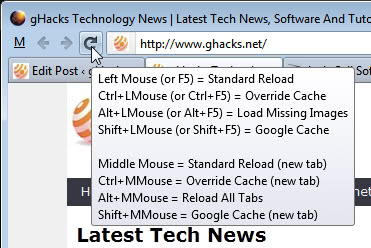
The extension adds several new options though. Users can load the Google Cache version of a web page by holding down shift while clicking on the reload button or with the keyboard combination Shift-F5. They can furthermore load missing images on a page with Alt-F5 or Alt and a left-click on the reload button.
Basically, the two new features are that introduced by Reload Plus are to load the Google Cache version or the missing images of a page.
The extension furthermore adds new shortcuts and mouse keyboard combinations, and options to open the cached pages in new tabs instead of the current tab.
Firefox users who want improved reloading capabilities can install the Reload Plus add-on at the official Mozilla add-on repository.
Update: The Reload Plus add-on has been pulled from Mozilla's Add-ons repository by its author. You can alternatively use the Absolute Load Control extension instead which provides you with a similar - albeit not identical - feature set.
Advertisement
















Hey Martin, many times when i’m installing a Add-On after clicking in the “install button” the downloading blue bar never end and stop in the finish (before the popup with the countdown appears). Them I need to restart the download and next time works fine. this happens to you?
It happened sometimes that the “installing” bar vanished completely and I had to restart, but that’s the only issue I ever had.
Great find, and useful info that I wasn’t aware of.
Thanks.
Thanks martin, have been using firefox from v2 and never know that Ctrl+F5 will do the trick for me.