
Why Are 2 Plugin-Container.Exe Processes Running?

I recently discovered that I had two explorer.exe processes running on a Windows PC. Odio posted a comment under that article where he mentioned that on his PC 2 plugin-container.exe processes were running instead. If you do not know anything about plugin-container.exe you can check out the informational article about it that I wrote in 2010.
Plugin-container.exe is Mozilla's implementation of separating core plugins from being executed in the same process as the Firefox web browser.
This is done foremost to improve stability. A plugin crash previously would have often caused the whole browser to crash as well. With plugins moved to plugin-container.exe the browser remains unharmed if a crash happens.
Back in 2010 Firefox used one instance of plugin-container.exe for the three plugins Adobe Flash Player, Microsoft Silverlight and Apple Quicktime.
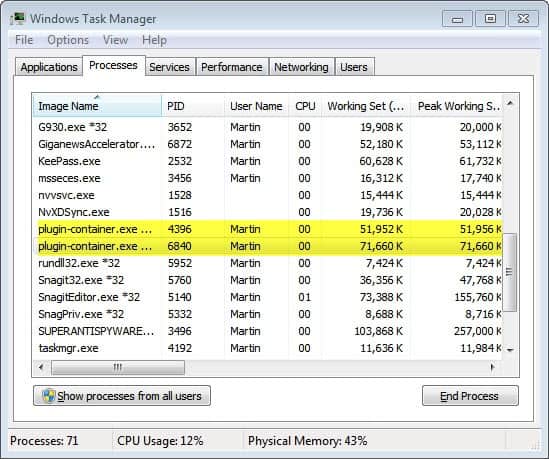
Firefox users nowadays may see more than one instance of the plugin container process on their system and some may wonder why that is the case. The idea from the very beginning was to move core plugins into their own process eventually, and that's what has been integrated into the browser now.
You can test it on your system easily. Make sure you have the Adobe Flash and Microsoft Silverlight plugin enabled. Visit YouTube and start watching a video to trigger the Flash plugin-container.exe.
Now open a new blank tab and visit a site that uses Microsoft's Silverlight technology to play videos. You will notice that plugin-container is launched twice and that the processes stay open when the video stops playing and even if the page is closed.
Not all plugins will be launched in their own plugin-container.exe process. If you launch a Java application you will notice for instance that it is not launched in its own plugin container process.
Firefox users can disable plugin-container.exe completely in the advanced configuration of the browser. Enter about:config in the address bar and hit enter. Now filter for the following term and set their values to false to disable the feature.
- dom.ipc.plugins.enabled
You can also disable separate processes for a specific supported plugin instead.
- dom.ipc.plugins.enabled.npctrl.dll (Microsoft Silverlight)
- dom.ipc.plugins.enabled.npqtplugin.dll (Apple QuickTime)
- dom.ipc.plugins.enabled.npswf32.dll (Adobe Flash)
- dom.ipc.plugins.enabled.nptest.dll (NPAPI test plugin)
Many Firefox users are reporting issues that they have with plugin-container.exe all over the Internet. What is your experience with Firefox's out of process plugins?
Update: You may also see a FlashPlayerPlugin process (or two) in the task manager when you run Flash contents in recent versions of Firefox. If you see it, Flash Player Protected Mode is enabled, if you see plugin-container.exe instead, it is disabled.


















MF’ER uses all your CPU 2 load a F’ING page,real smart smucks,smuck
It is a Hebrew Word for the Foreskin that gets chopped off at birth. So when a person that is educated or a Jew calls you a Smuck. He or She is calling you a useless piece of dick.LIBERALISM Is It Mental Illness or Demonic Oppression?.
Went to about:config, and did a search for just dom.ipc Here’s the only thing it’s listing:
.plugins.enabled (true)
.plugins..java.enabled (false)
.plugins.parentTimeoutSecs {Integer} (0)
.plugins.processLaunchTimeoutSecs {integer} (45)
.plugins.timeoutSecs {integer} (45)
.processCount {integer} (1)
This plugin-container is indeed a very poorly coded application. The people who coded it should seriously quit being programmers if they are going to churn out trash like this that literally crashes the entire computer. It froze my whole computer! Couldn’t even get into task manager. That’s insane folks.
The reason plugin-contatiner concerned me is that it runs using as much ram as the Firefox does and at times there are 2 of them running at the same time as Firefox. That slows everything down terribly. Should that be happening?
If i remove the plugin-container.exe will it cause problems?
Will it simply be reinstalled by mozilla on each update?
Thank you
You can disable it in the about:config, this way it won’t be reinstalled or reactivated. If one of your plugins crashes though, your whole browser goes down with it. That’s the trade-off.
My Firefox 9.0.1 hangs each time i look a video and i have always to kill plugin-container.exe
Now i disabled it and i can see videos withouth hanging firefox
Thank you very much, i resolved my problem
You’re an Educator, Glenn? You could have fooled me, as well as everybody else on this blog!!
Based on your comments and the content, it’s quite apparent that you need way more educator than you let everybody to believe!
Your comments are not only false, but childish and senseless to boot and your choice of language leaves a lot to be desired.
Perhaps you should find a hobby, something that involves playing with toys, rather than posting total rubbish!
Don’t like Firefox, then as Midnight stated, use IE or whatever browser you fancy! Either way, nobody cares!!
Get real, huh?!!
Again. Another fool, with nothing to qualify an argument but insults. Like I said, if you attack people you don’t know who have had bad encounters with Freezefox, it says more about you, rather than them.
It is pretty obvious that you are rather a poor, sad, pathetic individual. Instead of offering any qualified defense of Freezfox, you resort to insults. Is that what you came on here for, since it seems to be a common trait with Freezefox punters. Instead of offering any evidence to shoot down my argument, you resort to being an idiot. And, when did anyone say anything about NOT liking your high and mighty browser? Do you have a problem reading too? You obviously do.
Get a girlfriend.
One more thing. Calling yourself `Anonymous’ speaks for itself. Lol.
You’re just dum.
Coming from an educator, you’re really not too smart and it’s Your comments that are ridiculous and full of nonsense!
For one thing, the Browser is called Firefox and not the foolish name that you choose to give it!!
Hundreds of millions of people around the world have made it their Browser of choice, so according to you, Mr. educator, there are that many ridiculous people who made bad choices when they installed and are using the Best Browser in the world.
If the students, as well as you, don’t like Firefox, then use IE, as you all have a choice, but at least show some maturity and post intelligently!!’
One more thing…Get a Life!!
It’s morons and flamers like you that give Blogs a bad name!!
Again, an opinion. The more you say, the more you expose yourself, since you seem inept at offering anything constructive.
No, fool. It is morons like you who give blogs a bad name, since your immediate response to me was to be insulting and abusive. In case you haven’t noticed fool, forums are for constructive feedback. You failed to show any competence to back up your defense of Freezefox, and you accuse those who nicknamed it appropriately of having personal problems. It’s obvious who has the personal problems pal.
You’re are just peeved now because I’ve obviously told you a few home truths that others have already told you about yourself. If you can’t take it, don’t give it out.
It’s you who needs to get a life instead of signing up to blogs to insult people you don’t know who you disagree with. Says more about you than me. You’re pathetic. Now go annoy someone else.
……In addition, Freezefox still cannot get to grips with Flash.
Glenn, get an education and learn what a real Browser is!
As Anonymous posted, Firefox is the fastest, safest and most secure Browser available and NO software is perfect!
You prefer IE, then use it and enjoy all the security holes and the flaws that come with it!
It’s you who needs an education, fool. I teach at a college and a university. Students at both libraries are constantly demanding that it be removed.
What is noticeable about your ridiculous comment is that the only reason you left a comment at all is for pure delusion of grandeur, trying to sound clever, when all you sound like is a fool, since you clearly `cannot’ even address the issues I’ve raised, so are obviously too dumb to provide anything constructive, other than an opinion.
Do you honestly believe that people fabricate such bad experiences about Freezefox? Perhaps someone should explain to a dummy like you what a browser is, a*****e!
Plugin-Container is the dumbest idea Freezefox has ever come up with. Mozilla obviously never considered that is a massive resource hog and almost cripples the system. This is on top of Freezefox’s huge footprint.
Look, let’s face it. The `only’ reason why Freezefox is so popular is entirely because of its add-ons, period. As for its security. That is a complete phallacy, since infuriating pop-ups cannot be disabled, and there isn’t a pop-up blocker that will stop them all. Even bookmarks is screwed up, since all links are completely out of sync, which leaves you having to search for them all over again. At least with IE, all you have to do is click the `star’, choose from your favourites and it will lead you right to the page you bookmarked, unlike Freezefox.
FREEZEFOX IS NOTHING MORE THAN A SCAM, SUPPORTED “ONLY” BY ADD-ONS.
Hey! Be nice and try to act somewhat Professional, here!!
Firefox, in spite of it’s “minor” pitfalls, is still the fastest, safest and most secure Browser available!
It’s the Browser of choice for those in the know!
Keep in mind that NO software is perfect AND you do have a choice!
Don’t like it, use Internet Exploder (IE) and enjoy all the security holes, the bugs and all the grief ActiveX causes!
Why two?
Each out of process plugin, already mentioned in list gets its own plugin container.
Disabling it will not do any good. It is good for multicore processor users to offload plugins to other cores.
I explain this like this. If I open two tabs one with Silverlight while other with Flash, I will get two plugin container. Its simple is that.
Firefox fixed many bugs related to it and enhanced it a lot. So its not good to disable it.
Benefit:
It saves from crash caused by Flash and not hang browser if any plugin object cause endless loops..
thanks for the explanation!
I always had problems with plugin-containter.exe at Firefox closing when plugin-containter.exe uses 90% cpu for (sometime) 2-3 minutes. I even has 10 instances of plugin-containter.exe runung at closing Firefox. I use Firefox 7.01
Bad troll, ilev. You should at least try to sound plausible.
Additional:
Mozilla developer did a good job, but they lack a button(or menu) to kill this process when not needed.
plugin-containter.exe prevents memory leak from Flash, Silverlight, Authorware, Shockwave.., kill a process is the best way to release memory, if you run flash from firefox.exe, you will get memory leak problem, but with plugin-containter.exe, you can kill it anytime with Task Manager.
Set dom.ipc.plugins.enabled to false will prevent plugin-container.exe from display, but shouldn’t do that.
I forgot to mention, if one uses a process viewer such as Process Explorer or Process Hacker, it’s possible to get detailed information about the plugin-container instance, simply by hovering the mouse over the entry, or by selecting the entry and choosing properties.
Or you could view the “Command Line” column in the windows task manager. It shows the full path of the plugin.
Good point. I personally use the task manager for quick look arounds and the other programs to analyze a process in depth.
Just checked Task Manager and I also have two instances of plugin-container.exe running.
One is 1, 836K and the other is 11,876k, which is strange since I never installed Silverlight, as I am not a Developer.
So, time to disable all that and see what happens.
Thanks for the tip, Martin!! :)
Midnight, you may want to check the plugins enabled on your version of Firefox to see if other plugins may be the culprit, maybe Quicktime?
Have no fears, Martin, all is well!
No more double entries! :)
I don’t see that plugin-container.exe entry at all. And I tried running a Flash video at Youtube. Did Mozilla implement that isolation after the 3.6 release?
The only double entry I see in the Plugins tab is for:
Microsoft® DRM 9.0.0.4503
ID: npwmsdrm.dll
DRM Store Netscape Plugin
Can it be that you have set the feature to disabled in about:config?
Nope. Just checked and the dom.ipc… settings are all set to “true”.
Flash is enabled? And you are not using HTMl5 video on YouTube?
3.6.4 and up
HTML5 has to be implemented by the website. Youtube was (is?) conducting a test so that users can try HTML5 but it looks like you need at least FF4 to do so. See:
http://www.youtube.com/html5
Also, this site tests the browsers capability to support HTML5:
http://html5test.com/
I only get about 45%.
Maybe this plugin-container.exe double entry thingy only shows up in FF4+ browsers?
No, did a right-click and verified that I am using Flash on Youtube videos.
How would I switch YouTube to HTML5 anyway (on FF 3.6.23)?
Oh, good question. Just assumed that the browser would support HTML5 but cannot say for sure. Do you know?
Well, I have ZERO instances of Plugin-container.exe in task manager.
Running 3.6.23.
I’ve never had any issues with one or more plugin-containers. they take minimal resources and seem to do what they were intended for.
I use Nightly x64 as my default browser, with 64 bit plugins for Flash, Java and Silverlight. I don’t have Quicktime, as I’ve never found a use for it. I also have Java and Silverlight disabled, as they are seldom needed.
In addition to Nightly, I have Aurora and the latest release builds, which use 32 bit plugins
For those interested, there are some new e10s ‘try’ builds available from ftp mozilla and they’re working quite smoothly.
http://ftp.mozilla.org/pub/mozilla.org/firefox/try-builds/felipc@gmail.com-f72840df16fe/
It looks like having two Flash Players running is hurting my performance (in Firefox). My PC hangs and freezes. If I end one of the Flash Players (In Task Manager) performance improves. But soon I am back to having 2 Flash Players again.
I’m running Aurora, and while I noticed that the processes can use quite some RAM, I never experienced issues that other Firefox user experienced (ram and cpu shooting through the roof)