
How To Change Your Primary Facebook Email Address

I just received a handful of emails from different individuals who all wanted to know how to change their primary Facebook email address. While it could be all the same person sending me emails from all of their accounts, I'd say it is still worth an article. When you sign up on Facebook you have to enter an email address. This becomes your primary email address on Facebook.
The primary email is used for all communications, for instance notifications that someone messaged you or that a user logged in with your account from another computer. If you do not have access to your primary email anymore you will not receive those notifications and communication, unless you change it on Facebook.
Changing Your Facebook Email Address
You can only change your email address on Facebook if you can still log in on Facebook. Sign in as usual and locate the Account link at the top right corner of the screen. Click on Account and then on Account Setting under the Context Menu.
Locate Email under the Settings tab (which is the default tab) and click the Change link on the right of the preference. Your primary email address is listed on that screen.
A menu looking similar to the on shown on the screenshot below should be displayed on the same page when you click on the change button.
All email addresses connected to this Facebook account are listed there. If the other email address that you want to use on Facebook is already listed, select it and click Change Contact Email.
This makes the selected email address your primary email on Facebook.
If the email is not there, enter it under New Contact Email and click the Add New Email button afterwards.
You are asked to enter your Facebook password to confirm the change. If you enter the right password, a confirmation email is send to the new email address. It contains a confirmation link that you need to click on to confirm that you have access to the email address. If clicking does not work copy and paste the link in the email to your web browser and activate it that way.
Facebook sends a second email to the current primary email address. This contains information that a new email address is about to be added to the account. This email contains a link to cancel the operation, so that the new email address is not added to Facebook.
New emails that you add and confirm are not added as the primary email by default. You need to go back to Settings > Email to select the new email address under Contact Email. A click on Change Contact Email opens the password prompt again where you need to enter the Facebook password again to confirm the change.
The selected email should now be displayed as the primary email on Facebook. You can use the Remove links next to all emails but the primary email to delete it from the account. You need to confirm the removal of email addresses with your password.
Update: Facebook has modified the general account settings page and thus the process to change your primary email on the social networking site.
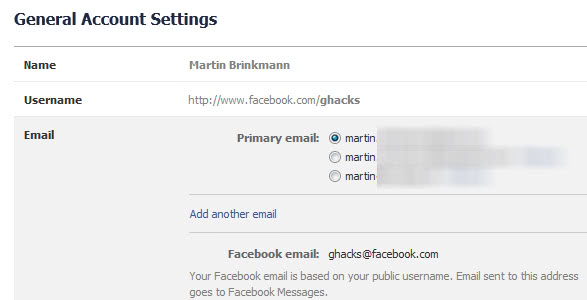
The first thing that you need to understand is that you need to have at least two email addresses added to your account before you can switch the primary address. Once you have at least two, you see a selection menu on the general account settings page that allows you to switch to another email. It is this email that will receive all the notifications that you receive from Facebook.
Please note that you can use all emails as the log in username, and if you do not have access to one of the emails, I'd suggest you click on remove next to it to delete it from your account.
Update: Things have changed over at Facebook a bit. You now need to load the following web page on Facebook. Here you need to enter your password for the site again before you are presented with a menu where you can change your primary Facebook email address to another registered address.
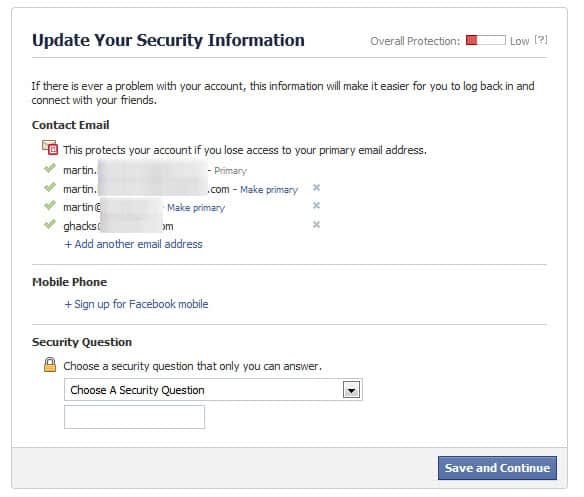
You can add another email address here as well in case you only have one registered with Facebook. If you want, you can also remove email addresses from the account, but not the primary for obvious reasons. To switch, simply click on make primary here.
Advertisement













My Facebook Google account remove
I finally found a way to change primary email on iPhone. Method does not appear in any web site I’ve yet visited. I tried methods on iPhone Facebook App, iPhone Safari, and then I went to my iMac. The old primary email never had a delete button, nor did the new email have a “make primary” button. Here’s what worked. On my iMac under the settings and email section it asks the email for sending ads. It listed the old email address. I changed that to the new email address, and then, finally, the buttons appeared to delete the old address. Facebook does not want your email changed unless they can send ads to it.
Thanks. The last solution worked for me today. I was running out of hair to pull out!
I open the account with two numbers other one is not working its invalid number so I want to remove those number they say I must confirm the number they send the on that number even that its pending i need help to remove those number
fb email id model name changes
To all the strugglers. Use the mobile link of facebook in case of pending primary address. My pending email address account has been long deleted so I can’t do anything about it – https://m.facebook.com/settings/email/?email_status=6&_rdr
It is horrible!!! time consumed trying to change the primary email (does not exist anymore) for the additional, but the system does not give the icom/option to change this stupid primary email that you insist to keep!!
I need helppppp!!!
I just wanted to say thank you. You helped me change my primary email and update my facebook account.
Really great that you kept updating things. It was extremely helpful and you’ve spared me days of aggravation!
Thank You-
I have received confirmation for 2 additional email addresses but it still will not allow me to delete the existing inaccurate address or select either of the new addresses that I have added as the new primary address.
I got the primary email changed on my own! Thanks for the Help! :D
Thanks Martin. It worked wonderfully for me! Somehow (and I must have done it but how I don’t know) I added a facebook account’s email with another facebook account’s email and ended up not able to access the second account!
I have ‘keep me logged in’ checked off on Facebook log-in page; I have changed my primary e-mail address in Facebook, but still when I open my browser, the log-in page still shows the old e-mail address – how to change this? Thank you.
i just wanted to say, THANK YOU!
Thank you so much for your help!!! I was going crazy trying to figure out how to change my primary email!!! I kept seeing “Remove” next to the new email I wanted to use and I thought if I clicked next to that email that it would be removed! (I’m a blond…)
Someone changed my primary email address now I can not recover as I lost my mobile as its not in use.please help
I thought that too…Dennis, in the first line of the UPDATE the words WEB PAGE are hilighted. Hit that… go put in your password and then you can easily change your primary address.
Thanks so much for the update… that helped me.
Thank you, thank you, thank you for the UPDATE web page link. I finally fixed my e-mail issue. Happy New Year!
Obviously you don’t know what your talking about I have searched Facebook help and Google until I’m sickup and fed and I have determined you can not remove your Primary email Facebook is so Chicken Ship they avoid this question in there help pages
Thank you man, I really mean it!
thank u it helps me a lot!
Thank you so much for this! The update link you provided worked a charm!
I want to retrieve my account details
what updated link?
I followed instructions, sounds easy enough. Yet, my screen will not allow me to do anything except “remove” the other 3 emails (one of which I want to put as primary) the primary one will not let me remove it, either. there is no contact email avail for the new account. I DO NOT want my “fluffy” facebook clutter sent to same address as my main one I use for work and attorney. Please help!
God is mighty
Good eve,
i want to change my primary email but still i cant change my email because still invalid. can you help me?
it is not helpful at all….really…i want to change my “primary email id”… your article has helped in only addind the new email, it is not helping in changing the primary mail..for eg i had yahoo mail id as primary id in Fb..but now i want to change it from yahoo to gmail as i have forgotten th pasword of yahoo ID and iam no longer connected with this ID(yahoo)… but this is not helping…sorry for such response, but it is useless…..!!!!
zaheer
I have an additional problem. FB deleted my personal email address and I ONLY have the FB address. What’s worse is when I try to add my personal email, it tells me to choose a primary. Since the FB email address is the only one there with a button next to it, I have to click that as a primary. then I get another error message… You may not set your Facebook email address as your primary email.” I’m in FB hell. Any suggestions?
This article is complete crap! There is no “Change Contact E-mail” option on the Facebook E-mail setting screen.
I frickin agree even facebook avoids how to change primary email it can’t be done it’s probably Obama and his Muslim anti american spy network
Hi, how can I unlock my facebook accaunt? & my email address which i use to log in my accaunt is :bakarisaid57@yahoo.com Name: bakari said Friend’s name : tophista odeke.I tried this request almost 100 times but i was told to upload my government document which contain my coloured picture .but sir i don’t have any.so, would you send me alink on how to solve this issue? I am a humble man who has faith in God, please i miss my closet friends in that accaunt. CAUTION ! DO not Consider me as a cyber criminal!
My account settings page does not look like yours, does not use the term “contact email,”and does not include the option to change contact emails after I add my new email. Someone above says that will change after confirming the new email, but mine didn’t. What am I missing?
can i use two different passwords to access my same login of facebook
Thank you kindly for your help
hi
my problem is this… I have a new email address now and my old address has been deleted… I’ve forgotten my log in to Facebook, and it won’t send me a reset link to my new address since i can’t log in. So what in this world can i do?
Check out this one, to recover your account access by friends: http://www.facebook.com/help/?page=228169557197326
Or this one to recovery with your security question: http://www.facebook.com/help/?page=188199391227105
If you have added a mobile phone number to Facebook, you can also log in with your phone number.
This morning, I noticed that facebook had changed my default email address for my fb account to be a @facebook.com email address.
It’s one thing to offer @facebook addresses to people who want them, it’s another to change people’s settings without their permission in ways that affect their privacy and infiltrates facebook into their communications more.
I know it’s not the first time that facebook has made such a change, and it won’t be the last — still it really makes me mad. It’s this type of heavyhandedness which makes me use facebook less and less each day.
I have added a new email address and it sent a notification to my new email address but nothing to the old one. The email I got said to click on the link to confirm the address but the only links in the email are the email address itself. As soon as I click on the link, it creates a new message instead of opening a link in my browser. Please help. :)
This does not work!!! I do not have an ad email box. A lot of our screens do not look like yours. I can not believe you did not take this into account when you wrote this article!!!!!!!!!!!!! Are you stupid???
This worked awsome thanks. Just remember to confirm in your new email then go back to facebook account setting and it will now give you the choice to change primary email account.
im segnal emil face book help me im
Hi, hey this is all cool but right now when I add an email, the confirmation email goes to my primary which is no longer valid i.e I cannot access it so I can’t authorise the new email address. What now?
Many thanks
just login to facebook after you have added and confirmed new addess then select as primary. my old email account was closed with telus and I had no problem you only need new one and to be able to access facebook just enter old email and facebook password .
kindly help me out in changing primary email address
How do I chang my facebook email addres
How do I change my facebook email address
My primary email account got removed because someone tried to attach it to a different facebook account, and I accidentally clicked on the confirm link. I removed my email from the other facebook account, but now the only listed email on my account is the @facebook.com email. It will not let me list this email as my primary email, and there are no other emails to list as the primary. I can not get past this point, so obviously I cannot connect my email back to my account… suggestions??
Here’s the answer to your problem. Faced similar problem tonight.
https://www.facebook.com/update_security_info.php
Thanks for that, I have updated the guide with the new information.
I have same problem. Someone changed my primary email address on the 30th April and now I can not access my account! It is my business page that I really need to access. Please help!
That link still did not work for me. I clicked on my other email address to make it my primary account and nothing happens.
I also have the same problem, and when i tried to add a new email address, it says yo may not use your facebook email add as a primary, and when i removed it, it say you must have a primary email address, how can i add a new email address and make it my primary email address.
a g yes genial ke onda que haces y kiero un correro electronico para mi facebook
I have a friend that used her husband’s email address when she set up her fb account because they were just using the same account. Now he has his own and used the same email on his account. I tried to fix it and it looks like she may have never verified his email as the primary on her account. It is stuck in a pending status and the option to add a new email address doesn’t exist. Is there a way to cancel the pending request so she has an option to enter a different email address? Right now she has to login by user name and it’s technically not linked to any email address.
Thanks for the article.
I got the email account changed no problem.
Facebook apps are still sending to the older email – the one I originally signed up to them with. Is there a way to force an update in the apps?
Do you know if the apps will eventually update thier database and switch or do I need to quit the app and re-sign up?
Dave good questions, I cannot really say. Check out the support page of the app for assistance.
Hola, alguien pudo encontrar la solución? a mi no me deja cambiar la direccion principal de facebook. Gracias!!!
I have two email addresses in my account settings THAT ARE NOT MINE, and I can not remove them. there is a “remove” tab next to the addresses, but it can not be removed, even though they are not the primary email addresses. they are hacker email addresses how can i get them removed ASAP? Thanks
Maybe this helps: https://www.facebook.com/help/hacked
so does that mean i can login my new email??
e.g.
my previous account is: , so i need to log it in on facebook first then change my email to , after all the confirmation… will i be able to login to facebook using and see everything that i had back then??? next question is what will happen to my first account ??? will i have to re-register it again on facebook to use it or is it registered as a blank account??
I am having the same as Janice and Kunam.
The primary email is there but as soon as I click edit it is gone. I can’t change anything because it keeps saying “You must choose a primary email.†And can’t add an email because you can’t add a secondary email without a primary.
I can’t login with what it shows as the primary email address either; have to use the username approach.
Is there some kind of paid support available at facebook? Or are you just left to follow their help links endlessly in circles?
There is only a community support forum as far as I know: https://www.facebook.com/help/community
My current mail address still in use but disabled as per mail received from facebook, how do I fix this problem? Please help! Thanx
thank’s v.much
thanks:)
Am also facing the same problem. Please i really need to know how to change my primary email address
My account is dnt open
I don’t know how but facebook got personal an email address of mine that I did not add to the account and put it in the primary contacts section under account settings. I tried removing it but it doesn’t let me. There is no message as to why and the page doesn’t do anything. Has anyone else had this problem? Thanks
I just tried to add/change email address in account settings. Before I click on “change” you can see my address listed. When I click change and the tab expands the primary email field is blank and it will not let me add any email cause there is no primary. I close it and there is my email address again. I have tried several times and it works fine on my boyfriends account. Any ideas?
I am having the same problem. The primary email is there but as soon as I click edit it is gone. I can’t change anything because it keeps saying “You must choose a primary email.” Did you find a solution?
Having same issue! if anyone knows how to fix this, I so need to know’!
I am having the same problem – has anyone figured this out?
thanks so much.
On July 7th I was signed in on another computer while on vacation. That afternoon when I tried to sign in on Facebook a red message told me I had changed my password at 1:26pm that day. Obviously, someone else had, not me. I then locked my account. Since arriving home, I have tried unsuccessfully to unlock my account several times. I have scanned my driver’s liscense twice in an attempt to move to Step Three in unlocking my account. I have found no other ‘Help’ site that offers a solution neither do the telephone numbers offer help. What is taking so long? Thank you for responding to this promptly as this is a great inconvenience for me as well as some of my friends.
This would great if my screen looked like this! I dont have the option to add a new email. My primary has changed but i can’t make the change on FB. Help!!
Same problem…
I too have the same problem…. My primary email doenot show when I click on email under context menu… How to get it… I also cannot add any other email as it says, Enter Primary email.
Same problem here!
I have the same problem — Add Another Email doesn’t show up when I click on the edit screen — that option simply doesn’t display. Did anyone ever resolve this issue? The FB FAQs don’t address this situation and I have been stuck for months. Help?