
Tab History Redux, Makes Child Tabs Inherit A Tab's History

Firefox keeps track of all websites that you open in the web browser. It stores those information in a global history and makes individual histories for each tab that you have open in the browser available as well.
You can access a tab's history only on that tab. The history is not inherited if you open links in new tabs. If you look at the new tab's back button or history, you will notice that it has none.
You need to switch back to the original tab if you want to access the history of that tab which is not a very comfortable thing to do.
Update: Tab History Redux has been pulled from the Mozilla Add-ons site by its author. We suggest you check out BackTrack Tab History instead for Firefox.
Tab History Redux is a Firefox add-on that changes the browser's default behavior. It configures child tabs in a way that they inherit the tab history of the originating tab.
Say you open Ghacks and navigate around a bit. You read some articles and find an interesting external link. A double-click on the link opens it in a new tab. You cannot go back to the page on Ghacks on the new tab originally using the back button.
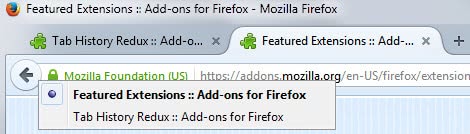
With Tab History Redux you can. This can for instance be helpful if you want to open another link on the original article on Ghacks, or want to read the article again or look at the article's comments. The extension enables you to do that without switching to the original tab first.
Please note that the extension works only if you open a link in a tab in the same browser window. You won't be able to access the tab history of the original tab if you open links in a new browser window instead.
Tab History Redux is a helpful extension for the Firefox web browser. It is compatible with all versions of Firefox from Firefox 4 on. Interested users can download the Firefox add-on from the official Mozilla Firefox add-on repository.
The extension is mostly useful for users who open links in new tabs at times. If you use the same tab at all times, it is of no benefit unless websites sometimes happen to launch links in new tabs automatically even if you left-click on them.




















Alternative:
Rightclick the original tab header and choose Duplicate Tab (or do Ctrl+Alt+T)
The duplicate will have the same history.
Now go to your link in the duplicate.
That’s nice. I do not have the duplicate tab link, and Ctrl-Tab-T is not working as well. Are you sure it is a default feature.
FYI, the “duplicate” tab with tab Forward/Back history is also available in Opera: Right-click on tab > Clone Tab
I’m pretty sure it’s an added on feature with the Tab Utilities extension