
How To Disable Google Search Redirects

Many websites look up the IP address that you are connecting with, or other browser header information, to redirect you automatically to a language specific version of the website.
While those systems usually get it right, they are annoying for users who do not want to be redirected to a country specific domain name or different language version.
The main address of the search engine Google Search, located at google.com, redirects first time users automatically to a localized version of the search engine if it exists if the IP address lookup determines that the user is based in a different region or country.
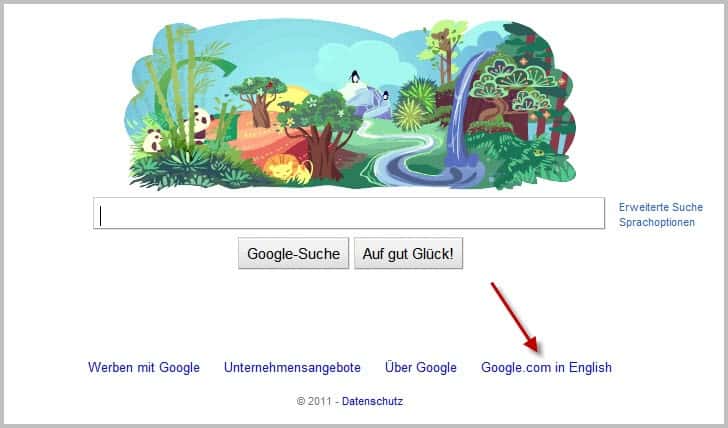
You can click on the go to google.com link at the bottom to force the switch to Google.com. The information is saved as a cookie or the account if you are signed-in. You need to remain signed in on any device that you use to avoid being redirected, or set the cookie on any device if you are not signed in. The latter requires that you refresh the cookie if it expires as well.
Tip: Check out how to get Google Search results in a different language. It offers updated information.
Disable Google Search Redirects
Back in 2008 I posted a solution to the question Why is Google.com redirecting me to another Google domain?. The solution back then was to use a special url to load google.com without being redirected to a country specific search domain.
The url https://www.google.com/webhp still works as intended. Roman send me an email recently that described a second option which blocks the redirect completely and loads the standard Google search engine homepage.
If you load https://www.google.com/ncr you tell Google that you do not want to be redirected. The NCR stands for No Country Redirect.
Now, if you bookmark that domain name you will always end up on the default google.com search page. Google will automatically save a cookie on your computer that prevents redirects to other localized Google search engine domains. You can theoretically open google.com directly after this point as long as you keep the cookie on the system. If you want to avoid trouble at all, you may want to always use the ncr address.
It is not an ideal solution, considering that you cannot seem to use http://www.google.com/ncr as your browser's search engine for instance, but it works reasonably well if you bookmark the url and use that bookmark to open the Google search website.
Remove the no-redirect cookie
If you have used one of the special domains that prevent you from being redirected so that you can use google.com without hassle and want to undo that change, you need to remove the cookie to do so.
While you can now go ahead and delete it, you can alternatively select the "use Google" link at the bottom of the main page to to do so.
Now Read: Malware can also be responsible for Google Redirects



















Seems that Google’s NCR (No Country Redirect) parameter is not working anymore as of December 15, 2015.
Luckily, you can still avoid Google’s country redirects using the following new link instead:
http://www.google.com/?gfe_rd=cr&gws_rd=cr
Regards,
Bassem Fanari
I don’t have any google cookies – in fact, they are not even allowed to exist – all cookies from everywhere are blocked (and I have a handful I whitelisted, either permanently or as session only). I also don’t live in the USA (and am not hiding my IP address) – and yet all my google searches are .com (even before https) – thats news, images, anything. I also use a number of items (greasemonkey script, extensions, userstyles etc to pimp my google searches – such as two column, numbered, auto-pagination, removed suggested/ads, dark style, custom decluttering and width adjustments etc). Been like this for years … can’t stand the rubbish and bright light mess I see when I use a client’s browser
1. I use FF. I removed ALL the search engines in the search bar (manage search engines – removed the lot)
2. Added Add to Search Bar ( https://addons.mozilla.org/en-US/firefox/addon/add-to-search-bar/ )
3. Went to google.com (https) without the redirect, and right clicked in the search field and clicked “Add to Search Bar” .. etc
The add to search bar searches are stored in “D:\Portable\Firefox\Data\profile\searchplugins” (substitute your own path) and are .xml files. If you can’t get to the .com search page without a redirect, here is the xml contents. just create a new file, name it google-.xml, edit it in notepad. Restart Firefox.
Google
Google
UTF-8
data:image/png;base64,iVBORw0KGgoAAAANSUhEUgAAABAAAAAQCAYAAAAf8/9hAAABWUlEQVQ4jaXTPUvDQBgH8HyzkiCVdlBcFD+CDgUn0bU5rUMRS6mD4BuCVgfFKmitCl0s+FKhvoEgVvsyWKuRS9JLcvm7tcplSHW44e6e5/c8x91JAaKFZJXWFELRzZBVWgsQLST9JfknInlt9ExRJLMMqSOG67ID7gLb5xbG100h1hNIFyzM51gbu61wnN7Znl14Al+GC7LTas9nMi20bPgHPnUXmatOxbE1E89v3D8wd8DAbGBiw0R/XMfupY3RJcM/oBCKkUUDiUMGF/h1HN+AQiiC0xSa4aL04mBgVvcPTKZNbBYspHIMy3mGJnXx+s4xmBARAVg4Ybh4ctAb66wNJXSUGxx7RfEqBaDa5EgdMSEwmWXIlnwA+Qcb5QbHcLLTbjBGcfboILLq4yX2xXVsFSzUP1zcVzmOb2zsF21EVsRkhVD89zPVJTmqhWWV1rsGVFqRo1r4G6iM33AbQTj+AAAAAElFTkSuQmCC
https://www.google.com/
Now go forth and add your own special searches for ANY search field on the internet
And now for Chrome (where I do allow cookies to exist .. for the session – in other words, I have none when I start the browser).
1. go to chrome://settings/
2. Under Search, click Manage Search Engines
3. Add a new search engine
– Name: Google NCR
– Keyword: google.com
– Search: http://google.com/search?q=%s
4. Make default
Test
1. type in http://www.google.com .. does it stay there? If it does, search for banana .. is your results still .com?
2. type in http://www.google.co.uk .. does it stay there? ditto as above
3. close browser (i have no cookies), reopen – go to .co.uk – it still sticks – clearly i don’t need NCR
I can go to any google country and it sticks – my default from the omnibar and start page are .com
Anyone else getting this behaviour?
I’ll try that again .. either install https everywhere ( https://chrome.google.com/webstore/detail/gcbommkclmclpchllfjekcdonpmejbdp ) or edit the search string to https
And when I said i have no cookies – I mean i have no existing cookies (maybe you could selectively remove anything *google. Once I am testing various google sites – i end up with cookies from each and every one. They dont seem to interfere with each other at all.
I am using http everywhere to enforce encrypted … change your search string to http://google.com/search?q=%s
Try that. I also have no cookies – no gmail .. I also have location awareness turned off
When I enter google.com, I’m redirected. When I enter google.co.uk, I’m not.
In Thailand getting redirected to Thai, (which most foreigners cannot read) is driving us crazy, so the ideal answer is to lock it out completely if possible…… As a separate subject: – I used Baidu to automatically update my websites, which caused my computer to shut down. When I restarted I had over 1,200 extra cookies that I removed with Spyhunter4, then Google would not give me access because I would not allow cookies, but with some persistance I gained access again, without changing any cookie settings, – Thanks for your on-line sugeestions, – Peter, (Thailand)
Hey, anyone know how to direct the google search via the address bar to .com w/ Opera browser in a manner similar to Chrome’s localstate hack?
tHanks
Please let me know how can i disable it ..i once by mistake enable google/ncr but now i want to disable.. please give me some suggestion
When you visit http://www.google.com/ncr it creates a cookie to save the “No country redirect” setting. To disable it you must delete the new google cookie. This can be done by purging all cookies or searching in your “Temporary Internet Files” folder, within the Local Settings folder of your profile, for cookies related to google.com.
I NEED SOME ADVICE
Please I need ur help they hacked into my blackberry 9300 and email address. On google, yahoo or webmail I get redirected if I try and create a new email address etc please help. Rathr comment on ur site as my email is compromised what can I do as they use wifi technology in the area I’m staying even my dvd and tv has been reprogammed?
i really like this it’s nice
nothing explained in this article work anylonger, forget it and hack google or use tor
any domain you type with /?
after domainname will get you there without issues.
ie: google.com/?
I have resolved the redirect issue using forced HTTPS option under advanced options of NoScript. Since I live outside the US at time and clear cookies regularly the redirect had become a major pain in the neck with every search.
https implementation of google does not seem to have been rolled out to local domains (is it rolled out to anything outside google.com?). So if you force other domains to use https, they will automatically redirect to encrypted.google.com
problem solved with the added bonus of better privacy
Martin,
The url http://www.google.com/ncr does indeed lead me to the standard Google homepage, but only when I disable the addon “OptimizeGoogle” in Firefox 4.0 (on LinuxMint)…
OptimizeGoogle probably interferes with the Google url
Hoi Martin, is it not even better and saver to use:
https://encrypted.google.com/ncr