
Copy Links For Firefox Lets You Copy Multiple Links At Once

I occasionally use JDownloader to download files that are hosted on free file sharing hosts like Rapidshare, Filesonic, Oron or any of the other ten thousand file hosting sites on the Internet.
I usually copy a link to the clipboard which gets then automatically picked up by JDownloader's Linkgrabber. That's comfy for single links on a page. I did recently encounter a page with hundreds of links, and the prospect of seeing me right-click links a hundred times on that page was not that promising at all.
I had to find a userscript or add-on to download all those links at once with as little effort on my side as possible.
I found lots of suggestions, Flashgot, Down Them All, external programs, copying from the source which all did not work the way I wanted them to work, or would not really save my time.
The Firefox add-on Copy Links turned out to be exactly the kind of extension that I was looking for. The extension adds two options to the Firefox right-click menu: Copy selected links and copy all links.
Both options are more or less self-explanatory. Copy selected links copies all website addresses that are currently selected on the active page, which can be all if you press Ctrl-a on the page or selected the whole page manually with the mouse.
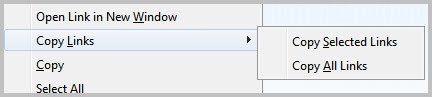
Copy all links copies all links that are found on the active page to the Clipboard. Please note that this includes links to images or other pages as well. The good thing about that is that JDownloader will only pick up links pointing to supported pages which means you end up with a filtered list of links in JDownloader's Linkgrabber listing.
The extension is obviously not only useful if you want to grab links to add them to JDownloader.
Maybe you want to copy all links on a page for bookmarking or archiving purposes, or send them to a friend. If the links are in close proximity on the page it may speed things up. Say you want to copy all article links on Ghacks' frontpage to send them to a friend via email. You could repeat the right-click, copy link, paste in email client job multiple times or use the extension to copy everything in one go.
Firefox users can download the Copy Links extension from the official Firefox add-on gallery at the Mozilla website.
Update: Copy Links has not been updated since 2010. While that means that the add-on won't -- very likely -- receive new updates in the future, it is still working in recent versions of Firefox without issues.



















Copy Urls Expert 2.1.0 is much better then yours
Thanks for this info, I was just looking for this type of extension for firefox, thank you very much!
Great find. Problem is I have tons of extensions that I need to use only once a month and I forget that I have them.
I meant that this extension will fall into list of “I have them, but I forget about them when I need to use them. Lets see how good it is, and if it works I will uninstall Multilinks. There is no need for two similar extensions and I do not need most of Multilinks functionality.
Interesting. I just checked with Multi Links and noticed that it has an option to copy to Clipboard. Did not know that. Thanks for letting me know.
hi martin, i believe you can do this in opera as well, go to panels, click the plus sign, click links, and voila, you get every links on the page, select/copy multiple link or filter it further as desired.
Great tip Stan, thanks a lot.