
SaveGame Profiler, Switch Between Save Games Easily

Games where you only get one save game are not that common anymore, thankfully. But if you happen to play one you may have found a way to manual circumvent the limit, for instance by manually copying the save games to a backup location.
Modern games support cloud saves usually but the same cannot be said for classic games. It may still be useful to back up save games even if cloud saves are supported.
SaveGame Profiler
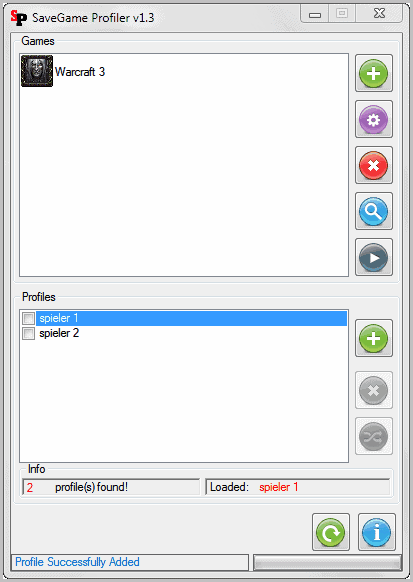
SaveGame Profiler has been designed to automate the backup process. Another reason why you might want to use the application is if other users are playing games on your system, or if you are playing games on other people's computer.
If you ever started a game that you have been playing for 20 hours or so only to find out that your little brother started playing it as well on your computer and erased your save game in doing so, you know that save game backups could have saved you from losing your save games and progress.
SaveGame Profiler is a free software for Windows that supports all kind of games that write save games to the local hard drive. It includes configuration options for select games, but works with games that are not in its database as well.
How does it work in detail? You have to add games manually from one of your computer's hard drives. Just click on the green plus icon in the upper half of the screen and fill out the game name and browse to the path of the game executable and save path.
The game is then automatically added to the list of games. The program tries to identify the game icon and will use it if found. You then need to add profiles to the game. Profiles are created for each game individually. They make use of the save path that you have configured automatically, and the program switches between saves automatically when profiles are switched.
The existing game saves folder will be automatically associated with the first profile that you create for the game. You can then switch between profiles and start the game from the SaveGame Profiler interface right away.
I'd recommend to create backups of save games before you add games and profiles to the application. While I did not run into troubles during tests, it is reassuring to have a backup at hand in case something does not work out as intended.
The developer has created a short demonstration video of the application, you can watch it below.
SaveGame Profiler is a handy application for gamers on multi-user systems, provided that every single user starts using SaveGame Profiler. That's probable the biggest issue of the application.
SaveGame Profiler is a free software for windows that can be downloaded from the project web page.





















