
Google Mail: Manual Option To Add Contacts

I have more than 1000 contacts in Google Mail, all people that I know and hold dear. Just kidding. Everyone, and I mean every single person who send you an email in the past is automatically added to your contacts, as is everyone that you sent an email to.
That is not really comfortable considering that spammers and god knows who were added to the list of your contacts without your doing. Most email programs only add contacts to your address book if you write a message, or add the contact manually.
In Google Mail, this was not possible until now. Until now? Yes, Google finally came to their senses and added an option to switch from the automatic contact creation mode to a manual mode.
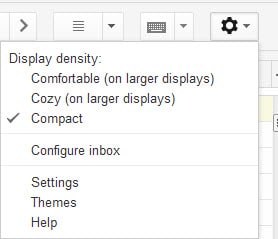
You need to change a configuration setting in your Gmail account settings to switch from automatic to manual mode. Open the Google Mail website and log in. Click on the preferences icon in the upper right corner of the screen and select settings from the context menu an.
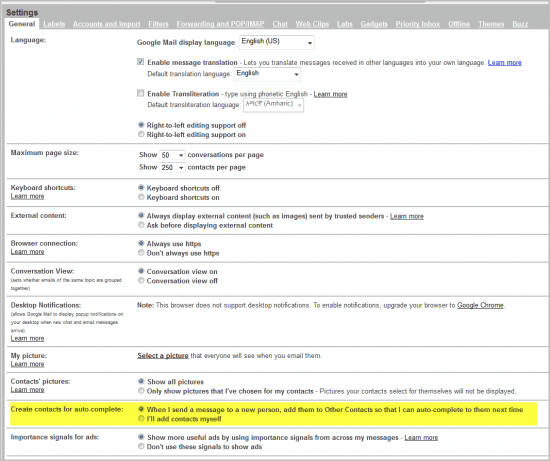
Scroll down on the settings page until you see the new entry Create contacts for auto-complete.
Switch from the default mode When I send a message to a new person, add them to Other Contacts so that I can auto-complete to them next time to I'll add contacts myself. Scroll down to the bottom of the screen and click the Save Changes button.
Contacts will not be added automatically to your contacts list from that moment on. You are on the other hand still stuck with all the automatic contacts that have been added to the address book in the past. There is unfortunately no option to get rid of those without manually removing them from contacts.
The Gmail blog has posted a rundown of other features that they have added to the email service.
This, in short, includes better warnings for typos in email addresses, fewer error pop-ups, the transition from a refresh link to a refresh button, an always-on keyboard shortcut help page (Shift-?) and better transitions between certain actions.
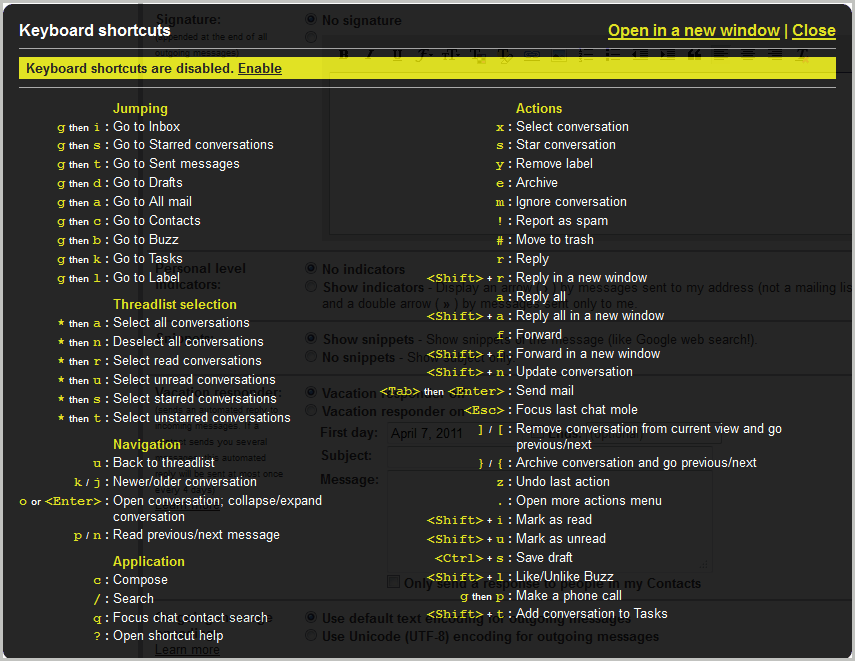
Especially the new keyboard shortcut help page can be a productivity booster as it provides quick access and look-up options (what was that shortcut again?). Gmail blog via Caschy.




















Yesterday I cleaned up my googlemail contacts list. That left 210 in ‘my contacts’, 20 in my ‘most contacted’ list and nothing in my ‘other contacts’ list. Today I sent ONE email and within seconds there were 24000 in my ‘other contacts’ list. All the same address (plus some from my contacts list that had no email addresses, only phone numbers)
Do you think your tip about manual option to add contacts would avoid this problem? Would be really grateful and so would the hundreds of others who post on the gmail forum with the same problem.
Hello, I’m new here and want to say hello, all what I love to do is playing games so decide to share what I know better I have several favorite games and now I’m playing this game http://www.24addictinggames.com/game/536/Potty-Racers.html
please share your games too :)
:)
>>Everyone, and I mean everyone, who send you an email in the past was automatically added to your contacts
Bollocks!
There was no such thing.
Only contacts you wrote to was added…
Bollocks! I never emailed half the addresses collected “for me”. Until recently. Than it changed to those you emailed to.
Thank you for pointing that out. I’m using Google Mail only for a specific reason and yes “finally” is a good word. I wondered before why there’s no way to change that. Now there is. :)
Thanks. Gmail’s auto-add feature as been Most Annoying.