
How To Hide From Friends On Facebook Chat

Facebook users who log into their account on the popular social networking site are automatically registered as online on the network.
Online, among other things, means that your friends and contacts see that you are logged in and available for chat.
You may have noticed the chat interface in the lower right corner of the Facebook website. It indicates that you are online, and displays the number of friends that are online and available for chat.
A click on the chat indicator expands the interface. All online Facebook friends are now shown along with a link to friend lists and options. The easiest way to drop out of chat is to click on the small green and white switch that you see next to Other Friends. If you click it you go offline and none of your friends will see that you are actually online and available for chat.
You can alternatively click on Options > Go Offline which sets your status to offline until the next time that you click on chat.
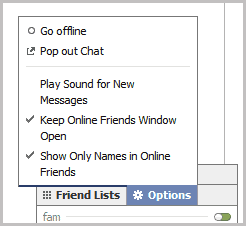
The two options so far are there to go completely offline on Facebook, so that no one can see that you are online. Some Facebook users may prefer to stay online for select friends, and offline for others.
Enter Friend Lists. You can create Friend Lists on Facebook to group your friends. You may want to create a group for your family, one for work or school, and maybe another for your football buddies or poker group. You can then select to be online or offline for each individual friend list that you have created.
You create a new friend list with a click on chat and the selection of Friend Lists at the top of the window.
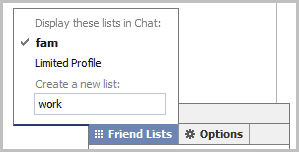
Enter a descriptive name for the new group and hit return. It should now appear in the chat listing. Move your mouse cursor over the new list and select the edit link next to it. Edit only appears if you mouse over the new group.
Facebook displays all of your friends in a new overlay window. You can add friends to the selected group with a click on their profile photo. Once you are done click the Save List button to save the list.
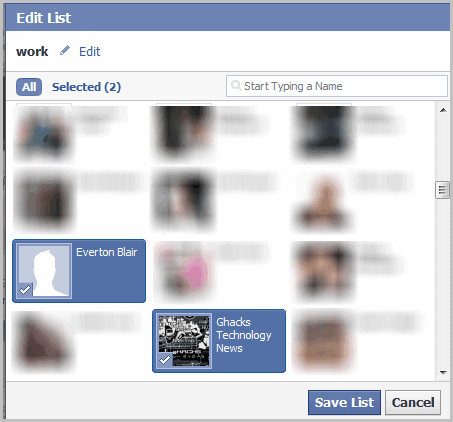
You can now go offline selectively so that selected friends will see that you are online and available, while others won't see that you are online on Facebook.
Have another Facebook tip to share? Let me know in the comments.
Update: Facebook has changed the chat layout recently. You now need to click on the options icon at the bottom row of the chat bar and select Limit Availability from the options.
Facebook displays an overlay window on selection that looks like this.
Here you can then limit your availability by selecting the user groups that you want to be visible for. For that, you need to create friend lists. You cannot do this anymore in the chat interface. For that you need to click on the Friends link in the upper left corner of your Facebook page and then on the Manage Friend List button at the top.

You can then click on the Create List button near the top to create new lists or add friends to existing lists.



















If you have to go to this much trouble then I think the person isn’t actually considered a friend or why hide? It’s better to unfriend someone, because they will realise you are never available to talk. I think ignoring people is another way of saying one doesn’t actually care and it’s less hurtful to unfriend than keep hiding from them.
I want to view only friends which are currently online, not those people additional which was recently or mostly online in updated g\facebook chat box
It still doesn’t work even though I have put unwanted chat friends in a special no chat folder. Facebook says that the group is there and cannot chat but they are still there on the pictures on the left and on the sidebar. So frustrating.
How do you do this now that they changed the stupid thing??!
Tony,
I have updated the guide with instructions.
FB just changed their chat options… this trick doesnt work anymore. Any ideas on how to get around the current setup? I love the option choosing people i am online with on chat.
I have use this trick since 2010, very effective :)
wow