
Firefox Download Guide: How To Download The Web Browser

Where can I download Firefox? If you hear that question once, you point the user to the Mozilla website. If you hear that question multiple times throughout the day, you start to think that a Firefox downloading guide may be a more appropriate option to tell users how to download the web browser.
So, in regards to Firefox downloads; where to start? All roads point to the Mozilla website, and I usually favor that website over third party download portals. Then again, you may want to try download portals if the Mozilla website does not load correctly. It also happens that download portals offer downloads of soon to be released versions of the browser before they are officially announced and linked on the Mozilla website.
Quick Link:
Firefox Stable Download all desktop systems and languages: https://www.mozilla.org/en-US/firefox/all/
Official Firefox Downloads
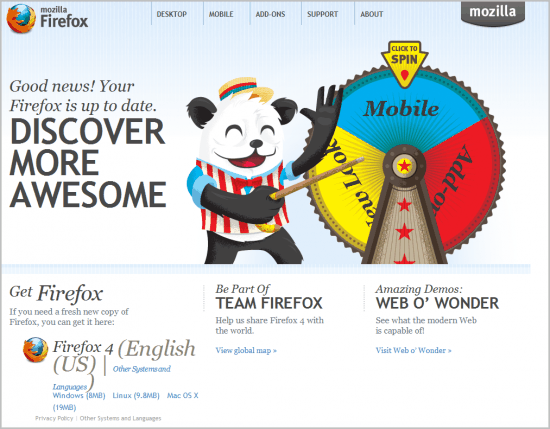
Lets start with the official way to download the Mozilla Firefox web browser. Click on the Mozilla link to open the website to download the stable version of the Firefox browser.
You can alternatively use the Get Firefox link to be redirected directly to the page on which the latest official version of Firefox can be downloaded. Please note that Mozilla detects your language automatically and will load the most appropriate landing page for you.
Firefox is compatible with Microsoft Windows, Apple Macintosh and operating systems based on Linux. Mobile versions are available as well for Google Android and Apple iOS.
The most appropriate Firefox download is linked right on the landing page. For me it is Firefox English US, for you it may be different depending on your system language and operating system.
Note: Mozilla distributes Firefox as a stub installer by default. The installer has a size of less than 1 Megabyte and will download the browser when executed. Firefox users who want the full package right away need to open one of the pages mentioned below. This is necessary for offline installation, in situations where the stub installer does not work properly, or when you want to download a 32-bit version instead of a 64-bit version that is offered by default.
You find links to other systems and languages on the same page, in case the automatic detection did not detect the correct language, or you would like to download a different language version of the web browser.
Just click on "download in another language" to open the download page for all supported versions and languages.
Here are the web addresses for direct Firefox downloads: The first link points to the stable version of the browser, the second to the beta channel, the third to the developer channel and the fourth to the Nightly channel).
- Firefox Stable: https://www.mozilla.org/firefox/new/
- Firefox Beta: https://www.mozilla.org/firefox/channel/desktop/#beta
- Firefox Developer: https://www.mozilla.org/firefox/channel/desktop/#developer
- Firefox Nightly: https://www.mozilla.org/firefox/channel/desktop/#nightly
Firefox Downloads, The Cool Stuff
Now that we have got the basics out of the way it is time for some Firefox downloading secrets.
First, check out our Firefox offline installers guide here. Offline installers are full installers that don't require an Internet connection to install the browser.
Mozilla FTP
The general location is https://archive.mozilla.org/pub/. You find all stable Firefox releases listed under https://archive.mozilla.org/pub/firefox/releases/.
The Mozilla FTP server has more to offer than just downloads of the latest Firefox versions. You can download nightly, beta and release candidates of the Internet browser as well.
Even better, you also get access to all previous versions of the browser that have been released: That's right: You can download all versions of Firefox from 0.10 to the latest versions.
ftp://ftp.mozilla.org/pub/firefox/releases/- This one links to all official releases of the browser. It contains beta and release candidate downloads but no nightly builds.ftp://ftp.mozilla.org/pub/firefox/nightly/ -The nightly builds are automatically generated and you usually find a new build each day on the server. These builds are development snapshots that may contain bugs and other issues. They are often less stable than the beta, RC and final releases.
Mozilla Mirrors
Update: Mozilla Mirrors are no longer revealed to the public. End
Companies and organizations all over the world are mirroring part of all of the Mozilla ftp server. These ftp server network is used to distribute the web browser more efficiently to the worldwide user base.
The main web address of the Mozilla mirrors listing is http://www.mozilla.org/community/mirrors.html. Mirrors are divided into primary and secondary mirrors and sorted by geo-location. These mirrors offer new Firefox release downloads before the official website. If you cannot wait to get your hands on Firefox update or new version, then your best bet is to try the Mozilla ftp server first, and then one of the mirror servers.
Third party download sites
Download sites like Softpedia or Major Geeks often publish new releases of Firefox on the sites before they are officially available. That's convenient for many users, but can sometimes backfire if Mozilla decides to pull a release in the last minute.
Mozilla advises against downloading releases that have not been announced yet publicly by the organization.
Firefox Updates
We have not talked about updates yet. Updates are nothing more than downloads with automatic installations. They are very convenient for users who do not follow Firefox development and release news. Experienced users on the other hand often dislike the time between release and update notification. It usually means having to work with an older version of Firefox for 12-48 hours. Not a big problem you say? That depends on the update. Security updates for instance make it desirable to update the browser as soon as possible to prevent possible exploits.
A manual update check, via Menu > Help > About Firefox is often the fastest way to automatically update the browser.
Here is a small graphic that visualizes the different ways to download Firefox. Click on the image to see it in its original size.
Fake Downloads
Firefox users need to make sure that they download the browser only from official sources or major download portals that have a good reputation.
If you search for Firefox downloads using Google Search, Bing or other search engines, you may encounter ads or results that promise downloads of the browser but may distribute a fake version, a version with installed add-ons or other modifications, or entire fake browsers to earn revenue in various ways.
How do you download the Mozilla Firefox web browser?



















Is ghacks now catering to special olympics crowd?
what is a browser? what do you mean “download” … is that something I get in the app store or from an apple store? I was with you until you mentioned eff tee pee. can you gotomypc and put the foxfire on my windows? I like to face book. will it do that or do I need to down load a face book app for that?
Thanks for enlightening me with your wonderfully huge article about such a complex task!
funny :)
i downloaded ff4 through a link on your site, because i didnt want to wait for the auto-update :)
I’m like you, I like to update the browser the second it comes out, not one or two days after.
I could not find the 3.6.16 download anywhere on the usual Firefox download pages. Not a hint of anything but the 4.0 release. This really sucked and wasted my time.
I finally had to do a Google search to locate the “old” downloads.
http://www.mozilla.com/en-US/firefox/all-older.html
Jojo it is there but hidden deeply on the page. You open mozilla.org, click Get Firefox, then the other systems and languages link, then Firefox 3.6.16 on the right. Firefox 3.5.x on the other hand seems to be missing completely.
I’ve read in quite a few places that it’s preferable not to download via
ftp://ftp.mozilla.org/ because of something about “load balancing”. The preference seems to be for the http:// way.