
Leo Backup Review

Leo Backup is a free and commercial backup program for the Windows operating system supporting all the features you'd expect from a software of its kind.
Data backups play a key role in disaster recovery plans. Many Windows users on the other hand do not backup their data regularly, if at all. Windows itself comes with several recovery options, from shadow copies to the built-in system restore - but those may not be enough, depending on the "disaster" that struck. What if your PC gets stolen? Right, the backups are on the PC and you cannot recover your data, if you have not stored the data remotely as well.
Backup software is the solution. Newer versions of Windows come with limited backup capabilities, a better solution in most cases is to download and make use of a third party backup solution.
Leo Backup is a free and commercial backup solution for the Windows operating system. The free version is limited but sufficient for basic backup needs while the pro version adds features such as SFTP, shadow copy, or a service mode to the program. A detailed comparison of the free and professional versions of Leo Backup is provided on the developer website.
Leo Backup
A wizard guides the user through the backup creation. The standard options to add files and folders are available, as are several interesting custom solutions, for instance to backup the Windows profile, the Windows Registry, Microsoft Outlook settings or the Mozilla products Thunderbird and Firefox. The standard and custom options can be combined in one backup.
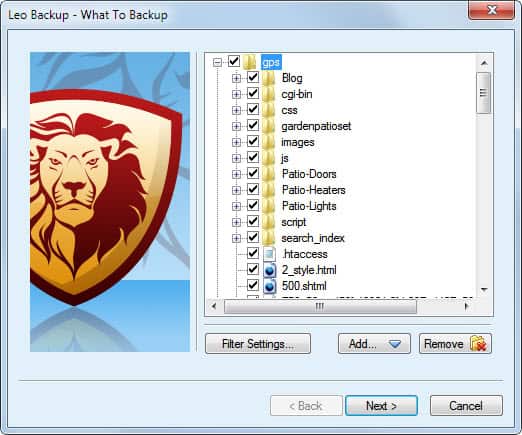
Filter settings are available to exclude or include specific data types. Users who only want to backup documents could add those document formats to the filter settings to make sure that only those are included in the backup. The program has no pre-defined filter lists for popular file types, something that the developers should consider adding in an update.
Leo Backup can backup data to a local disk or network disk, or to a remote ftp (optional SSL/TSL) or SFTP server.
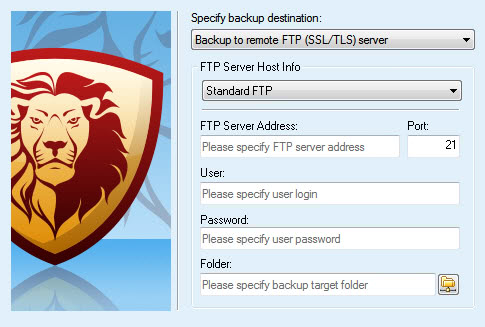
Support for secure data transfer options when transferring files to remote servers is usually a core requirement for organizations that evaluate backup software, to make sure that the transferred data is protected during the transfer.
Individual users benefit from those protocols as well, and it is generally recommended to make use of them. Most free backup programs do not offer those options.
Additional backup settings can be configured after the backup location has been selected.
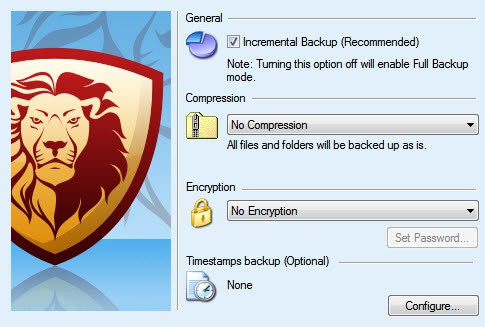
Leo Backup is configured for incremental backups by default, which only updates files in future backup runs that have been changed or added. Disabling the option configures the backup program to run full data backups every time.
The advantage of incremental backups is that you save space on subsequent backups as only changed or added data is included in those backup jobs.
Users can enable compression to save storage space at the local or remote destination, encryption to add an additional layer of security and timestamped folders for better identification of the backup folders.
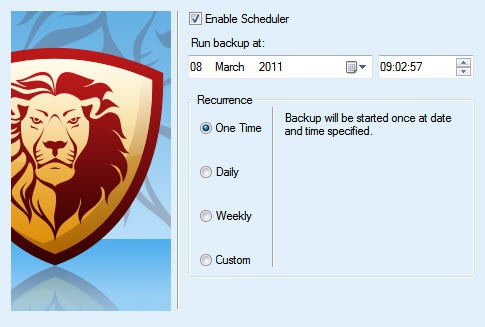
Backups can be scheduled during configuration so that Leo Backup runs them automatically on schedule after the initial configuration has been completed. Available for selection are daily, weekly and custom intervals.
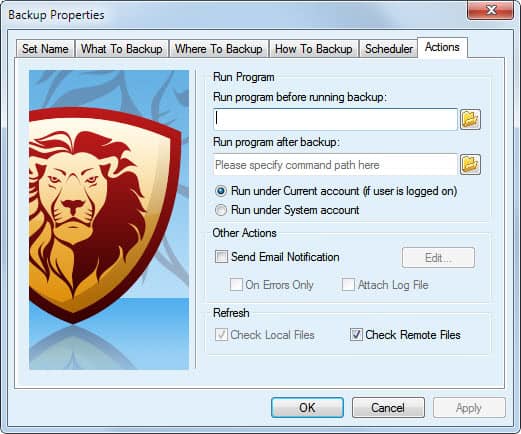
Programs that are run before or after the backup, and notifications are configured in the last step of the backup setup.
The backup software supports email notifications only. It is possible to attach the log file to emails, and configure the notifications to only be send out if errors have occurred during the backup.
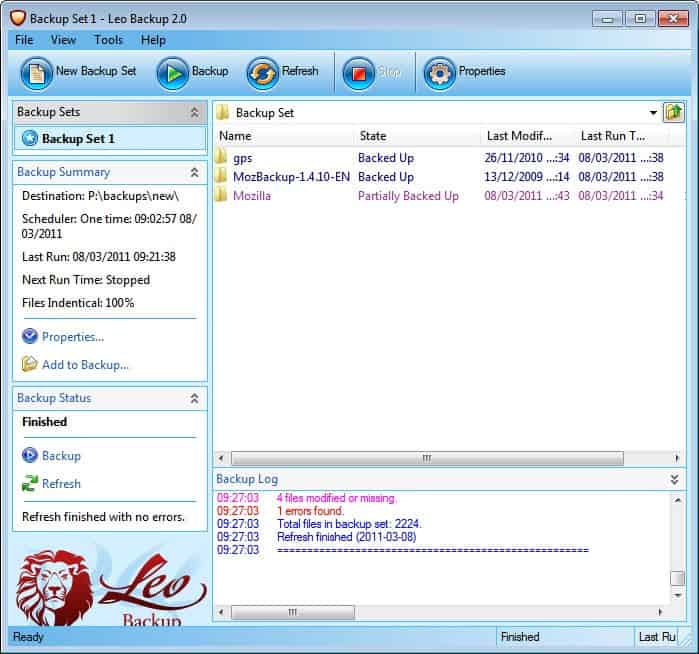
Leo Backup supports the creation and management of multiple backup sets which are all displayed in the left sidebar after they have been created. The files and folders that are included in the backup are shown after selection on the right.
The sidebar displays a backup summary with information about the backup destination, schedule and last run.
Backup sets can be modified with a double-click. All backup options are displayed in tabs in a single window which makes it easier to modify backup settings.
The developers are working on a free version of Leo Backup that will be first released in this month. It will offer a similar feature set with a few exceptions.
The commercial version is available as a 30-day trial version on the official website. The download page links to a pdf manual and the online user guide as well.
Verdict
Leo Backup is an easy to configure backup solution with several interesting features, among them support for SFTP and FTP SSL/TSL connections, pre-configured backups of important data, active directory impersonation, private/public key authorization and COM support.
The program could use some polishing touches in some areas, namely the file filter and reporting service. Additional pre-configured custom backup options, like backing up Internet Explorer data would be welcome as well.





















I have used this software. This is a very good and easy to use software for backup scheduling.
No expertize required to configure or use.
Good to have.
I tried it for the first time .I was impressed with very intuitive interface and speed of backup on local drives. However I tried to uploading a 7 gig file to a ftp site .It took about 45 mins to back up 2% of the file and stopped saying it will try other methods! I am rather disappointed at this!
I think it has great potential.s
excellent article….
Thanks Martin for the giveaway.
Please count me in.
Thanks, Grr
Please, count me in
Wao its seems to be a good backup program. All the essential features are present in this program except that making backup images which I would like the developer to add in the next version. I would like to win a license. Thanks for the giveaway! Hoping to win one. :)
Nice giveaway. The program promises to be interesting and to me it useful. And to this very good description. I’d like to get it. Thanks and best regards.
Please, count me in
It is always safe to choose remote backup. I am using SOS Online Backup (www.sosonlinebackup.com), i restore any version of the file anywhere, anytime.
Looks like a highly useful backup option. I’d love to have a license.
Yes, count me in as well- a fine program@ tweeted http://twitter.com/#!/anashct/status/45808725516226560
Looks nice. I must try it! I shall recommend it to my friends.
Thanks.
Please add my name to your drawing for Leo Backup. Thank you!
I love to have it because of special functions that others does not have. Please i need the code to unlock this this software, i have downloaded and installed it on my computer. Thanks.
Count me in.
Please add my name to your drawing for Leo Backup. Thank you!
Thank you for the giveaway! A really good software.
http://twitter.com/#!/vj_onix/status/45326848271466499
I currently use a number of free backup programs but I am looking for a change. Please count me in the draw.
Leo Backup? I must say I have never heard of this, however I am in need of a backup software would love to win. Thanks for the giveaway.
http://twitter.com/#!/NOKNOT01/status/45261463346098176
I could have used this a little while ago, as I have messed up my desktop and along with it about 15 years of collected data…I really want it now…
Looks like a great piece of software, love to get main hands on it.
Great !
Count me in the drawing please !
Thanks for this giveaway Sir.I would like to have this product on my pc.
I have tweeted this post over Twitter,link is
http://twitter.com/#!/siddxxxx/status/45167795280953344
Thanks
I’d like to give it a go as well… Thanks.
better then acronis?
Rolls dice.
I would certainly like to try this software…
Count me in!
Thanks
Thanks for mentioning this soft, it has some interesting features and reliable they are.
Sounds like a great program with the features that I am looking for. Thanks for doing the review and the giveaway. Count me in.
Thanks for counting me in. I tried this software, which is close to Backup Platinum and Handy Backup, but with nice features. I would definitely like to get a full license. Thanks.
Free stuff is always good.
Thanks for the review Martin.
Leo Backup is supposed to be Leading, Efficient & Optimal – OK I’ll Bite :)
http://twitter.com/#!/bionic_/status/45094355379294208
Martin, then count me out.
Sounds good, and I love the lion mascot. Hope I win a free pro license!
Can you make images of a hard drive with this software or does it back up files only?
Yoav good point. The program only supports file and folder backups, no disk images.
Seems like a nice program. Do count me in Ghacks. Keep up the good work.
Thanks for the information, I didn’t know this software
It seems to have the functionality I need (incremental backup + scheduler), that’s great.
The giveaway sounds very interesting to me
keep up the good work at ghacks ;-)