
Youtube TV Mode, Automatic Fullscreen Youtube Videos

YouTube is without doubt currently the most popular and known video hosting website in the world. The site, despite its popularity, lacks several features that may improve a visitor's usability considerably.
Two of the missing features that come to mind are the ability to select a specific minimum and maximum video quality automatically, and to save custom resolutions for videos so that all videos are played in that resolution if available.
While you can select if you want want to play HD videos or not on YouTube, you cannot specify a certain resolution that you prefer, nor a custom player size or even full screen playback by default.
A YouTube user who wants to view a video maximized needs to open it first before the option to switch to fullscreen viewing mode appears as part of the standard user interface. Doing that once may be inconvenient but manageable, but doing it a dozen times a day is everything but user friendly.
YouTube TV Mode is a lightweight userscript that will automatically load videos in full screen mode. A left-click on a video loads it in a new tab in the browser. Users who do not want to view all videos in full screen mode can middle-click a video, or right-click the video link and select to open it in a new tab to bypass the userscript automatically.
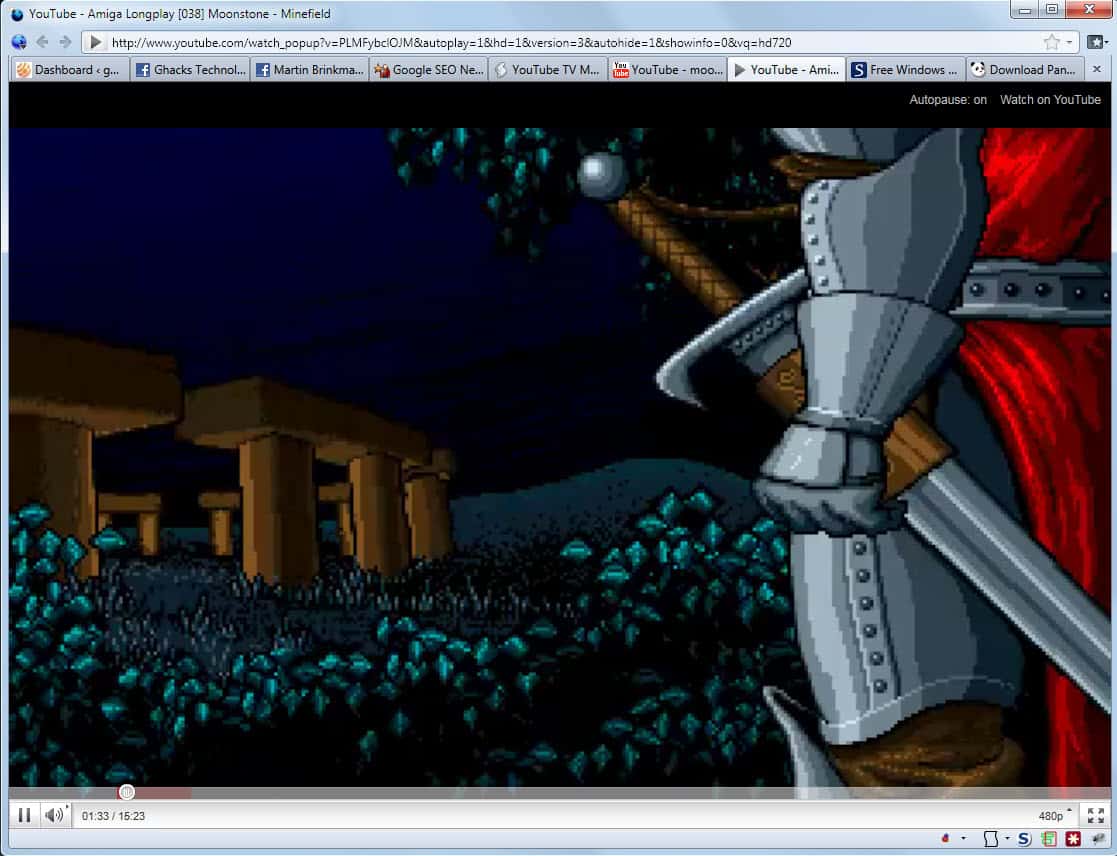
The video fills the full browser window regardless of its size and the video will always be loaded in HD format if available. This happens automatically without user interaction.
The developer has added an auto-pause feature to the userscript which pauses videos automatically if the video tab is not the active tab. And since videos are opened in new tabs they are automatically paused at least for the time it takes to switch tabs. This means that video data can be buffered in the meantime to reduce the chance of lags and stuttering.
The autopause feature can be disabled on the video screen in the upper right corner. The only remaining controls are to watch the video on YouTube, which loads the video in the normal YouTube interface and the standard YouTube video controls at the bottom.
YouTube TV Mode has been only tested in the Firefox web browser. It is likely that it will work in other browsers that support userscripts. Let us know in the comments if you have tested that. Firefox users need to install the Greasemonkey extension or Scriptish before they can install the userscript in the web browser.
Update: The userscript has been removed from the official Userscript website. An alternative is the excellent Yeppha Center for YouTube.
To configure it after installation click on the settings icon in the top right corner on YouTube. Here you find the following options:
- Player > Resolution to set a preferred resolution for videos on YouTube. Note that this resolution will only be picked if available, for obvious reasons.
- Player > Fullscreen Top Player to define the full screen playback mode. You can enable it by default, or only when videos are playing.
The script offers several other settings and features that you may find useful. Just check it out, it is awesome.
Update 2: Yeppha is no longer available. Use Magic Actions for YouTube instead which offers similar functionality.



















It’s “full browser screen”, not actually full screen, but I like it.
Thats not full screen. I cant watch with all those distractions and noise around the screen. Safari used to have an extension for automatic HD Wide which has been broken. Hopefully itll get back up.
Wow! MoonStone. Good choice!. Beware the Dragon! xD
I love that game ;)
Is it possible that this script does not work together with the Greasmonkey script YouTube HD Ultimate 1.2.9 and the Greasmonkey script YousableTubefix?
This because i cant get this userscript to install himself. Is it me or is it the compatibllilty?
Paulus could be, if it does not work try disabling the add-on to see if it works then.
The title made me think of Youtube XL (http://www.youtube.com/xl). It’s not a userscript. It is simply Youtube with an interface geared towards tv use (i.e. that you’re sitting far away from the scren).
To be honest, I never use it myself, but some people might find it handy.
I personally prefer solutions that are installed as extensions or scripts as they are usually more comfortable to work with.
True. Scripts win in terms of customization and the like.
However, if you’re accessing youtube on a different computer than your own – e.g. at a friend’s place, drinking beers – XL (or youtube.com/disco for that matter), might prove themselves useful.
It be real nice if you actually linked to the userscript your are talking about….
It is linked under “before they can”
Thanks…
Looked like 1 link going to Scriptish too me and probably to most people too.
I have never understood how you link things.