
Mozilla Demos Web Apps Store

Do you know the difference between web apps and extensions? No? You are not alone. Some users say that web apps are nothing more than links to websites, at least in this early stage of development. They can be more than that though, and developers who like to get started can take a closer look at Mozilla's Open Web Apps documentation.
The first public record of a Mozilla apps store dates back to the year 2009, see Mozilla Considering App Store For Add-Ons for details.
Mozilla is now demoing their own web apps store that supports Firefox and the Google Chrome browser. The Open Web Apps for Firefox extension or Open Web Apps for Chrome extension needs to be installed before the web apps become available in the selected web browser.
The installation adds a single button to the browser. Firefox users can move the button around after selecting customize from View > Toolbars. A click on the button displays all installed web apps. A click on a web app opens the page in a new app tab in the browser. App tab? Little pinned favicons that are displayed in front of all standard tabs.
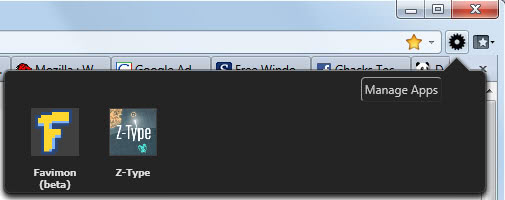
Apps are installed by hovering over their icon on the web apps demo page and selecting the install button. The installation confirmation dialog is different. Firefox users see a small installation window at the top of the browser,
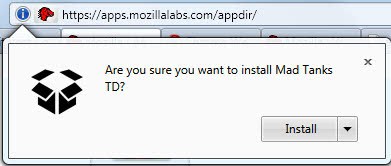
Google Chrome users an overlay instead.

The demo pages offers 17 gaming related web apps at this point in time, but that's fine since it is only used for demonstrative purposes. The web apps engine supports auto discovery of web applications. A user who has the web apps extension installed will be notified if a page offers an installable web application.

A click on the manage button in the web apps interface opens the list of installed applications with options to remove them again from the browser and to view their manifest. The page is also accessibly by entering about:apps into the Firefox address bar.
It would make sense to eventually integrate the list of installed open web apps in the Firefox add-ons manager.
Is it possible to install apps that are currently offered in the Google Chrome web apps store? No that does not seem to be possible.
Mozilla seems to have plans to integrate web apps support into a future version of Firefox so that the installation of the extension would no longer be needed to install and use web apps in the Firefox web browser. This could happen in firefox 6, according to the Mozilla Firefox development roadmap for 2011. Firefox 6 is expected to land in the third quarter of 2011. (via)
Update: The extension is no longer available on the official add-on repository.
Advertisement
















Hello go on my webaite
Get ready for the popular “donate button” addons to move to the app store; or at least offer a limited function free version, with the full on available on the store.
And think of all of the work warez sites will have to do – adding a new category on their forums!