
WSUS Windows Offline Update, Updated

The easiest way to update the Windows operating system, regardless of the version and edition used, is to use Microsoft's Windows Update service. It takes a few clicks to select the updates from the listing, and even less if automatic updates are configured. But not all users have a permanent Internet connection, or a computer that is connected to the Internet at all. Microsoft is offering two options for those users. They can either download the update via the Microsoft Download Center or order a physical DVD if available (see for instance How To Order The Windows 7 Service Pack 1 From Microsoft).
But there are also unofficial ways to download and install Windows Updates. WSUS Offline Update can for instance offers to download all Microsoft updates for Windows operating systems or Microsoft Office.
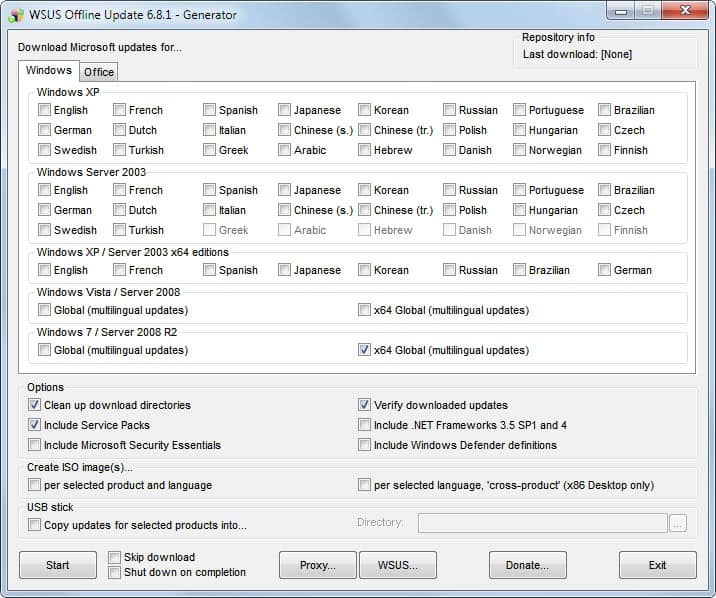
The software program has been updated in the past days to include the most recent Windows and Office updates, specifically the Windows 7 Service Pack 1 and Windows Server 2008 R2 Service Pack.
Here is how it works. You need to unpack the portable application to a local directory before you can start the UpdateGenerator.exe file. This opens the interface that you see on the screenshot above.
Operating systems are sorted by version and language. It is possible to select multiple updates at once, for instance for Windows 7 and Office 2010, or different languages.
Several options are displayed at the bottom of the screen. It is for instance possible to create ISO images that can be burned to disc, include service packs, the .NET Framework, Microsoft Security Essentials and Windows Defender definitions in the update or copy updates directly to an USB stick.
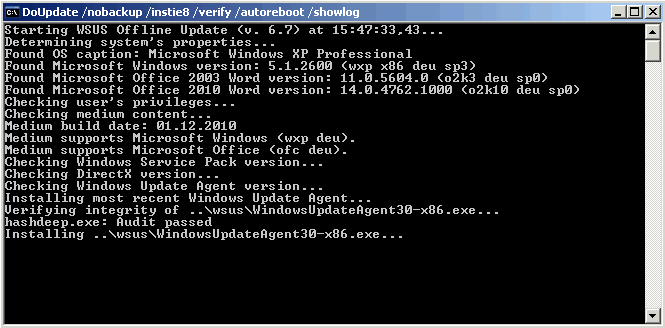
The updates are downloaded via a command prompt. This may take a while depending on the updates that have been selected.
The command prompt closes after the downloads have been completed. They can then be installed directly on the local system by starting UpdateInstaller.exe from the client directory.
The available choices depend largely on the system and range from installing Internet Explorer (up to IE9 RC), the .NET Framework 4.0 to Powershell and Microsoft Security Essentials.
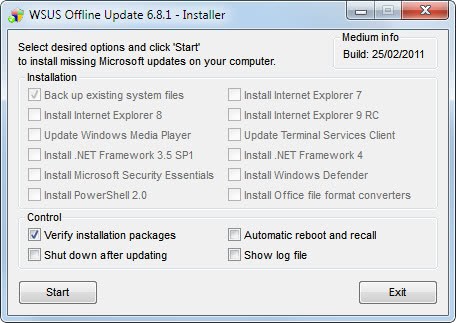
A click on Start begins the system update. Windows does not need an Internet connection for this since all updates have been downloaded previously to the computer system.
What are the benefits of using WSUS Offline Update? The program can save bandwidth if multiple computer systems need to be updated. Integration of all available updates for a specific version of Windows and Office make it an ideal product for offline updates, especially for computers who have no Internet connection, or unpatched computers where the user wants to update the system first before going online.
WSUS Offline Update can be downloaded from the official website.
Update: We have reviewed the latest version of the program, you can read the WSUS Offline Update 8.0 review here to find out what's new.
Advertisement


















Is there a way to get the updates, minus the telemetry privacing invading stuff too ?
Yeah, you gotta – pretty much – cripple the entire Windows system. Here’s a screenshot of mine, while I’m on the Internet here, it ‘doesn’t know’ that it’s online: imgur.com/9c8SiSb
It took a LOT of work: 1) using gpedit.msc to disable a torrent of various settings, then 2) disabling a serious amount of -system- Services, using services.msc and 3) deleting a TON of Registry keys (manually, using the Registry Workshop, for example) and shutting down all (!) available /visible /accessible Tasks through the Control Panel, Task Scheduler… Also, 4) using the COMODO Firewall, since Agnitum (Outpost Software) Outpost Firewall has been purchased by Kaspersky (another one bites the dust /can only HOPE that they won’t destroy it, best rule-based firewall today – which Kaspersky is NOT; not even close, heh.)
^^ And I’m pretty sure there had to be MORE done, in order to shut-down the Windows Telemetry. The way that they make it, integrate things so they are inter-dependent: some crucial parts of Windows won’t -really- work, if you disable – for example – the text-to-speech. Their agenda is SO convoluted, how they are trying to get everyone’s voice, everyone’s retina, fingerprints on record… It’s not possible to enjoy such security features on your laptop, while that information stays offline. They will ALWAYS try to upload it to their servers, one way or another.
On this PC, half of the Internet doesn’t really load; BUT, Cortana is -completely- disabled – it doesn’t, even, reside in RAM. There are NO drivers being invoked on boot (SysInternals Autoruns, the little utility software program can see that). It’s a thing of beauty: it takes about 30 seconds, to a minute longer for the OS to load the Desktop: it’s frantically searching for these files which have been scrubbed from the HDD, so that it’ll be IMPOSSIBLE for it to start!
*Honestly, however, it *did* take me about 24-hours to do it all. It would be a nightmare, any time I was going to install Windows again. xD
Best regards, from frozen Belgrade!! :))
Use linux Mr G, you can’t avoid that core feature of windows.
Would like to do this for windows 10.
Here ya go!.. https://www.ghacks.net/2015/10/10/windows-update-minitool-is-a-third-party-client-for-updating-windows/
Very good app. Have it under my portableapps folder since years. Where ever I am, I can help to update any machine to the latest patchlevel without internet connection.