
Autologon For Windows

There is really no need for typing in your Windows account username and password every time you log into the operating system, at least not if you are the only user with access to the Windows PC. I personally have configured my system to automatically log me in every time the computer is booted and Windows is selected as the operating system. This is obviously not practical for everyone but it can make the life of Windows home users and single PC users a tad more comfortable.
Autologon For Windows is a free Sysinternals software that makes it a lot easier to setup the automatic login. Users do not have to go through various system settings to configure auto login, all they need to do is to launch the program, enter their user account data and click on the Enable or Disable button.
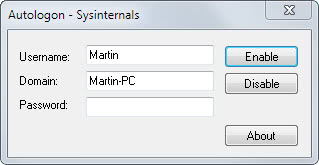
And that's it. Autologin saves the data in encrypted form to the Windows Registry if the auto logon feature is enabled by the user. No login screen is shown from then on when the operating system is loaded. Windows bypasses the screen and the selected user is logged on automatically.
Autologon for Windows fills out the username and domain automatically, with an option to change them if required. Users who want to disable automatic logon again can do so by entering the data and selecting the Disable button in the interface. It is furthermore possible to disable automatic logon for a particular session by holding down the Shift key during system boot.
The portable program accepts command line arguments in the form autologon user domain password. Autologon for Windows is available for download at the Sysinternals website over at Microsoft. The software is compatible with Windows XP and higher as well as the server variants Windows Server 2003 and higher.
Advertisement


















ReX,
I use logonexpert http://www.logonexpert.com via Windows scheduler for that
le.exe /setcredentials user1 pass1
after 18-00 it executes
/setcredentials user2 pass2
works for 2 years for me
Whenever I need to change the autologin to a secondary account (once every week), I just use ‘control userpasswords2’.
Check the checkbox, uncheck it again, hit OK and write the account & passwords details there.
Thanks for the info !