
System Restore Manager, Manage Windows System Restore Points, Settings

System Restore is a built-in feature in the Windows operating system that users can utilize to rollback recent changes. System restore points are for instance created before Windows updates are installed to give the user an option to rollback in case the update caused incompatibilities or other issues.
The main problem that most Windows users have is that System Restore is not really that easy to configure and manage (Windows 7 users find the configuration in the Control Panel under System and Security > System > Computer (right-click) -> Properties). The option to enable, disable and change the size allocation for instance is hidden deep inside the Control Panel.
System Restore Manager is offered as an alternative to the default System Restore management and configuration options in Windows.
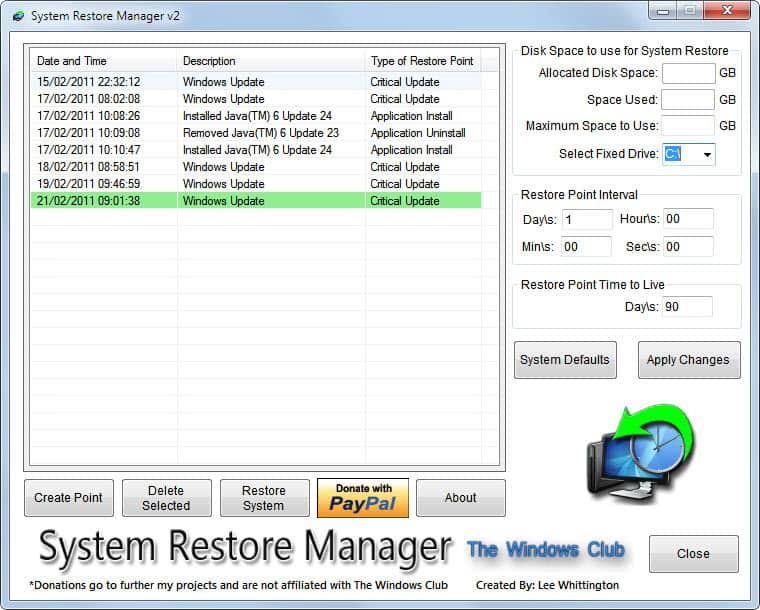
The free software displays System Restore points and configuration options in its interface.
Previously created System Restore points are displayed with their date and time, event that triggered the creation and restore point type. System Restore Manager offers options to delete selected restore points, create a new point or restore the system using the selected point.
Options are displayed on the right side. The program displayed an error on startup on our British Windows 7 64-bit system, the allocated disk space, disk space used and maximum space to use were not showing any values but that was the only problem we encountered during our tests, and it did not seem to have an impact on the program's other features.
The program by default should display the disk space values of the main Windows drive here. A pulldown menu is available to switch to another drive to see its allocations.
The two remaining options can be used to change the restore point interval which is set to 1 day by default. Windows will create System Restore points based on the interval specified, plus additional system restore points whenever a monitored event (e.g. Windows Update) is initiated.
Restore Point Time to Live on the other hand specifies the retention time of individual System Restore points. Please note that this is the maximum value. Entries are deleted automatically if the allocated space for System Restore runs out of storage.
System Restore Manager is a handy program for Windows. It is not clear if the program has any dependencies and if it is compatible with all Windows editions supporting System Restore. It worked fine on a Windows 7 Professional 64-bit system except for the aforementioned bug that the disk space allocations where not shown. It can be downloaded from The Windows Club website. (via)
Advertisement


















Martin, I think you may want to look at Rollback RX too. I’ve used it for more than 6 months and my IT friends highly recommend it as a better solution than the default system restore.