
Click-n-Type, Virtual Keyboard For The Disabled

The virtual keyboard software Click-n-Type has been designed especially for disabled people who cannot operate a physical keyboard but a mouse, trackball, joystick or other input device that allows them to send clicks to the computer screen.
The program is available as a portable version and setup, the functionality of both is the same. An always on top onscreen keyboard is displayed on startup. This keyboard uses a different layout than physical keyboards, the letters for instance are sorted alphabetically and not in the standard qwertz layout. This might take some getting used to time but should not be to difficulty to adjust to. Additional keyboard layouts are available from the Options > User Designed Keyboards > Select a user keyboard menu. Available for selection are virtual replicas of physical keyboards (along with the standard qwertz layout) but also keyboard layouts that have been optimized for specific input devices such as joysticks.
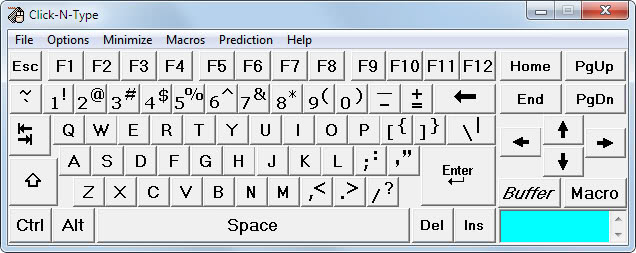
Using the virtual keyboard to enter characters on the screen usually involves two steps. The user needs to activate the form or text field first before the virtual keyboard input is recognized by the application.
A quick test with popular programs such as Firefox, Microsoft Word, the email client Thunderbird and Facebook showed that Click-N-Type supported all of them without problems.
Characters are send to the active application on click. Several special keys, like Shift or Alt stay active after they have been clicked on to give the user the chance to use their functionality. It is for instance possible to launch the Windows Task Manager by clicking on Ctrl-Alt-Esc.
The program offers several advanced features, from word prediction and completion over macro support to audible feedback and a custom keyboard designer. Specific features like autoclick or scan improve the usability further.
Feature Overview
- FREE full featured on-screen virtual keyboard for anyone with a disability that prevents, or makes it difficult for, him or her from typing on a physical computer keyboard.
- Word prediction and completion
- Fully configurable including macros.
- AutoClick and Scanning Modes.
- Many language/keyboard packs available. Keyboard Designer and many user designed layouts included
- Audible and visible feedback options, including Spoken Keys.
- Designed for anyone who needs help using a physical keyboard with special consideration for the severely handicapped
- Works with all pointing devices including head mouse and virtual mouse programs like Point-N-Click.
- Programs to administer user access available.
- Requires Windows 98/Me/NT/2000/XP/Vista/Win-7.
- Portable version for USB Flash Drives.
- A Win-95 version available
Click-n-Type is an excellent onscreen keyboard that has its uses not only for the disabled, but for everyone else who wants a reliable virtual keyboard for their Windows PC. The software is available free of charge from the developer website over at Lakefolks.
Advertisement


















