
Firefox Download View

Computer users who want to access a list of recent Firefox downloads need to open the web browser to access that list provided that the download records are stored and not deleted on exit or user request.
Downloads are listed under Alt-key > Tools > Downloads or by using the keyboard shortcut Ctrl-j. Both operations open the download manager of Firefox listing all downloads, completed, paused and stopped til the last clearing of the listing.
Firefox Download View is an alternative for the Windows operating system. The free portable software lists all recent Firefox downloads after launch in its interface. The main advantage of using the software is that it offers better accessibility and processing options.
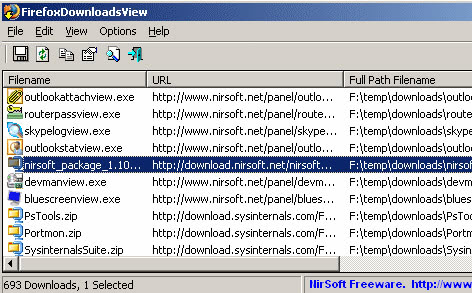
Each download is listed with its file name, website address that it was downloaded from, the full path on the local drive where it was saved to, the referrer if available, mime type of the file, file size, download duration and average download speed.
The data is taken directly from Firefox and therefore as accurate as the data displayed in the browser.
Especially a look at the average download speed can provide valuable information about the speed of the Internet connection over time. The average download speed is calculated from the start and end time of the download and the size of the file.
The utility is compatible with both Firefox 3 and Firefox 4, earlier versions of the web browser are not supported. Update: Now also compatible with all newer versions of Firefox.
Firefox Download View offers additional options besides displaying the list of downloads. It is possible to open the url the file was downloaded from, or the folder on the local drive. Entries can furthermore be copied to the clipboard or exported to text, csv, HTML or XML files.
Other useful options include specifying a profile folder manually and changing the default double-click action from showing the download properties to opening the file or folder, or the url the file was downloaded from.
Users who also use the HashMyFiles utility from Nirsoft can copy and paste the list into the tool to calculate hashes for each individual download.
There is one core difference between the program and the native download manager of Firefox: While it displays the information, it does not provide you with options to modify the data in any way. You cannot delete some or all entries from within FirefoxDownloadsView.
Firefox Download View can be downloaded from the official Nirsoft website. The portable software is compatible with all versions of Windows from Windows 2000 to the very latest.





















