
Microsoft Arc Touch Mouse Review

I was pretty excited when I read for the first time about Microsoft's Arc Touch mouse. The unique design and touch capabilities brought features to the table that no other Windows mouse offered at the time of writing. Many questions remained unanswered though which I definitely had to find out before I'd consider purchasing the mouse:
- How comfortable is it to work with the Arc Touch Mouse?
- Is there a middle-mouse button?
- Which touch features are available, how are they used?
- How responsive is the mouse
The Microsoft Arc Touch Mouse has primarily been designed for mobile use which is especially outlined by its design. It is bigger than a standard laptop mouse but smaller than a regular desktop mouse. The mouse ships in flat stage, with two AAA alkaline batteries, a booklet and a wireless transceiver for the USB port of the computer. The mouse uses Microsoft's Bluetrack that ensures maximum compatibility on nearly every surface the mouse is used on.
Setup of the mouse was a breeze. All I had to do was to put the two batteries into the mouse, and the transceiver into a free USB port of the computer. The mouse is activated by bending, which is indicated by a blue light at the bottom. The Microsoft Arc Touch mouse was recognized automatically by the Windows 7 operating system and additional mouse drivers (Microsoft IntelliPoint) were installed. It was ready for use right away afterwards.
The Design
The mouse design is spectacular which can be attributed largely to the unique bending feature and its looks. The bending has a functional use as well, as it turns the mouse on or off. The mouse itself is very compact which is ideal for users who travel a lot. It fits into nearly every pocket or laptop bag without bulging it to much, a problem that regular mice often cause, if they fit at all.
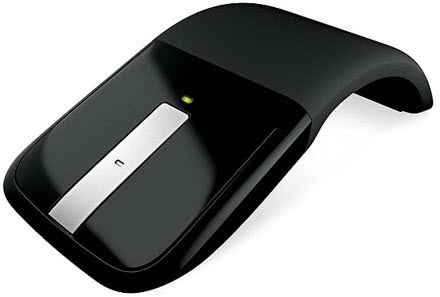
The mouse itself looks unique and interesting on first glance, and it happened more than once that people came over to my table to take a closer look. It features two physical buttons that are used for left-clicking and right-clicking, and a touch strip in between that offers multiple uses, among them middle-clicking that is emulated by two finger taps on the strip. This takes some getting used to time because of the tapping and the fact that it takes two taps to middle-click. The tapping itself however is very comfortable.
A magnetic storage space for the USB transceiver is provided at the bottom of the mouse which is ideal for traveling as it ensures that the mouse and the transceiver are always in the same place, and thus ready for use.
The glossy black of the mouse front is a magnet for fingerprints. Lastly, it is possible to put to much pressure on the mouse to flatten it. It is however unlikely that this happens under normal circumstances as the pressure has to be quite high to achieve that.
The Touch capabilities
The middle strip offers several touch capabilities that need further explaining. Microsoft launches a website after driver installation that explains those features in detail. We already mentioned that it is possible to middle-click by tapping twice on the center of the strip. Pages are scrolled by sliding the finger up and down on the touch strip which feels more natural than using a scroll wheel for the same effect. Flicking the mouse up and down accelerates the scrolling to quickly scroll through documents.
Vibration Feedback is enabled by default which mimics the sound and feel of a traditional scroll wheel. It does act as an indicator as well as touch feedback stops when the finger leaves the touch strip.
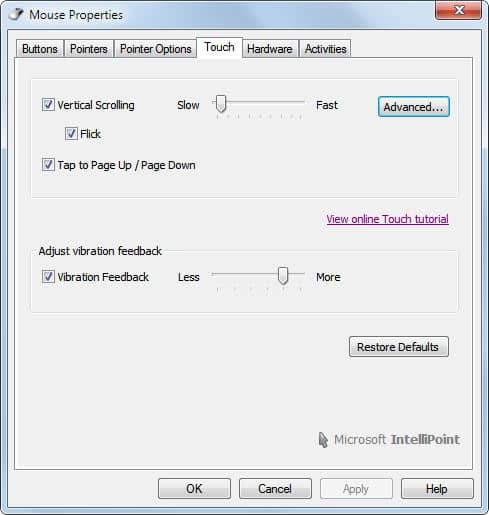
Tapping once at the bottom or the top of the touch strip scrolls a full page up or down on the active page. This takes some getting used to time before the right "spots" are tapped on every time.
The middle-tap action can be changed in the mouse settings, the up and down single tap actions cannot. That's fairly inconsistent and it would be great if Microsoft would update the mouse driver to add that option to the mouse; It would increase the number of possible mouse buttons from three (left, middle and right) to five (top and bottom of the touch strip).
Conclusion
Microsoft's Arc Touch Mouse has been designed for mobile usage, and for that it is an excellent choice, especially for users who want a compact stylish mouse that goes along well with their laptop. Users with big hands will have their troubles working with the mouse effectively due to its compact size.
It is an ideal mouse for uses who have been working with smaller laptop mice before as it is a bit larger than those and offers a far superior functionality. Users who are used to standard desktop mice on the other hand should try it out in a shop or at a friend's house first before they make the decision to buy it.
Giveaway
Microsoft was nice enough to sponsor one Microsoft Arc Touch mouse for a give away here at Ghacks. It is unfortunately only open for users from the United States. If you are from the US and want to win a Microsoft Arc Touch mouse let me know which mouse you are currently using. I will draw a lucky winner in 48 hours after the review has been published. Please add the information that you are from the US to the comment.
Advertisement













I am in the USA – in California – and am currently using a Logitech Model Number:M-UAE96, that I think is about 10 years old. I’d really appreciate a new Microsoft’s Arc. I’ve seen them on line, but did not realize that it flattens, I thought the curve was permanent.
I am currently using the Logitech M305 and would love to use this mouse. It looks very intuitive and sleek. Please include me in the giveaway !!!
I am not very computer minded but my husband is and I would love to be able to give him one of these for ‘Father’s Day’. He takes his lap top when we travel on vacation and this looks perfect for taking along! (Maybe it would help him be able to finish all his computer work faster so we’d have more time to vacation!) PLEASE enter me for the contest!
When will the drawing be? (guess, I shoulda asked that first!)
I want a microsoft mouse.
plz i want it jaldi….
I’m using the Logitech M395 Wireless Mouse
I am in the USA and using a Rocketfish Nano Laptop Optical Mouse. Would love to have the stylish Arc. Thanks.
I’m in the US and want to win one.
This awesome mouse would replace my another microsoft optical mouse 3000.
Just to clarify I am from US.
this is awesome and would make good use of this. Count me down for it!
anashct [at] yahoo [dot] com
I am from the US. Virginia, in fact.
I would love to win a Microsoft Arc Touch mouse. I was once fond of the Logitech RX1500 I was using, but it has been misbehaving lately.
I am using HP wired keyboard from last couple of years. I m from USA.
Logitech MX1100
I am in US and using 3 years old IBM wired mouse.
I m currently using Targus wireless rechargeable optical Mouse. I am using it from last 5 month. I am in US.
I’m using a Microsoft Wireless Laser Mouse 6000, but it’s gotten damaged in transportation. I live in the USA and would love an Arc Touch!
This looks phenomenal. Right now, I’m using the Logitech M305. I am from the U.S.
(This is a copy of above comment with clarification that I am from U.S.)
This looks phenomenal. Right now, I’m using the Logitech M305.
I am using HP wired mouse which came with my computer. Its 6 years old. I’m from US.
Awesome Giveaway. I could replace my existing HP wireless 3 button mouse. I am in U.S.
Currently I am using Dell Black Deluxe USB Optical Mouse. I’m from U.S.
I’m currently using a Logitech vxNano portable mouse. This would be a perfect upgrade! I’m in the US– This would be awesome!
I don’t have a mouse :( Built in touchpad ftl
I am using HP wired mouse from last 5 years. I will love to win and try this out. I am from usa.
logitech m1000
I’m using an aged Logitech G5 mouse… (WIRED!)
I can’t win the mouse as I’m not in the US, but I’d like to point out that as much as I love Microsoft hardware (I’m typing on a MS ergonomic 4000 keyboard right now) their ignorance of the rest of the world is absurd. The reason that everyone is abandoning MS is that MS has abandoned them: I’m even using Ubuntu now, and lots of people are ditching Windows for Ubuntu as MS provides less and less localised support in their operating system and other software such as IE and MS Office.
Pretty much, if you are not in the US then Microsoft does not want to deal with you. That’s fine: Ubuntu has been welcoming us with open arms.
Logitech diNovo media, for bluetooth. M-RBA97. I just replaced the battery (rechargeable, not oem replaceable), but I could use one for the media center, I should have shortly.
I’ve got the Logitech V220; nothing fancy, but it gets the job done. The Arc Touch, on the other hand, is a mouse with style and a level of portability one could get used to.
using a logitech g9
I’m rocking a Dell default mouse. It’s awfully regular.
I would love to win. I’m in the US (Colorado)
I don’t have mouse. I have laptop so use touchpad. but i would like to use this arc touch mouse.
Thanks for this giveaway..
I’m in U.S.
Hello and thank you for another great article and review. Amazing design for a mouse. I’m currently using a 2 -3 yr old Logitech mini…that’s not so mini nor does it work too well. When traveling I use the touchpad because of the hassle of the the “portable” mouse’s portability issues. Live in Missouri, USA.
I am currently using Microsoft Explorer Mini Mouse. I would love to try this out.
I am from USA
Hi from California I am using a Microsoft wireless mouse. Love the look and specs on new mouse. Hope to win. Thanks
I am currently using Logitech Wireless Mouse M305 Red color.
I am in USA
I’m here in the US using a logitech notebook mouse on my laptop. I’ve always wanted to win an Arc Touch mouse.
I’m in the US and I currently use a standard HP laser mouse… :) would love a wireless one!
Logitech MX Revolution. I’m in the US.
I have HP wireless mouse. I am using it from quite long, hmm almost 4 years..
I am from USA.
I am using Logitech V220 Cordless Optical Mouse.
I m frm US.
I am using Logitech Wireless Mouse M305. Yes, I am from US.
I’m in the US – I use the default touchpad.
The mouse that I have been using currently is a black IBM mouse. I am totally in the U.S.A. (CA)
Thanks. Many of them.
I am frm US. I use Microsoft Comfort Optical Mouse 3000.
I don’t know why it is saying Anonymous .. So commenting again
Hi! I’m currently using a failing Logitech Nano mouse. Has issues double-clicking. I live in the US.
Thanks for this giveaway. I am US resident.
I am using HP wired keyboard from last 5 years.
I’m currently using a Logitech M150 as part of a wireless set here at work. At home though I’m using an ancient Microsoft Intellimouse Optical and an upgrade would be well put to use.
I am using an Logitech usb mouse that is about six years old. It’s pretty worn so I don’t see any model numbers or anything.
(US reader)
Thanks for the review. I’m intrigued by the Page Up/Page Down functionality of the center touch strip. That is functionality I love about my Logitech MX-1000, which has a rocker surrounding the scroll wheel to implement that. I’m glad to see another mouse pick up on that idea.
I would love to win the mouse. I am from the US.
Looks really neat, would love to give it a try! Currently using a Gigabyte wireless mouse after my last one died.
Hi, I am from the US. The mouse I use is a wireless HP mouse that came with the docking port for my laptop. It’s a nice basic mouse. If I am on the go I have a portable mouse that I got with my HP laptop….the only p0roblem is that mouse is too small and I find myself accidently right clicking alot.
The MS Arc Touch Mouse you are reviewing looks to be amazing, convenient and comfortable.
I am using the ELAN touchpad on my laptop. I would love to have the touch mouse.
I am from the Southern U.S.A.
I am currently using Microsoft Comfort Optical Mouse 3000.
Looking forward to replace this soon.
I am in US. Currently i am using Targous blue tooth wireless mouse. I brought this mouse 3 years ago.
I am using a HP optical mouse with a cord. Would love to experience the Arcâ„¢ Touch Mouse.
I am in the USA. Gosh. I use a mouse all the time and that one looks sexy!
I am currently using a Intellimouse Optical 1.1a.
Yup, I’m in the US! I am currently using a generic DELL corded mouse. Please help! ;)
I am using the HP M-UAL-96 mouse.
I am from the US.
Mine is a Logitech and I think it is a v220 or something like that. I have been using it for close to 4 years, so it might be time for an upgrade.
Hey!
I would love to get my hands on a MS-Arc Touch Mouse. I am in the US, so hopefully I can get one. I use a Logitech wireless mouse. Thanks.
I’m using Logitech wireless mini mouse. I’d love one of these though! I live in the US, so pick me :)
I’m in the US and I’m using a stock Dell optical mouse…. it is sad.
In the US. Using several Microsoft Wireless Intellimouse Explorer v2.0 mice and a Microsoft Bluetooth Notebook Mouse 5000. Would love to own an Arc Touch mouse!
I’m from the US. I use the Lenovo mouse that came with my system.
I am in the US (all hail South Jersey) and currently suing a ValueRays heated mouse at my desktop. On my laptop I do not currently use a mouse, but this looks like a fun thing to try.
I’m currently using Microsoft Wireless Laser 7000.
I’m herein the U.S. of A. and would love to win an Arc Touch.
Thanks!
Logitech M310 Wireless
Daytona Beach Florida
Hello I am currently using a Microsoft Wireless Laser Mouse 6000
Ive been using this for a couple years but the huge receiver is kind of annoying…
from the US
Beautiful looking mouse would really love to replace my crappy ge wired mouse with this one. It would make my life in the US supreme
Using the ELAN touch pad, but this mouse would really be a nice addition
I’m currently using the generic Gateway wireless mouse that came with my computer.
I’m herein the U.S. of A. and would love to win an Arc Touch.
Thanks!
Thanks for the review. My Microsoft Wireless Mobile Mouse 6000 works wonderfully, but I certainly would like to try out the Arc Touch! I am in school in St. Paul, MN but originally from Iowa.
Am Currently using a Logitech MX Revolution
Would love to get to test one of these out, thanks for making a giveaway!
Am from the US
I am currentky using a Logitech rechargeable mouse that is too large for travel. I am in the US.
Thanks for the opportunity to win this mouse.
Right now I’m using the built in touchpad on my laptop. This would be nice upgrade. (I’m in the US)
I’m using a rather old logitech mx500. It’s not particularly portable!
… and I am in the USA. Sorry for missing that.
I’m using the TrackMan Wheel by Logitech, I live in the US
Looks like a great mouse. I am using a cheap wireless that mostly works. I am in the US.
I use a Logitech Trackman Wheel Trackball in the US. It’s been a while since I’ve experimented with a new mouse config.
I am using a Microsoft wireless laser mouse 5000 and I live in the US.
I’m using a Microsoft Optical Desktop keyboard and mouse
I’m currently using a Logitech M305 Wireless Mouse and I’m from the US.
I’ve been using a Logitech Trackman Wheel (thumb trackball) for years for mobile usage because I can rest it anywhere without having to have a mousepad area. It is big and clunky though, and I live in the U.S.
Hi, I use Logitech mouse with my Laptop and I reside in US.
I’m in the US and using the Touch pad.
I live in Virginia USA, currenly using an Apple Magic Mouse with my Air
I live in NYC, and I use a Microsoft wheel mouse optical right now (basically the default laser mouse that comes with some new laptops). I would absolutely kill for a mouse upgrade.
I’m in the US, using a 2-year-old Microsoft Bluetooth Notebook Mouse 5000. It’s a decent mouse, small enough to be portable, and I like not having to use a dongle, but it drops the connection every so often. The Arc Touch Mouse looks more comfortable–definitely something I’d love to try. Thanks!
I really would love to win this mouse. And no, I’m not from US but I have very very nice friend living in Florida who can receive this mouse. So I think I can try my luck this time :)
I am currently using the HP mouse that came with my laptop – looking for a good upgrade. I am in the US.
i have a ms arc mouse (non-touch variety) and overall its a very good mouse.
To compare i also ave the apple mighty mouse and it has to be one of the worst mice i have ever used.
Massively over sensitive and doesn’t work well because of this this with most programs include apps like chrome.
bad not-so mighty mouse
Hey!
I would love to win a Touch Mouse. I am here in the US, so hopefully I can win it. Thanks
I’m currently using a desktop mouse logitech something ;). It’s a rechargeable one so I like that a lot. But it is too big for traveling sometime.