
Recover Videos With Get My Videos Back

The durability of CDs and DVDs depends on several factors. These factors have a direct influence of the longevity of the data which usually ranges between 2 and 15 years. This alone makes CDs and DVDs an unreliable backup medium. Computer users on the other hand do not use recordable CDs and DVDs just for backup purposes. Some like to burn videos on the discs, for instance from holidays to watch them on television.
The limited longevity can be problematic if the CD or DVD becomes unreadable, which it will eventually, especially if no backup is available.
Get My Videos Back has been designed as a video recovery software that offers to restore media found on CDs, DVDs and other optical discs.
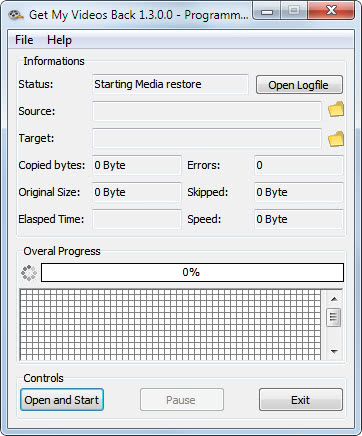
The file recovery application can only recovery videos that have been directly burned to disc. It does not support video DVDs or CDs.
The Open Source application supports a variety of media formats, including avi, mkv, mp3, mpg and wmv. A click on Open and start in the program interface opens a file browser to select a video file for recovery. The program can unfortunately process only one video file per recovery session, a queue to select multiple video files for recovery is missing.
Another file browser window opens after the video file has been selected. This time to select the location the recovered file should be saved in.
Get My Videos Back starts the recovery immediately after the save location has been selected. The program displays the copied bytes, errors, skipped bytes, speed of recovery and elapsed time.
Options are available under File > Settings to switch from the default mode of keeping the original file size to trimming the file size if errors occur. It is also possible to enable byte mode to save all readable bytes.
Get My Videos Back is a portable open source application for Windows. The program desperately needs a queue or some form of processing multiple video files at once but is otherwise well versed for the recovery job.
Downloads are provided on the project homepage over at Sourceforge.
Advertisement


















isn’t that just unstoppable copier?
No this program is not the unstoppable copier. It’s fully different I think. And I never seen unstoppable copier before.
Thank you Martin!
Could you please check it on the link below?
http://gmvb.thomace.com/index.php?page=ghacks.net
I hope it’s okay for you! Thank you!
ThomAce, yes that is fine :)
Thank you for this article about my software! I would like to use this article on the project page with your permisson.
ThomAce, as long as you give credit no problem.