
Change Firefox's Minimum, Maximum Tab Width
I just stumbled upon the Firefox extension Custom Tab Width which adds functionality to Firefox to change the minimum and maximum tab width.
The default values are a minimum width of 100 pixels and a maximum width of 250 pixels. Custom Tab Width adds a small configuration window to Firefox where users can change the maximum and minimum tab width.
The idea here is to either make more room for tabs on the tab bar without having to scroll, or to display less at the same time but more of the site's title.
Note: Mozilla changed things in recent versions of Firefox. Skip to the "Update" part of the guide below for recent instructions.
I did seem to recall however that this setting was available in the advanced configuration of the web browser. I'm not sure if I have published a guide in the past about this. I think I did but I cannot find it.
Firefox offers two parameters to change the minimum and maximum tab width of the browser. To change these parameters users need to type about:config in the Firefox address bar and hit enter. This opens the advanced configuration. Users who never opened the configuration before see a warning page before the configuration is displayed to them.
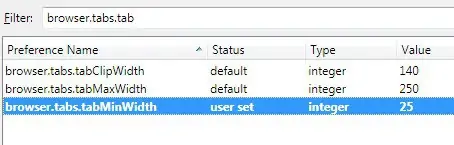
The configuration holds many parameters and it is usually a good idea to use the filter at the top to display only those parameters that need to be edited. Enter browser.tabs.tab in the filter form, this should display the following parameters:
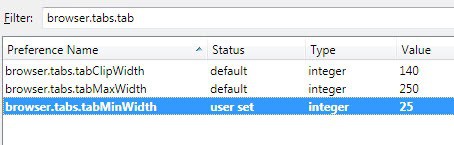
browser.tabs.tabMaxWidth defines the maximum width of each individual tab in the browser. The default value is set to 250 pixels.
browser.tabs.tabMinWidth defines the minimum width of each tab in the Firefox web browser. The default value is set to 100 pixels.
Why is there a minimum and maximum value for the tab width? Firefox changes the size of the tabs dynamically based on those values. A few open tabs are shown with 250 pixels which is reduced gradually until the minimum width 100 is reached.
A good value for the minimum width parameter is 25 which reveals enough so that the tabs can be identified. Some users may want to reduce the minimum width so that only the favicon of the site is displayed. These users need to reduce the minimum width further and test the setting with dozens of open tabs.
Update 2: Mozilla added the preference browser.tabs.tabMinWidth again to the browser. You can use it to set a minimum tab width before scrolling is enabled. The default is set to 76 in Firefox 58 Nightly.
Update:
The parameters are no longer working in Firefox 4 or newer versions of the web browser. The only available option is to use CSS to define the maximum and minimum tab width.
The following entries need to be added to the userChrome.css file in the Firefox profile folder:
.tabbrowser-tab:not([pinned]) {

max-width: 250px !important;

min-width: 40px !important;

}
The easiest way to find the right profile directory is to enter about:support in the address bar to load the page.
It list, among other things, a button to open the active profile directory. Open the Chrome subfolder and look for the file userChrome.css. If it does not exist create it. This is best done by creating a new text document and renaming its name and file extension. Windows users right-click in the directory and select New > Text Document.
To be clear, you need to put the userChrome.css file into FirefoxProfileFolder\chrome\.
Now copy and paste the code into the file. You can append the CSS code at the bottom in case the file existed previously. Please note that the above instructions change the maximum width to 250 pixels, and the minimum width to 40 pixels. You may want to play around with the values to find the one best suitable for you. Restart the browser after making the change to see the changes in action.
If you do not feel like editing the configuration file, install the add-on Custom Tab Width ( no longer available) which allows you to modify the minimum and maximum tab width of the Firefox web browser as well.



















Same problem as Willem van Houten…
Good day,
There is a problem with adjusting Maxwidth. the problem is this: once I do this, then the realignment after closing a tab doesnt happen.
So if I have three tabs: TAB 1 X TAB 2 X TAB 3 X
And I close the middle tab: TAB 1 X . . . . . . TAB 3 X
Then normaly the right Tab would move to the middle: TAB 1 X TAB 3 X
But this doesn’t happen: TAB 2 just leaves an empty space.
Any solutions to this?
Thanks. Selected tab suddenly began overflowing on both sides. Adjusted ClipWidth from 140 to 200. Seems to have worked.
How do you make the tabs vary in width depending on the title? Also the addons are all dead….
You have two options which are both outlined in the “update” part. Either use a CSS file or set only the minimum tab width.
I realize this blog post is older now but it is stil listed on first page of startpage.com when looking for “minwidth firefox”.
“The following entries need to be added to the userChrome.css file in the Firefox profile folder:”
The problem is the userChrome.css needs to be in a folder named “chrome” that sits inside firefox profile, this works on 52.3.0 ESR. Please update your blog it took alot of searching to find the problem.
This is mentioned in the article. I have added another sentence to make it clearer.
Thank you I do see that now after rereading a few times, not sure how I missed it.
How about the height? Went to about:config and see max & mini weidth but no browser.tabs.tabMaxHeight, is it possible? The Firefox 17.0 button is less in height than the tabs leaving a blank area 1/3 the height of it. Using the default theme and disabling Tab Mix Plus doesn’t help. Any idea?
Thanks for the article and for the update (css trick), I tried it in my Firefox 12.0 but it didn’t work fine in combination with ColorfulTabs: when I closed a tab, a “phantom” tab would still continue there, even keeping the colors of the closed tabs.
I decided to install the extension Custom Tab Width and it’s great in its simplicity! It keeps using the browser.tabs.tabMinWidth setting, so you can change its value from both the extension’s config page or from about:config.
Thanks a lot! always prefer to do this kind of thing without installing an addon.
In latest Firefox 4/5, add the settings to the ‘userChrome.css’ file:
C:\Documents and Settings\user\Application Data\Mozilla\Firefox\Profiles\default\chrome\userChrome.css
.tabbrowser-tab[fadein]:not([pinned]) {
min-width: 0px !important;
max-width: 30px !important;
}
Need to adjust the path to suit your system and the pixels desired. The above will show just the tab icon, which I find enough to identify them. Plus they’re placed consistently instead of shrinking & expanding depending on when more/less tabs are open.
did this but it made all of my close buttons disappear. . . trying to figure out how to force firefox to get them back!
Or http://en.design-noir.de/mozilla/tab-width/
For the record, the answer is there:
http://blog.miranda.or.at/mozilla/firefox-4-and-minimum-maximum-tab-width
Hello,
Looks nice, but does not seem to be available on Firefox 4.
Any idea?
This did work in a previous build but is not working anymore. I’m not sure why. Thanks for posting the link to another option to change the tab dimensions.
I like Faviconize Tab. My GMail and Google Reader tabs always open only the width of the favicon. With GMail’s new unread-count-in-favicon lab and Better Greader showing unread count, it works great!
yep Tab Mix Plus , once set up save the TMPpref file under ‘settings ‘ -export.
can save a heap of work
Or for those whou thing that doing all above is a hustle there is a much more simple way by the Firefox add-on Tab mix plus 0.3.8.4
With this add-on there is even much more possible than only the tab wide.
Tab Mix Plus is one of the first extensions I install. It offers a dizzying array of modifications to tab appearance and operation. Two thumbs up here!