
Display Modification Dates Of Firefox Extensions

Users who troubleshoot the Firefox browser often take a closer look at extensions and plugins installed in the browser as they may be the cause for the issues experienced.
One problem that Firefox 3 users experience is that they cannot access information about the last modification dates of extensions directly in the browser. These information are simply not listed in the Firefox add-on manager or elsewhere.
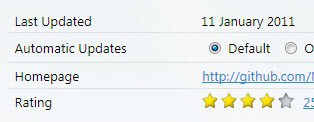
This has changed in Firefox 4 where it is now possible to display the last updated date with a click on the More link next to each extension.
To get there simply load about:addons in the address bar and hit enter. There you find listed all add-ons and a more link next to each which lists the information.
Firefox 3 users have the option to open the profile folder on the hard drive to evaluate the modification dates directly.
Windows users for instance will likely use Windows Explorer to display those dates. While it is possible to do that it is usually not that comfortable, and inexperienced users will have a hard time finding the profile folder in first place.
Long time reader Jojo just emailed me another option. The Firefox extension Extension List Dumper can be used to dump information about all installed extensions in the web browser.
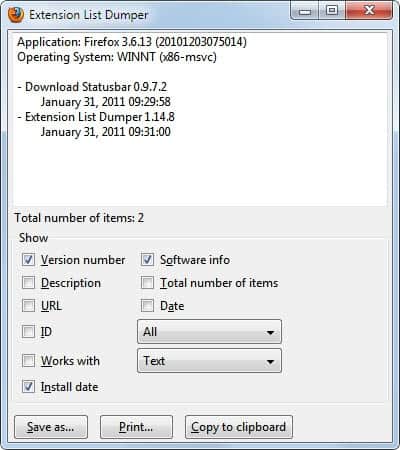
The new export option is displayed in the Firefox add-ons manager. A click on the new button Dump List opens the menu shown in the screenshot above.
It is then up to you to select the information that should be included in the export. Available among others are the program name, version, url, date and install date.
The last two display the modification date and the date the extension was installed.
Information can be exported in a variety of file formats, including text, html and csv.
Extension List Dumper can be a handy extension for Firefox users who want to troubleshoot issues in the browser, providing of course that the browser is still starting up.
Update: The add-on has not been updated since 2011. Some users reported issues with the latest version and it seems that you cannot install it directly in the latest version of Firefox anymore. There is no comparable extension available.
It is however still possible to open the add-ons manager to display update dates there directly.




















The original Add-on: “Extension List Dumper” version 1.15.2.1 (by developer: Sogame) was Last Updated: August 13, 2011, and as mentioned in the article, this add-on has some problems and may no longer work at all.
Another developer has created a new version of this add-on to correct some problems with the original add-on. The new add-on: “Extension List Dumper 2” version 1.0.2 (by developer: Iceberg) was Released January 14, 2017:
https://addons.mozilla.org/en-US/firefox/addon/extension-list-dumper-2/
I haven’t tried it yet but it supposedly works, according to comments I’ve read.
Also, for a “quick-n-dirty” (not really “dirty”) developer script solution that works great, see this post by “morat” on mozillazine.org:
http://forums.mozillazine.org/viewtopic.php?p=14015459#p14015459
If you simply wish to ‘put back’ the dates that were removed by bug 623207 add the following to the userContent.css:
#list-view > #addon-list .date-updated {
display: -moz-box !important;
}
With firefox 4 the chrome folder doesn’t exist by default, so create the folder in your profile directory, then create a file called userContent.css and add the css above.
The chrome folder is also home to userChrome.css and userChrome.js
Some clarification is needed.
I am unsure if I have some add-on in FF 3.6 that adds the install/update date to the add-on list but that info is available to me now. However, you have to click on EACH add-on to see it. Which is crazy, especially with 70 odd add-on’s like I have.
The real value of this extension is that you can dump your entire add-on list and then look at it in total. I recommend CSV format, as that would allow you to import the add-on list into Excel and then sort on the date column to see the last date that the add-on was installed OR updated.
Jojo, I looked at Firefox 3.6.13 without add-ons installed and it does not show the install / update date.And even if the browser would (like done in Firefox 4), it is to much of a hassle to click the more link for every add-on to see the date.
See:
http://i.min.us/idZlrg.jpg